"Gmailify" alternative: Gmail API Import fails in live workflow but works in manual test
Status: Closed · Asked by Yan K on · 0 views
(This is as an alternative to the deprecated Gmailify. For inbox emails I use the global forward anyway, so only spam remains)
Hello there,
Thanks for contacting us.
Could you please share the Workflow URL so that we can look into it and provide information accordingly?
Please be aware that to assist you effectively, we may need to access your Pabbly Connect account. If you're comfortable with this, please grant us permission by stating in your next email: "You have my permission to log into my Pabbly Connect account, and edit workflow {If required}. Here is the registered email address associated with it."
Thanks & Regards,
Adeel Akhtar
🌐 Pabbly.com
Hi, sure
workflow URL: https://connect.pabbly.com/v2/app/workflow/mapping/IjU3NjcwNTY5MDYzNTA0MzM1MjZjNTUzNDUxM2Ii_pc
You have my permission to log into my Pabbly Connect account, and edit workflow {If required}. Here is the registered email address associated with it - [email hidden]
Hello Yan,
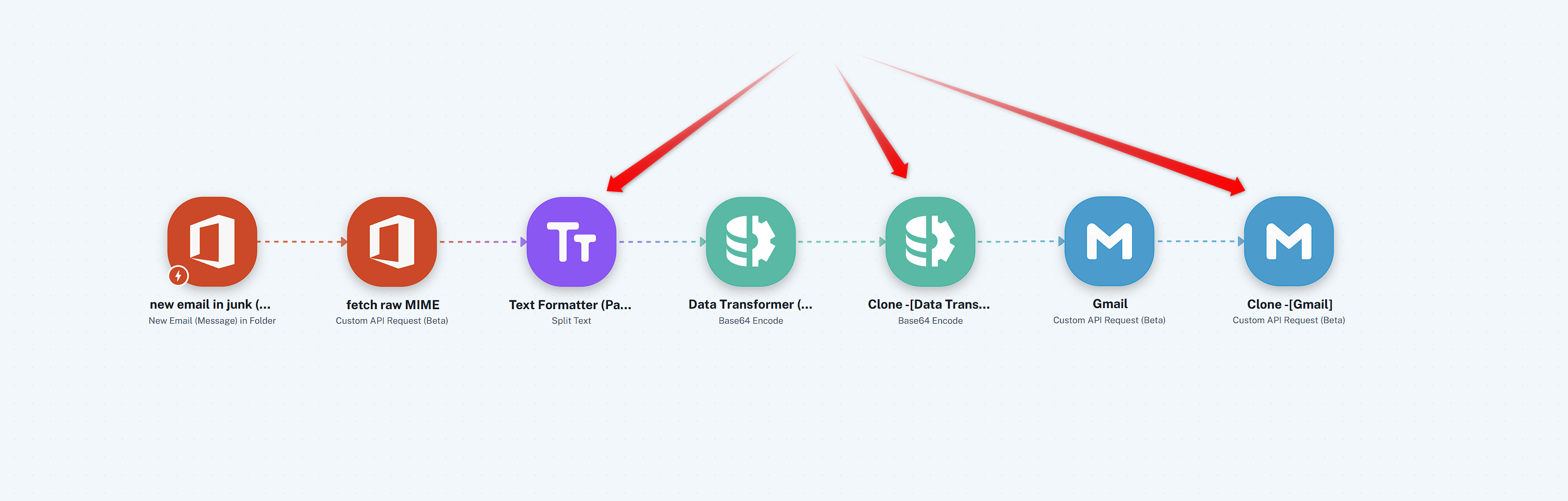
Thank you for sharing the workflow URL, we checked the workflow and the task history. The action is failing because there are multiple From Headers in the MIME message before encoding. Gmail allows only single form Header. Unfortunately, the response is received from Outlook only, which we tried to fix by adding 3 actions in your worklfow and without hampering the original steps. Here we tried to split the MIME version to remove the multiple From Header. If these 3 actions execute in your test then its possible else due to Gmail's policy it won't be possible.
That error is happening because the raw MIME you’re pulling from Outlook via Graph API $value isn’t in the format Gmail expects. Outlook often includes multiple From: headers (for example, one in the envelope and another in the message body), but Gmail’s import endpoint requires exactly one From: header.
Why does Outlook return multiple From: headers
The
$valueendpoint gives you the full MIME stream as stored in Exchange/Outlook.Outlook sometimes duplicates headers (e.g.,
From:in the outer transport headers and again in the inner message).Gmail’s API is strict: it rejects anything that doesn’t look like a valid RFC 2822/5322 message with a single
From:.
Thanks & Regards,
Adeel Akhtar
🌐 Pabbly.com
Thank you!
I see you've added a new text formatter step.
So, I've ran this new workflow, and again as before: manual test worked fine, but live test failed in the Gmail step with the 400 error "Expected a single 'From' header".
Apparently the text formatter didn't provide a solution...
Perhaps you have any other suggestions on how I could achieve the function I'm looking for?
Just to clarify:
As I've mentioned unfortunately, the result is the same:
Manual "Save & Test Request" imports the email into Gmail successfully. The imported email is perfect, including the sender, subject, body, and attachments.
Live workflow execution still fails with:
Error Code: 400
Error Message: Expected a single 'From' header
The thing is - I'm not convinced that the issue is simply that Outlook returns multiple From: headers.
The main reason is that the same workflow succeeds during the manual test. If the MIME returned by Outlook were inherently invalid for Gmail, I would expect the manual test to fail as well.
In addition, during my own investigation I inspected the MIME returned by the Microsoft Graph $value endpoint and found only a single actual From: header. The other occurrences of the word "From" appear inside DKIM/ARC signature metadata (for example, h=From:Date:Subject...), which are part of signed header lists rather than additional message headers.
Because the manual test works while the live execution fails, it seems that something is behaving differently during the live execution path.
Could you please investigate what is different between the manual test and the live workflow execution on Pabbly's side? Since both executions use the same workflow and configuration, I would expect them to produce identical requests to Gmail.
If there is a limitation or known issue with processing raw MIME messages retrieved from the Microsoft Graph $value endpoint during live workflow execution, please let me know.
I'm happy to provide any additional information or allow further testing on my workflow if needed.
Thank you.
Hello Yan,
We fetched the last failed task in the Trigger response to check the manual execution, it seems the email has been deleted already, due to which is the second step failed to fetch the MIME type.
Can you fetch a new trigger response and also trigger the workflow again so that we can check the Trigger response in the workflow mapping and in the Task history as well?
Thanks & Regards,
Adeel Akhtar
🌐 Pabbly.com
Sure! it's done.
Hello Yan,
Thank you for your prompt response.
Please do not delete this email, which you just added as the Trigger response. We will use this for testing, so fetching of the MIME type is required on step 2, for which the email should exist. Further, after initial review, I've escalated the issue to the Technical Team. We will get back to you as soon as we hear from the Team. It may take up to 48 hours to get back to you.
Thanks & Regards,
Adeel Akhtar
🌐 Pabbly.com
Hello Yan,
Our team has made some fixes to address the issue. Please test the workflow again using fresh data and confirm whether the action is now executing successfully in real time.
Please let us know the result after testing so we can assist you further if the issue persists.
Thanks & Regards,Anushka Sahu
Customer Support Associate
🌐 Pabbly.com
Hi team,
Thank you for your help and the update!
I retested the updated workflow and wanted to provide the current status and some additional findings.
After your changes, the previous Gmail step error:
Error Code: 400
Expected a single 'From' header
no longer occurs during live execution. So all good on that part. However, during testing I noticed other issues:
1. HTML entity encoding in live execution
The remaining issue appears to be caused by the MIME data being HTML-encoded during the live workflow.
When running Save & Test Request manually, Step 2 output contains (and I'm just using placeholders here for the privacy regarding the actual email):
From: ME <[email hidden]>
and the imported Gmail message is correct.
However, in the live workflow history, the exact same field contains:
From: ME <[email hidden]>
This means the raw MIME entering step 3 is already modified before Base64 encoding. As a result, Gmail cannot correctly interpret the original sender header.
The imported email after executing step 4 shows: (unknown sender) via gmail.com
Adding a Pabbly HTML Decode step between Step 2 and Step 3 fixed this issue: The sender displays correctly, and the email content is imported correctly.
So currently the working flow is:
Microsoft 365 → Get MIME → HTML Decode → Base64 Encode → Gmail Import
My question:
Is there a way to prevent this HTML encoding from happening earlier in the Microsoft 365 Custom API step, so that the additional HTML Decode step is not required?
Ideally, Step 2 should pass the raw MIME exactly as returned by Microsoft Graph.
2. Large emails / attachments
I also tested email with attachments. For larger messages, Step 2 fails with:
"Failed (422): The response received from the Microsoft Office 365 app is shown below.
Response payload size (16239325 bytes) exceeded maximum allowed payload size (6291456 bytes)."
I understand this is related to Pabbly's API response size limitation.
Additionally, according to Pabbly documentation, mapped field values have a maximum character length of 250,000 characters.
Since the workflow currently transfers the entire MIME message through multiple steps, large attachments will likely exceed these limits even if the Microsoft API response limit is avoided.
I would like your recommendation for the best approach here.
(As a preliminary step, I've set up a router to divide the next steps for "no attachments" route and "has attachments" route.)
The no attachment case now appears close to working perfectly after the HTML Decode fix. I would like to handle attachments in the cleanest way without hitting Pabbly's payload/field limitations.
Thanks again for your help. Please let me know what approach you recommend.
Hello Yan,
As we checked the Task history, there is no new execution of the workflow. Kindly trigger the workflow so that it can execute automatically. After real-time execution, let us know, and we will check the latest task history.
This is the workflow that you have provided when escalating the issue - https://connect.pabbly.com/v2/app/workflow/mapping/IjU3NjcwNTY5MDYzNTA0MzM1MjZjNTUzNDUxM2Ii_pc
Thanks & Regards,
Adeel Akhtar
🌐 Pabbly.com
Oh sorry, I've created a new workflow to test - https://connect.pabbly.com/v2/app/workflow/mapping/IjU3NjcwNTY5MDYzZTA0MzY1MjZiNTUzNzUxMzIi_pc
There you can find the new history.
Hello Yan,
Thank you for sharing the workflow URL.
As we checked the Task history of the new workflow, the new workflow is executing successfully and email is successfully getting imported in Gmail. If you are facing any issues, can you share a screen video explaining your concen/screenshots of the issue?
Thanks & Regards,
Adeel Akhtar
🌐 Pabbly.com
Yes, this is happens when the email has attachments:
I would need to create a different route for emails with attachments and avoid this limitation (plus, the limitation for mapped field values that have a maximum character length of 250,000 characters). Any recommendations?

Hello Yan,
You are getting this error because the attachment file size is 16 MB, and Pabbly Connect only supports the API response payload that must be less than 6 MB (6291556 bytes).
Thanks & Regards,
Adeel Akhtar
🌐 Pabbly.com