Gmails in automation suddenly not sending (returning Exceptions)
Status: Open · Asked by Jeffrey Yu on · 0 views
Our automated workflow was fine yesterday morning, when it suddenly broke, and our emails were not sending. Upon further research, we found it was because the gmail sending step was returning an exception. Really bizarre, considering it was working fine earlier that day.
I tried updating the connection, which then fixed it in the short term (for the past day or so). But then, today, it broke again, suggesting that there must be a deeper issue going on.
This is disrupting our client work, so please let me know ASAP why we're getting an exception! Thank you!
We're having to manually send out emails for the time being.
Update: it looks like the issue is because we've reached the 100 emails/day quota. I didn't realize that EACH person who receives the email counts as a user.
Is there any way to increase the number of emails sent per day? Or is the only way to reduce the number of people CCed in the email?
The weird thing is that the email that is connected is on our business Workspace. Here, it says Google Workspace accounts are allowed up to 1500 or 2000 recipients per day: https://developers.google.com/apps-script/guides/services/quotas
Why does Pabbly connect say we can only send 100 emails/day then? Is there a way to change that and pay more?
Hi @JeffreyYu,
"Exception" is a generic error message and doesn't provide much information about the root cause of the issue. To diagnose the issue, please reconnect the action step or contact the Gmail support team for the same.
If you have diagnosed the issue as being related to your daily email sending limit, please get in touch with Gmail's support team, as this limit is specific to your account and imposed by them. They are much better equipped to handle this concern of yours.
https://support.google.com/a/answer/166852?hl=en#zippy=%2Climits-increase-for-paid-accounts
Got it, thank you!
Hi, is the 100 emails/day limit for Gmail inclusive of recipients? For example, if I send one email with 3 people CCed, is it counted as one or three emails?
I checked the gmail API limits and didn’t find anything saying there was 100 emails/day of a limit.
The Gmail free quota for sending emails is the same regardless of the number of recipients in the To, CC, and BCC fields. This means that if you send 20 emails in a day with any combination of recipients in the To, CC, and BCC fields, you will still have 80 emails remaining in your daily quota.
Oh really? When I tested it out in Pabbly with two different recipients, it was counted as 2 towards the quota. That’s why I got confused and asked here.
Please allow me some time to discuss this with the team. I will get back to you shortly.
sounds good!
Oh really? When I tested it out in Pabbly with two different recipients, it was counted as 2 towards the quota. That’s why I got confused and asked here.
Yes, that will be counted towards the quota based on how many recipients you're sending emails.
got it
Hi @JeffreyYu,"Exception" is a generic error message and doesn't provide much information about the root cause of the issue. To diagnose the issue, please reconnect the action step or contact the Gmail support team for the same.
If you have diagnosed the issue as being related to your daily email sending limit, please get in touch with Gmail's support team, as this limit is specific to your account and imposed by them. They are much better equipped to handle this concern of yours.
https://support.google.com/a/answer/166852?hl=en#zippy=%2Climits-increase-for-paid-accounts
Hello! I've done more research with the Google support team, and they said that this is an issue with the apps script quota, NOT the gmail API quota.
https://developers.google.com/apps-script/guides/services/quotas
My question is, is the AppScript that PabblyConnect runs on executing the GmailAPI using our account (which is a workspace account), or a free account on the Pabbly end? My suspicion might be the latter, since that would explain why our limit is currently 100 emails, instead of the 1500* we are promised under the workspace plan.
"Exception" is a generic error message and doesn't provide much information about the root cause of the issue. To diagnose the issue, please reconnect the action step or contact the Gmail support team for the same.If you have diagnosed the issue as being related to your daily email sending limit, please get in touch with Gmail's support team, as this limit is specific to your account and imposed by them. They are much better equipped to handle this concern of yours.
https://support.google.com/a/answer/166852?hl=en#zippy=%2Climits-increase-for-paid-accounts
As mentioned before, the issue is related to your specific Gmail account; there is no free Pabbly Connect Gmail account involved here. We do have multiple users who send way more than 100 emails every day through automation. I suggest you get in touch with Gmail's support team and inquire more about your account limits.
That's the thing; Gmail's support team said to get back in contact with you (aka the app scripts?), and that it was an issue regarding App Scripts.
As mentioned before, the issue is related to your specific Gmail account; there is no free Pabbly Connect Gmail account involved here. We do have multiple users who send way more than 100 emails every day through automation. I suggest you get in touch with Gmail's support team and inquire more about your account limits.
Please allow me some time to discuss this with the technical team. I will get back to you shortly.
Great, sounds good!
I had a discussion with the technical team, and they have confirmed that the 100-email-per-day limit is specific to your account, and we cannot do anything about it from our end. A personal Gmail account supports 100 free emails through the Gmail API, whereas a paid one can offer you significantly more. If you do have a paid account and are still able to send only 100 emails per day, I suggest you get in touch with Gmail's support team to understand why this is happening.
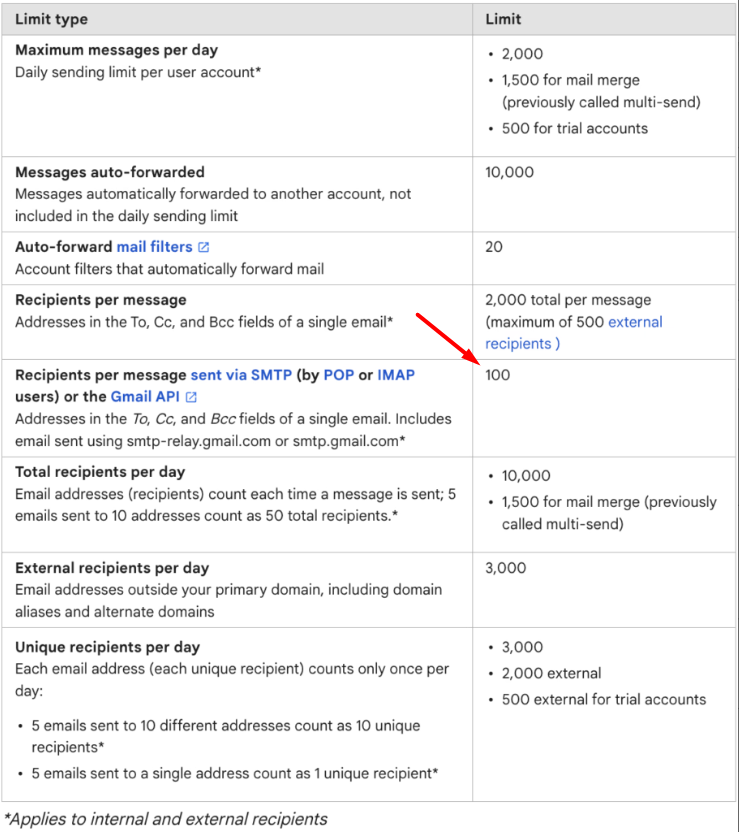
That is so weird, because it IS a paid workspace account. Okay, I’ll ask google support about the findings and get back to you.