Google Analytics Report, custom event and filters
Status: Closed · Asked by Benjamin Chew on · 0 views
Hi, I don't know if it's possible, but i hope there is a way.
I want to look for Leads in the Event count column from the analytics and filter it to only show results from Session Campaign "FACEBOOK AD" for example.
What this means is that I have a facebook campaign running with the UTM parameters "FACEBOOKAD" and look for the amount of Leads from that campaign.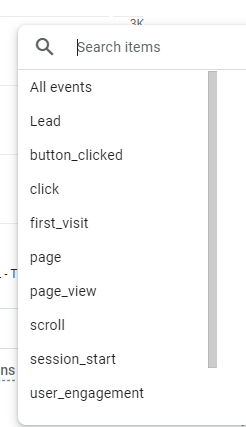
Is it possible?
Hey @benjaminshuu
To filter the "Session Campaign" as "FACEBOOK AD," you can add the "Filter by Pabbly" step in the action sequence.
In the filter step, you can define conditions to filter data based on specific criteria. Your workflow will then execute according to the set conditions. I recommend referring to the video tutorial below on filtering for further guidance and try at your end.
Hey @benjaminshuuTo filter the "Session Campaign" as "FACEBOOK AD," you can add the "Filter by Pabbly" step in the action sequence.
In the filter step, you can define conditions to filter data based on specific criteria. Your workflow will then execute according to the set conditions. I recommend referring to the video tutorial below on filtering for further guidance and try at your end.
Yes, i know how to do filters, but this doesn't answer my question because this is a Google Analytics task question. At this point, I'm getting this error
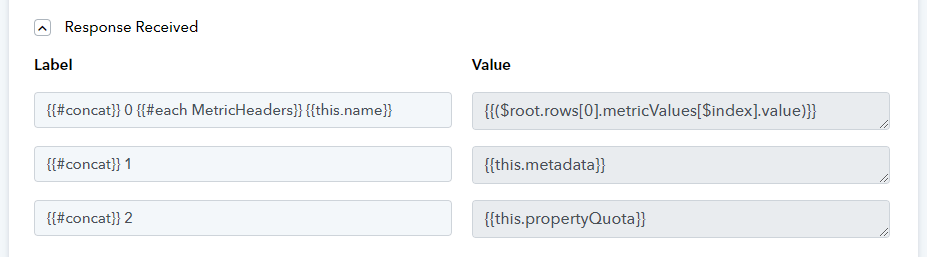
Usually this means that either the data doesn't exist or what I'm looking for is not correct.
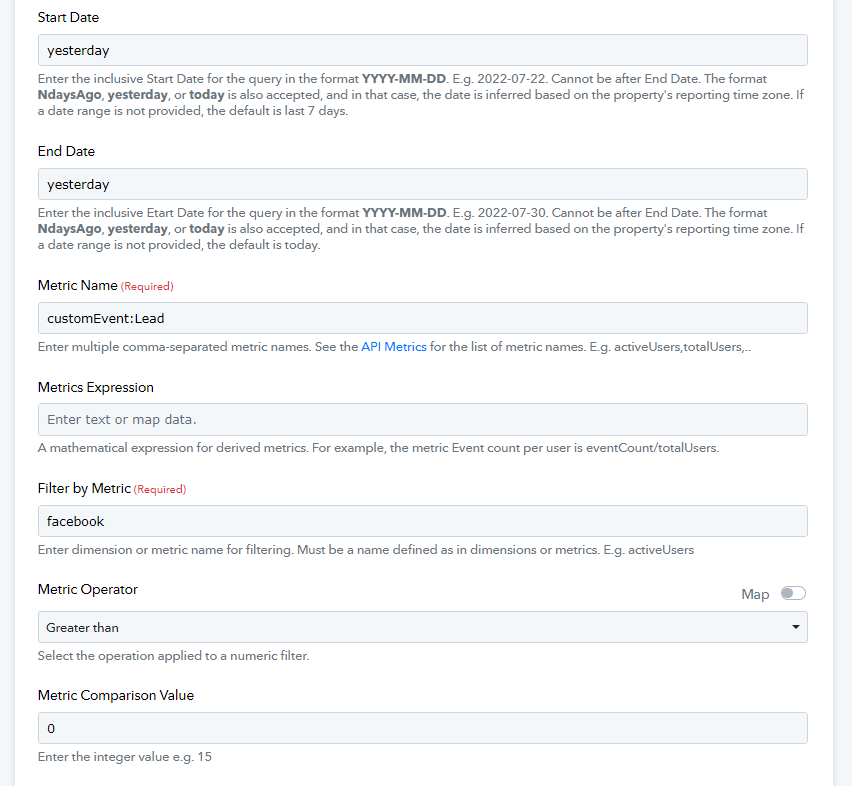
How would you look for Leads in the Google Analytics task and make it only report data filtered by Session Campaign using one of the keyword like a UTM word, for example "facebook"?
I kindly request you to reauthenticate the application and then proceed with the task.
Please inform me if the issue persists so that I can further assist you.
I kindly request you to reauthenticate the application and then proceed with the task.Please inform me if the issue persists so that I can further assist you.
It is not a authentication problem. I have reauthenticated it already before i started. If I put in a correct API, it works.
I kindly request you to reauthenticate the application and then proceed with the task.Please inform me if the issue persists so that I can further assist you.
I don't think you understand my issue.
Please pass to another colleague to help me
I apologize for any inconvenience.
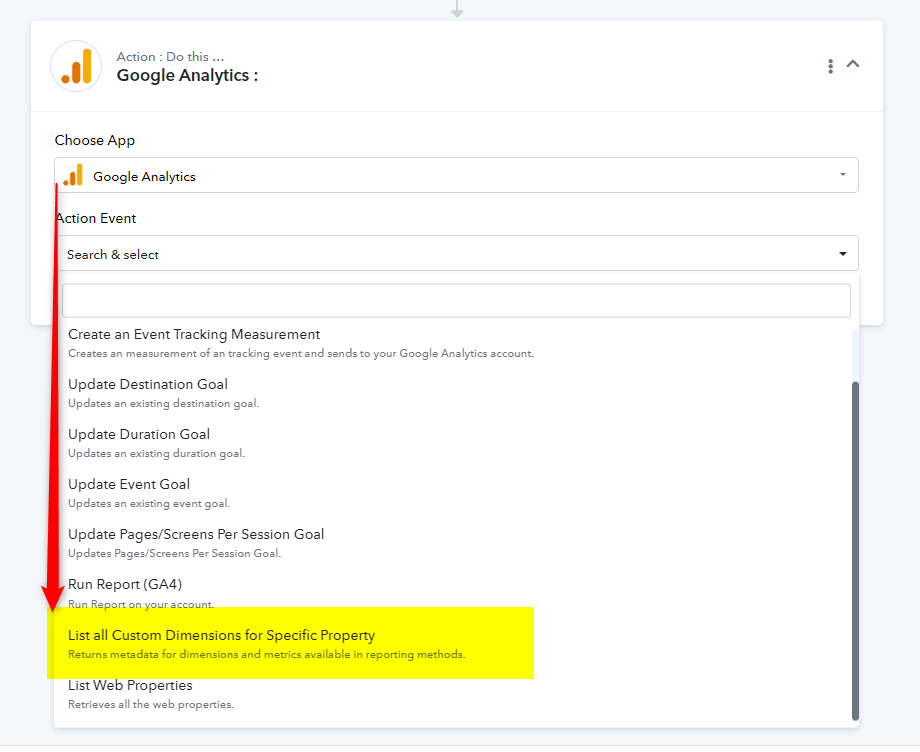
After reviewing your concern with our team, we have created a new action event called "Google Analytics: List all Custom Dimensions for Specific Property." We have listed all custom dimensions for your account, but unfortunately, we couldn't find any dimension related to "Custom Event: Lead," which you selected in the metrics name field.
I kindly request you to try using the new action event "Google Analytics: List all Custom Dimensions for Specific Property." This action will list all available dimensions, and you can identify the appropriate dimension. Once you've identified the correct metrics, please let us know so we can further assist you.
I apologize for any inconvenience.After reviewing your concern with our team, we have created a new action event called "Google Analytics: List all Custom Dimensions for Specific Property." We have listed all custom dimensions for your account, but unfortunately, we couldn't find any dimension related to "Custom Event: Lead," which you selected in the metrics name field.
I kindly request you to try using the new action event "Google Analytics: List all Custom Dimensions for Specific Property." This action will list all available dimensions, and you can identify the appropriate dimension. Once you've identified the correct metrics, please let us know so we can further assist you.
T
I apologize for any inconvenience.After reviewing your concern with our team, we have created a new action event called "Google Analytics: List all Custom Dimensions for Specific Property." We have listed all custom dimensions for your account, but unfortunately, we couldn't find any dimension related to "Custom Event: Lead," which you selected in the metrics name field.
I kindly request you to try using the new action event "Google Analytics: List all Custom Dimensions for Specific Property." This action will list all available dimensions, and you can identify the appropriate dimension. Once you've identified the correct metrics, please let us know so we can further assist you.
This is awesome guys. Good job!
But, unfortunately, my event did not appear here (I searched with ALT+F).
Here's a screenshot of my Google Analytics and where the thing is. Maybe you guys have a similar custom event.
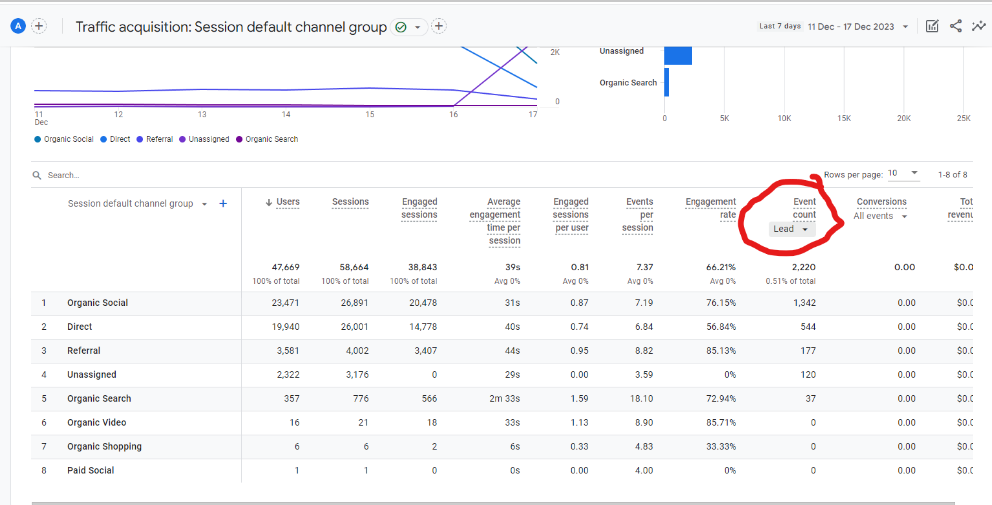
And when I click on that Event Count Lead, this appears 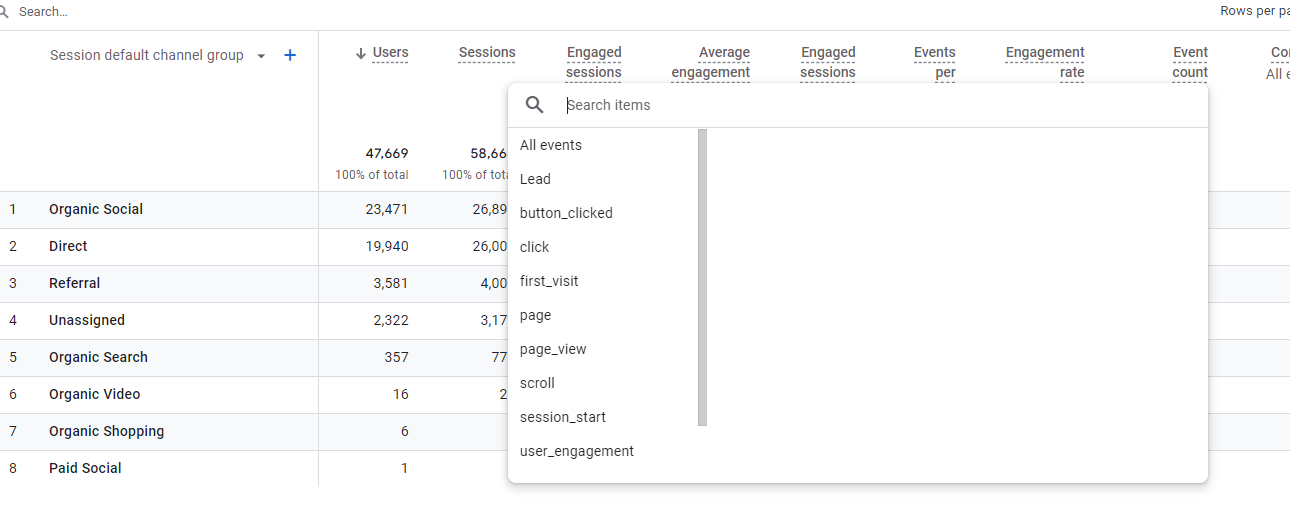
If you need any other info, let me know, I'll help out.
Could you kindly let me know your availability for tomorrow at 12:00 PM IST? This will allow us to connect over Google Meet and address your concerns.
Could you kindly let me know your availability for tomorrow at 12:00 PM IST? This will allow us to connect over Google Meet and address your concerns.
how about 2pm?
Could you confirm your availability for today at 03:00 PM IST as we have a scheduled meeting at 2:00 PM IST?
Sure. That's ok
Thank you for confirming.
Here is the Google Meet link for the scheduled meeting for today at 3:00 PM IST
Google Meet joining info
Video call link: https://meet.google.com/smn-zxya-gix
Or dial: (US) +1 484-416-1452 PIN: 329 157 656#
More phone numbers: https://tel.meet/smn-zxya-gix?pin=1425546823708
Hey @benjaminshuu
Thank you for your patience. The issue has been successfully resolved, and it is working now. Kindly check from your end and inform me of the status.
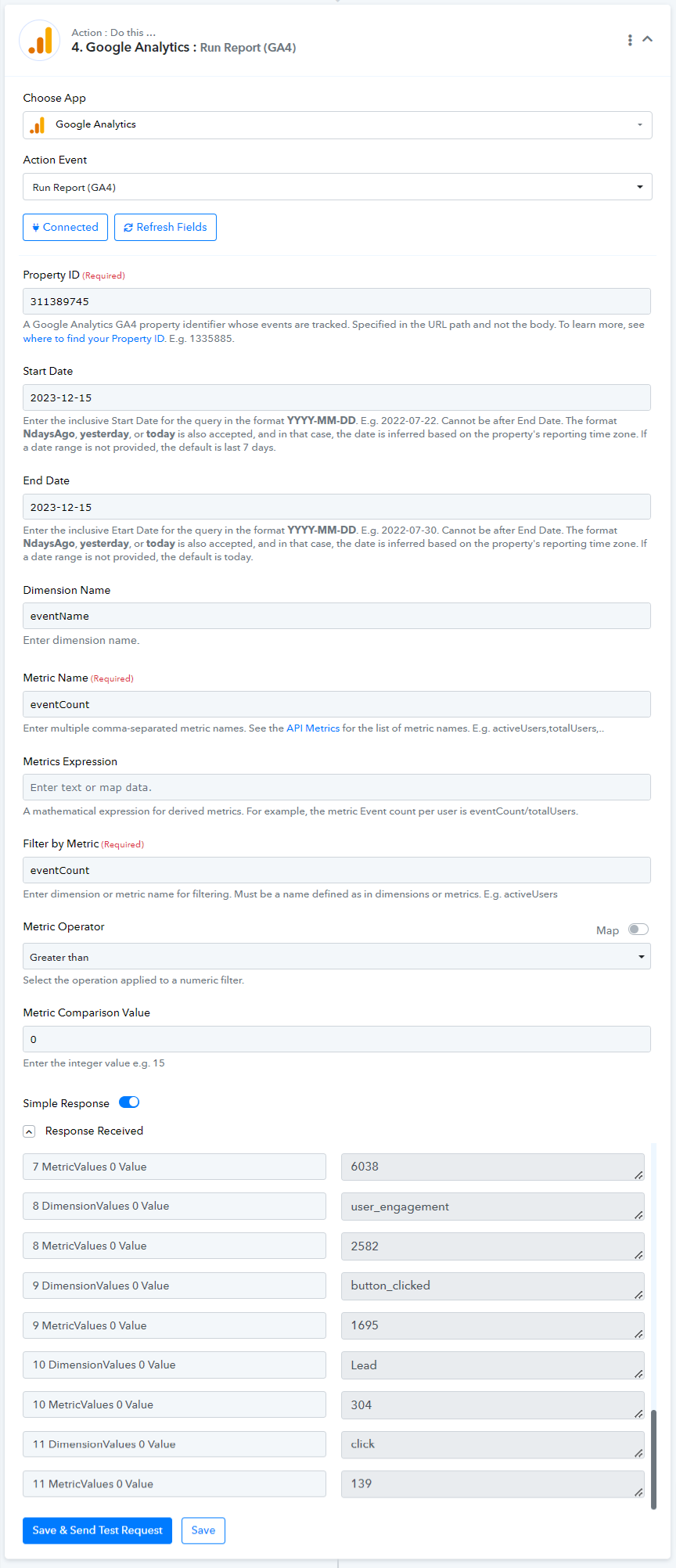
Hey @benjaminshuuThank you for your patience. The issue has been successfully resolved, and it is working now. Kindly check from your end and inform me of the status.
Thank you! That's super awesome. That works.
One more thing that will make it perfect, are you able to make it so that it can show data based on certain keywords like the "Search" function from Google Analytics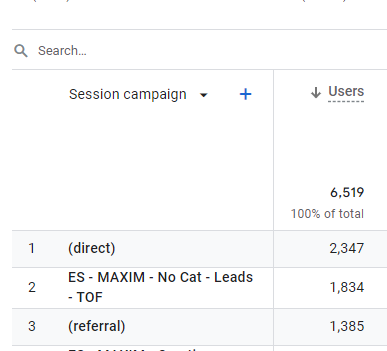
If I were to filter for "No Cat", so it will only display Leads from "No Cat" type of Session Campaign. Is it possible?
Thank you once again!
Could you confirm your availability for tomorrow at 12:30 PM IST or 01:00 PM IST so that we can connect again and help you.
Could you confirm your availability for tomorrow at 12:30 PM IST or 01:00 PM IST so that we can connect again and help you.
Could you confirm your availability for tomorrow at 12:30 PM IST or 01:00 PM IST so that we can connect again and help you.
Sure, 1pm works
Alright, here is the Google Meet link for the scheduled meeting for tomorrow at 1:00 PM IST
Google Meet joining info
Video call link: https://meet.google.com/smn-zxya-gix
Or dial: (US) +1 484-416-1452 PIN: 329 157 656#
More phone numbers: https://tel.meet/smn-zxya-gix?pin=1425546823708
Hey @benjaminshuu
We have configured the JSON in your Google Analytics: Run Report (GA4) Advance action step, and it is functioning properly. Please check.
Additionally, here is the code we have set up; you can also test it from your end:
{ "limit": 1000, "metrics": [ { "name": "eventCount" } ], "dateRanges": [ { "startDate": "2023-12-15", "endDate": "2023-12-15" } ], "dimensions": [ { "name": "eventName" }, { "name": "sessionCampaignName" } ], "metricFilter": { "filter": { "fieldName": "eventCount", "numericFilter": { "operation": "GREATER_THAN", "value": { "doubleValue": 0 } } } }, "keepEmptyRows": false, "dimensionFilter": { "andGroup": { "expressions": [ { "filter": { "fieldName": "eventName", "stringFilter": { "matchType": "EXACT", "value": "Lead", "caseSensitive": false } } }, { "filter": { "fieldName": "sessionCampaignName", "stringFilter": { "matchType": "CONTAINS", "value": "Cat", "caseSensitive": false } } } ] } }, "metricAggregations": [ "TOTAL" ], "returnPropertyQuota": true}
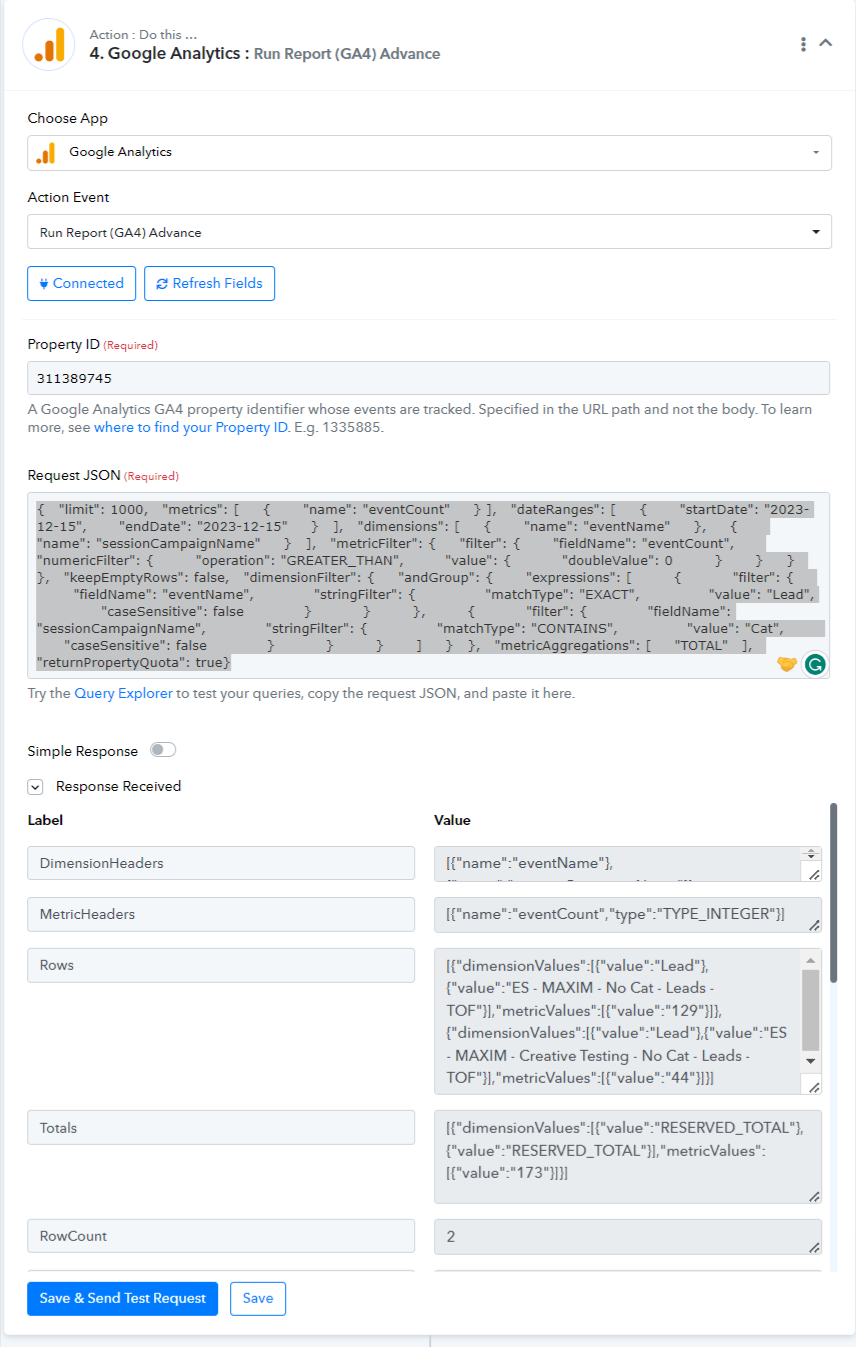
Works perfectly!