Google calendar reminder fault
Status: Closed · Asked by surositar on · 0 views
I was setting up a workflow to send automated Message reminders for every new event created in google calendar. I didnt want to change the date . I just wanted to give reminder 2 hour before and 1 hour before the meeting time. But in the captured event from calendar the time is showing in a different pattern that I was not able to understand. The automation also not working. Please help me set up this automation. Thank you in Advance
Attachments
I was setting up a workflow to send automated Message reminders for every new event created in google calendar. I didnt want to change the date . I just wanted to give reminder 2 hour before and 1 hour before the meeting time. But in the captured event from calendar the time is showing in a different pattern that I was not able to understand. The automation also not working. Please help me set up this automation. Thank you in Advance. I need a personalized help about this one. It is very important for my business.
Attachments
Hey @surositar
In the Delay Until action step, you need to pass the date time in the UTC format as well.
Though we have corrected the Delay Until action for now, so kindly give it a try and let us know if that works for you.
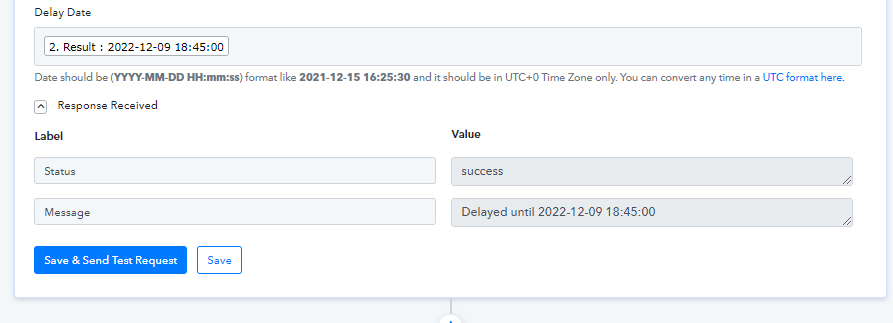
Hey @surositarIn the Delay Until action step, you need to pass the date time in the UTC format as well.
Though we have corrected the Delay Until action for now, so kindly give it a try and let us know if that works for you.
ok. let my try. I will get back to you. thank you so much for helping
ok. let my try. I will get back to you. thank you so much for helping
Hey @surositarIn the Delay Until action step, you need to pass the date time in the UTC format as well.
Though we have corrected the Delay Until action for now, so kindly give it a try and let us know if that works for you.
I am not understanding the time zone action steps here. One time zone format step is added in the workflow. Is that added by the pabbly team? please can I get some personalized help here. to get this workflow done? Can I get a callback from from the team to figure out this workflow. This is just a test workflow so I can give every detail about this. After it is done then I will implement this actually in my business with upgraded account surely. please get me some help. Thank you in advance.
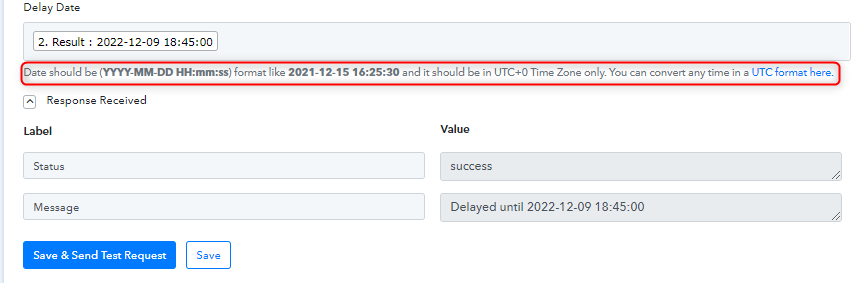
To run the Delay Until action step on your timezone you need to pass the time in UTC format as mentioned in the help text, if you are getting the time in IST (GMT 5:30) then you need to convert the timezone first and then process the time difference.
Can I get a callback from from the team to figure out this workflow. This is just a test workflow so I can give every detail about this. After it is done then I will implement this actually in my business with upgraded account surely. please get me some help. Thank you in advance.
Further, for your concern, we highly recommend hiring an automation expert who can design such email content for your workflow and manage everything for you - https://forum.pabbly.com/threads/pabbly-connect-experts-and-consultants.22/
And can even find automation experts in our Facebook group as well - https://www.facebook.com/groups/formget.deals/