google calendar to whatsapp integration
Status: Closed · Asked by Jing on · 0 views
1. some of the meeting scheduled in google calendar are in person meetings while others are online. For the online meetings, we wish to include the meeting link in the whatsapp message. The lesson template is found below. I use the same template for both online and in centre meeting. Problem is the message runs into error when the meeting is in person as there is no meeting link in {4}. How to get around this problem?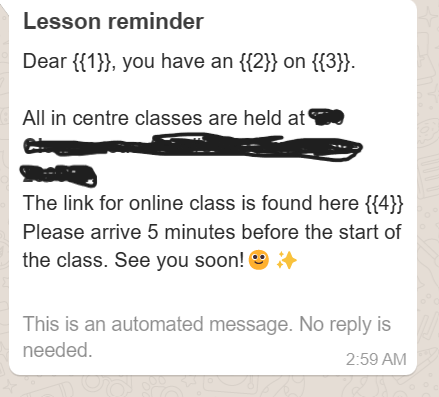
2. I will like whats app message to be sent out one day before the meeting, but message is sent the moment the meeting is created in google calendar. is there any application to delay sending of messages?
Hey @Jing
Please refer to the following video tutorial once on how you can design the workflow to send the WhatsApp message.
Hi,
I followed the steps but the message is not delayed. https://connect.pabbly.com/workflow/share/CkJZa18ICGtXHVA9AUpRdlpOV1NVDFY0XEUGFFBfBn5SHAFEVhcAag5CVnQAWwFgVx4JYw9QDGwPG1JWCV8BclFLUW5dQlEMVmVSFwZZWHIKaA## here is my workflow. Please help! thank you
Hey @Jing
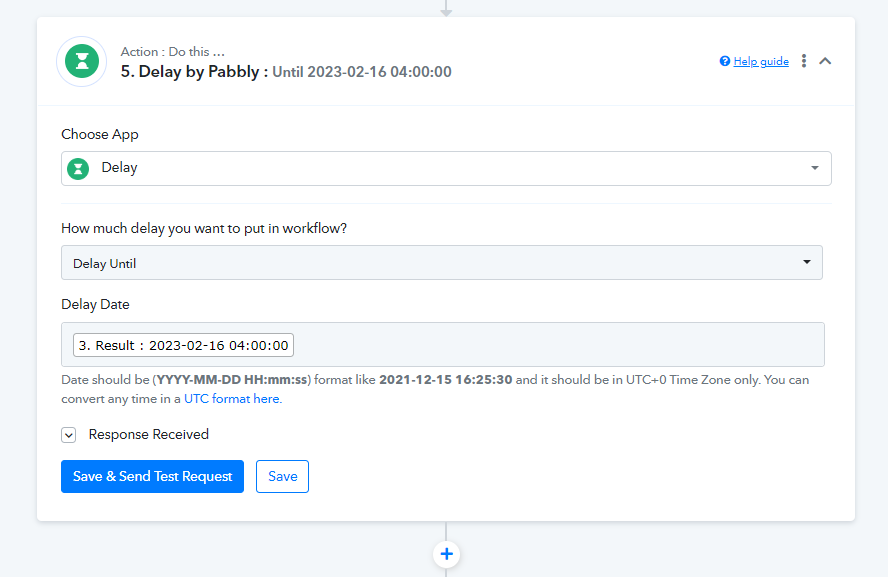
Please convert the Date Time format once in UTC format and then try again as mentioned in the help text.
hi,
I did as suggested but there is no delay in message sent
Hey @Jing
In which workflow do you have made the changes, as we are unable to find the workflow?
Hey @JingIn which workflow do you have made the changes, as we are unable to find the workflow?
https://connect.pabbly.com/workflow/share/C0NSYFMEUzBXHQVoUhkAJwkdUVVXDgJgBx4EFgcIUytbFQRBB0ZfNVoWVXdWDVMyUhsIYlQLB2cAFAUBVAJRIgMZUm0HGAdaUmEDRgFeDyULaQ## Hi here is the workflow, I changed the time to UTC time, but the message is not being sent and not delayed.
One more question, what happens if I will like to inform a few attendees in the google meeting? I cant seem to send whatsapp messages to a few attendees
hi,
can you help please. my workflow has been stuck for the whole week. I tried many ways and it doesnt work
1. when i have a few attends in the google meeting, it cant work
2. the message also cant be delayed
You haven't converted the date time format to UTC format which might be required in the Delay Until action step.
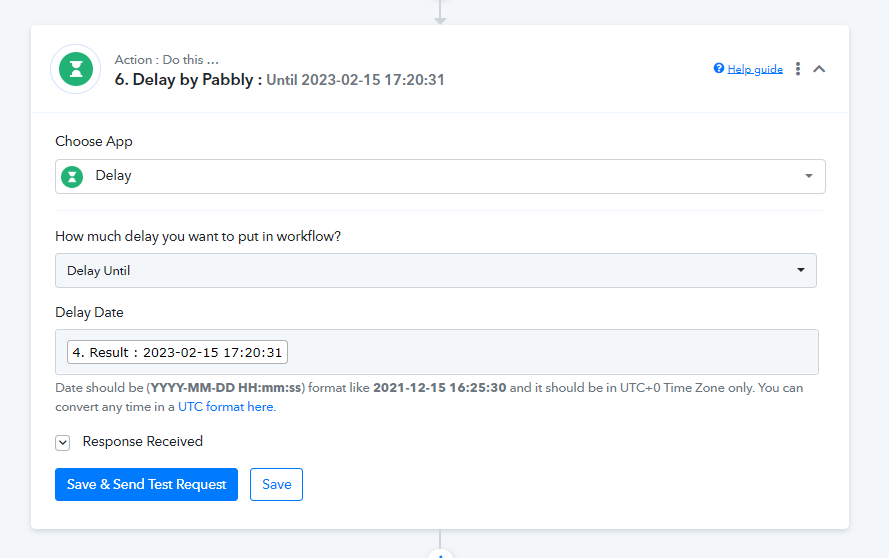
Though we have made the changes, so please try now after doing the following changes.
Along with that, you might have made some changes in the trigger response, and because of that mapping gets disrupted.
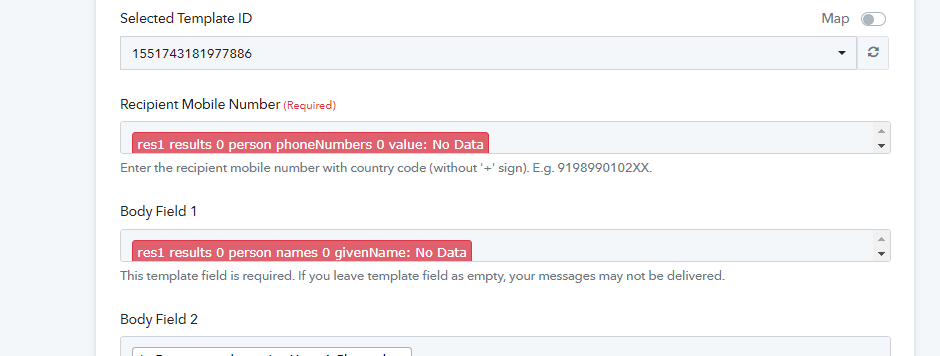
So, please remap the values in the Cloud API action step and try again.
Thank you, but how to map the values when there are a few meeting attendees?
Hey @Jing
Thank you, but how to map the values when there are a few meeting attendees?
Can you please explain the scenario?
this work flow is for a coaching school. I will to create classes in google calender and send whatsapp lesson reminders to the class participants. basically the number of class attendees are different for each class so the system has be dynamic. Each message will include the time and date of lesson together with the name of attendee. so far the work flow has not been working. please help
Hey @Jing
As we can see from your 5th action step where you are subtracting the time from the start time is actually not going according to the Delay Until action step.
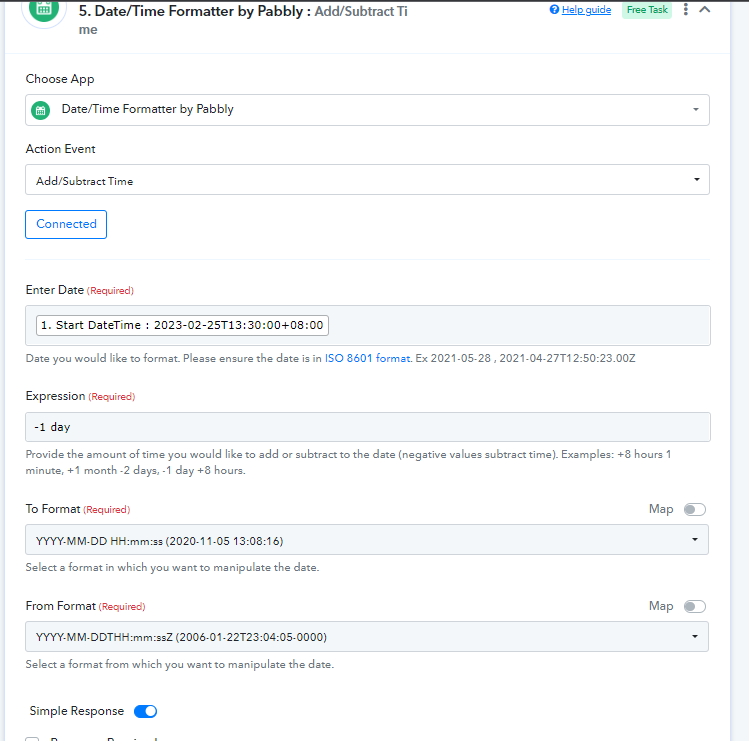
Since the subtraction of time from the start time goes to the old day it will not process the workflow.
In Execution -
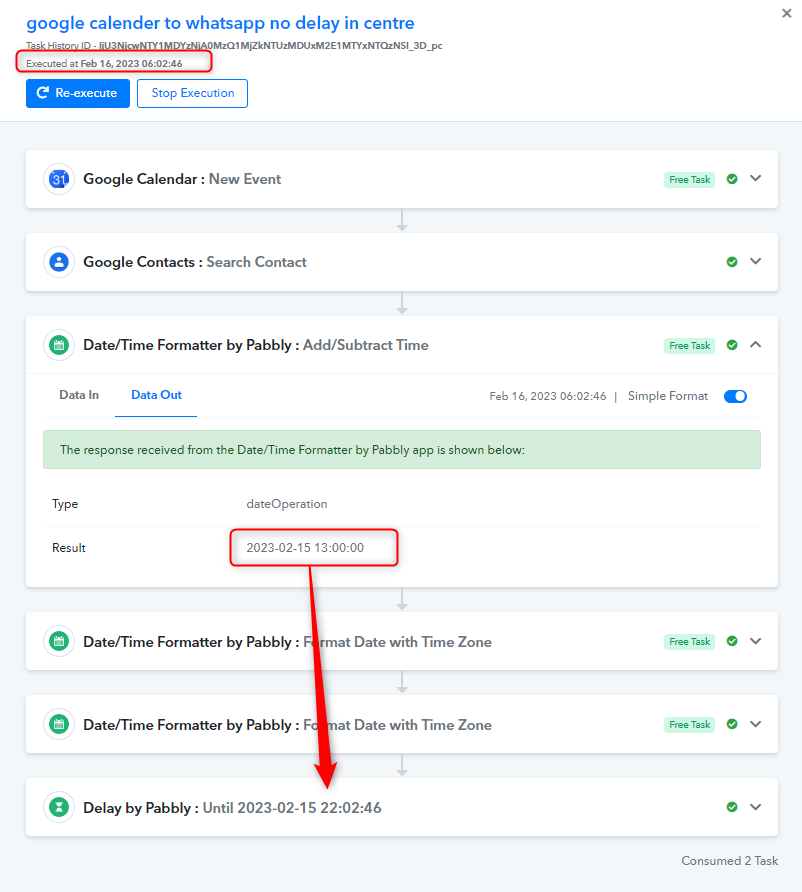
So, as a solution, we request you follow the mentioned video once and try again.
(Try the last part of the video)
Hey @Jing
We have checked the workflow and now it will work correctly. Please once try to book an event in the Google Calendar.
Hi I booked an event to test, but there was no whatapps reminder sent
Hey @Jing
You have put the delay function in the workflow so it will send the Whatsapp message when the delay gets completed.
Hi @Kunal
I have already added the delay function. but it is not working. my recipients didnt receive the messages at all
Hey @Jing
Please check the time at which you have executed the workflow and the calculation you have done at which you are trying to send the message notification.
Since after the subtraction of time from the DateTime Formatter, the time which Delay Until got was already past because of that message did not get forwarded.
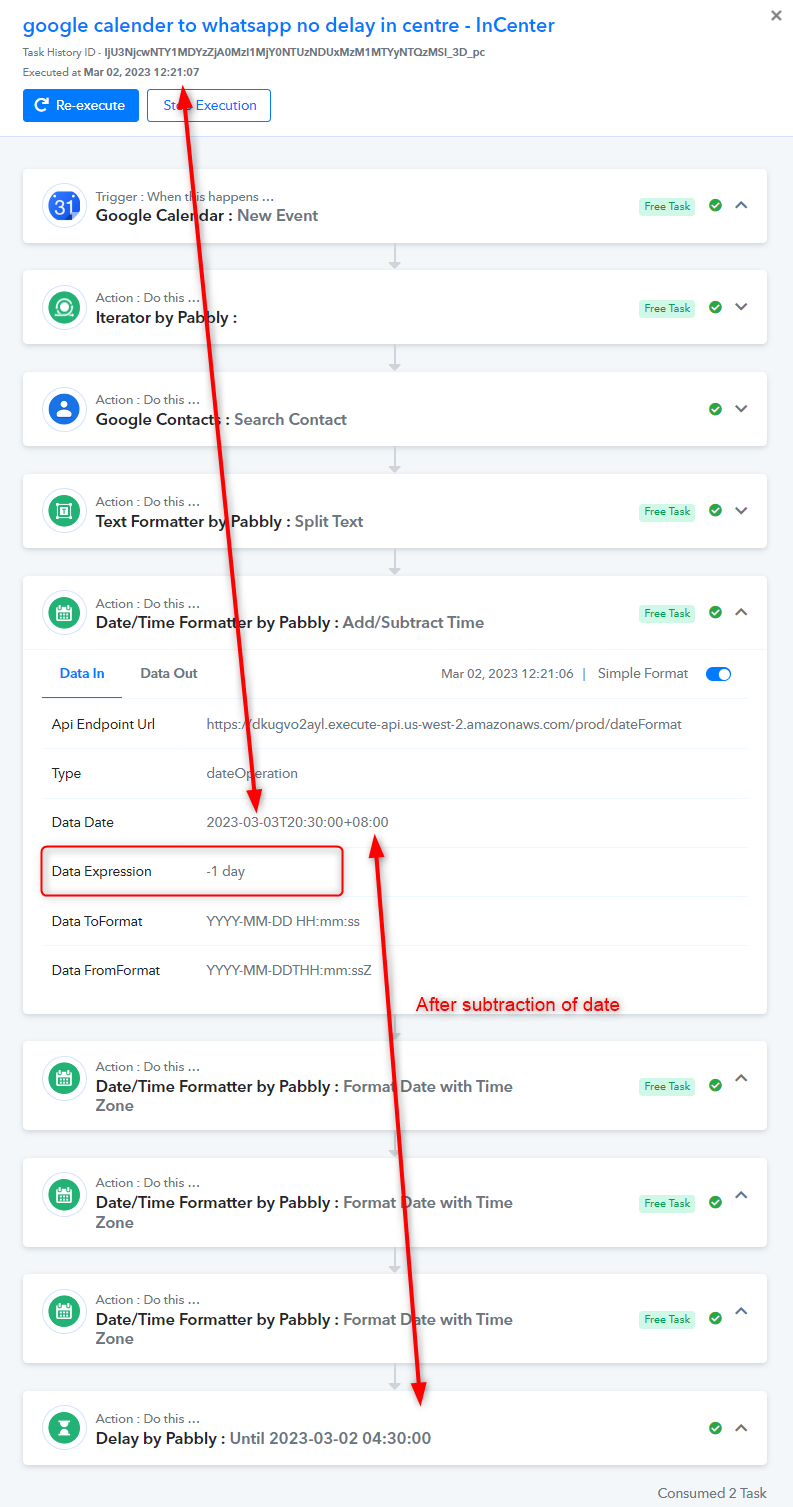
@Supreme I selected delay of one day & inserted new meetings that are more than 1 day away. Sadly, I did not receive any message notifications.
Seems like the messages only come in during testing but not after that
Please share the task history Id of it.
IjU3NjcwNTY1MDYzZjA0MzI1MjY0NTUzNDUxMzM1MTYyNTQzMSI_3D_pc here is the task history. It says successful, that is because I refreshed the workflow on pabbly connect. Another class I created on google calendar didnt work at all. no notification was sent.
It only works if you keep clicking the save and test request button on pabbly connect.
Can you please help? this problem has been stuck for sometime. thank you so much
Hey @Jing
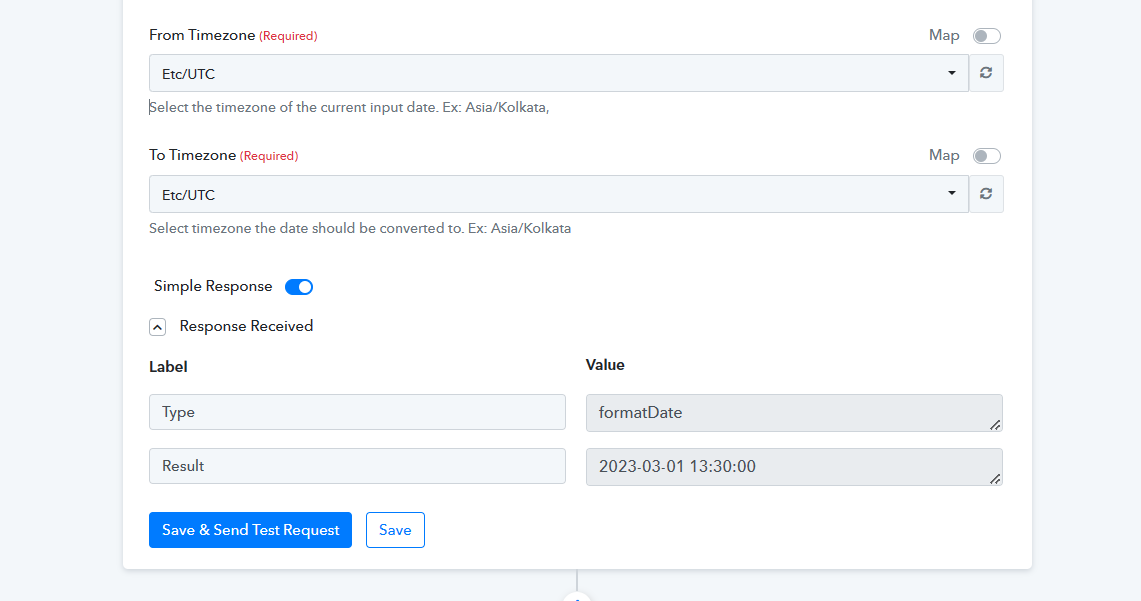
It appears that from Google Calendar the events datetime is coming in UTC format directly.
So, I think we don't need to convert the timezone, as it will directly work for Delay Until action step.
Please try now, I hope this should work now.
Hi
It is not working again
[JUSTIFY]
This email is to notify you that for the workflow "google calender to whatsapp no delay in centre - InCenter" , a recent task was not executed due to following error -[/JUSTIFY]
Task History ID: IjU3NjcwNTY0MDYzMjA0MzQ1MjZlNTUzZDUxM2I1MTY0NTQzOSI_3D_pc
Step Name: Date/Time Formatter by Pabbly > Add/Subtract Time
Connection Name: N.A.
Task Error Detail:
{
"status": "error",
"message": "Required field Enter Date missing. Learn more: https://forum.pabbly.com/threads/how-to-fix-required-field-is-missing-errors-in-pabbly-connect.7488/"
}
Can you please tell us why are you using the Iterator action step in your workflow?
Can you please tell us why are you using the Iterator action step in your workflow?
@Supreme I was advised to include it. I run a coaching school and wanted to send lesson reminders to students & tutors. Each meeting has different participants. Hence I was advised to include this.
Can you help me with this workflow? it has been dragging on for weeks and very important for my business. some of my students received incorrect whatsapp messages and it is really embarrassing
Hey @Jing
We can only try with your use case since after many changes we have made a slight change in your workflow. Can you please check again?
Further, if the issue still persists we recommend hiring an automation expert who can design such automation for your workflow and manage everything for you - https://forum.pabbly.com/threads/pabbly-connect-experts-and-consultants.22/
And can even find automation experts in our Facebook group as well - https://www.facebook.com/groups/formget.deals/
hi @Supreme thank you for your help. The workflow works when there is only one meeting attendee. When I add on more meeting attendees, it doesn't work
[TABLE]
[TR]
[TD][JUSTIFY]
This email is to notify you that for the workflow "google calender to whatsapp no delay in centre - InCenter" , a recent task was not executed due to following error -[/JUSTIFY]
Task History ID: IjU3NjcwNTY0MDYzMDA0MzE1MjZjNTUzMzUxMzU1MTYwNTQzNCI_3D_pc
Step Name: Text Formatter by Pabbly > Text (Basic Formatting)
Connection Name: N.A.
Task Error Detail:
{
"status": "error",
"message": "Required field String missing. Learn more: https://forum.pabbly.com/threads/how-to-fix-required-field-is-missing-errors-in-pabbly-connect.7488/"
}[/TD]
[/TR]
[/TABLE]
Hey @Jing
Because you are sending messages to multiple users at different times, the Iterator with Delay action step is causing a disruption in the live execution, so we have created another workaround in your workflow that you can try.
Hi
It is not working again. https://connect.pabbly.com/workflow/share/DERRY1cAUzBeFAJvAUoGIQ4aUFQCW1Y0U0oHFVNcVCxaFAZDUxJfNQtHUnBXDFQ1BUxSOAZZDGxfS1FVA1VVJgYcVGsHGAJfV2QEQQNcWHIMbg##
Can you advise?
Is this ever going to work?
It appears that from the desired workflow, it can only send notifications to one user at a different calculated time.
@Supreme Is it better to use the schedule function?
I was thinking of creating a workflow using the schedule function.
1. Everyday at 9 am, the bot would send WhatsApp reminders to all the meeting attendees for all next day meetings
2. There may be several meetings the next day & the each meeting has different number of attendees
Can you let me know if this is possible & how can I create such a workflow
Regarding your concern, we strongly advise working with an automation specialist who can create the necessary automation for your workflow and take care of everything for you - https://forum.pabbly.com/threads/pabbly-connect-experts-and-consultants.22/
And can even find automation experts in our Facebook group as well - https://www.facebook.com/groups/formget.deals/
Thanks!
Hi @Supreme
Can you recommend me any automation experts? Seems like most are very busy & I didn’t get a reply. My problem is still not solved.
I am a bit confused, I thought using pabbly means we can solve automation problems without coding? Do we have to search for automation experts?
Because you have a specific use case that needs to be checked to see if it is possible and how it can be done. As a result, we recommend that you contact an automation expert who can manage the use case condition and build one that meets your needs.
@Supreme I engaged the help of an automatic expert but the workflow still doesn’t work. Can u help?
@Supreme please advise
Please record a video on how and what issue you are facing. Also, you may contact him for your automation guidance -
Fagun Shah
- Automation Freelancer
- Let's Connect - https://www.facebook.com/fagun.shah.7/