Google Docs (new document in folder) to WordPress (create a post)
Status: Closed · Asked by Mathias on · 0 views
In my Google Docs (new document in folder) to WordPress (create a post) workflow
The body content is missing when the WordPress post draft is created
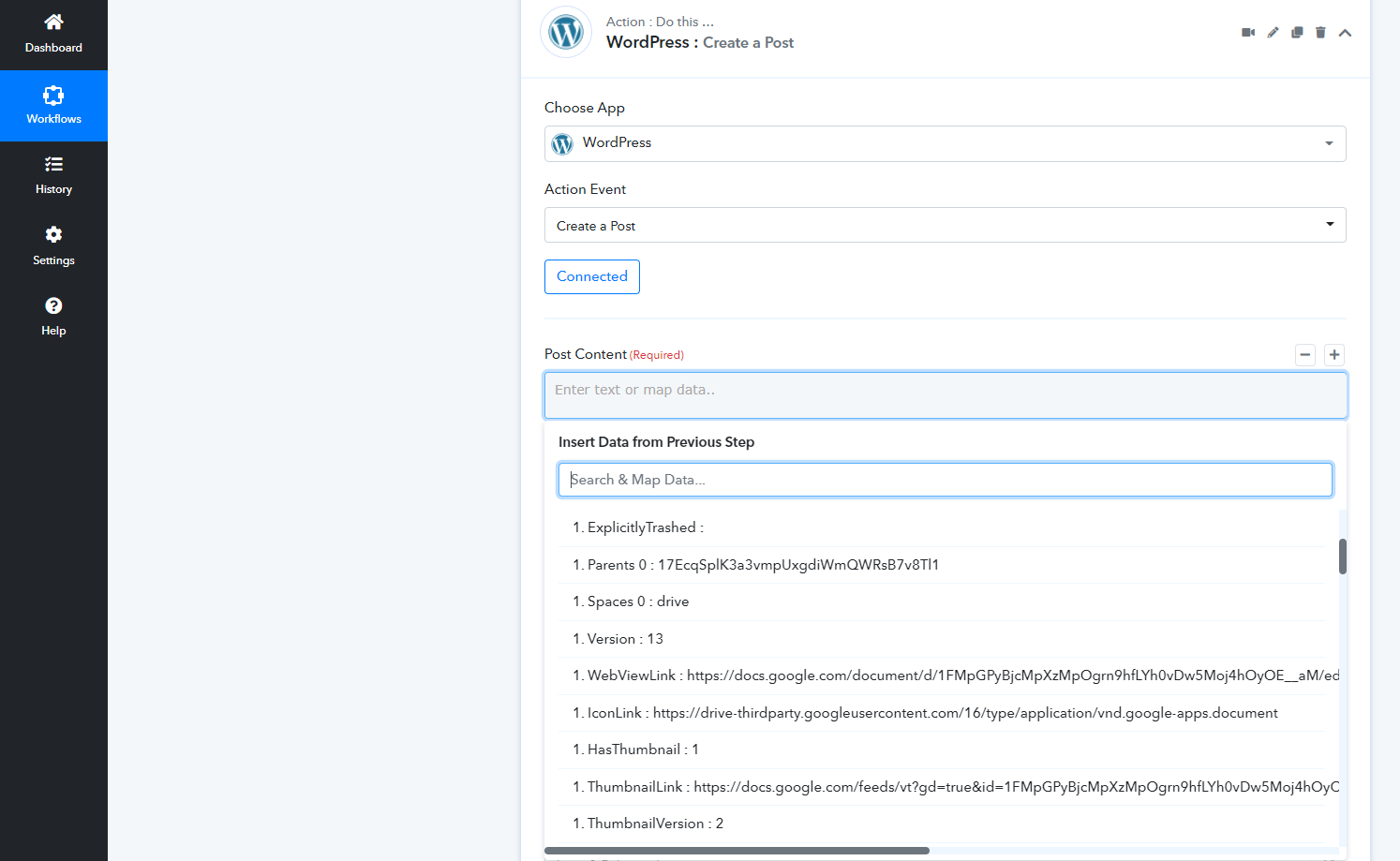
What data do I map to the 'Post Content' (required field)?
Here are the ones that appear, none of them seem to relate to or pull in the actual content from the Google docs file
- 1. Kind : drive#file
- 1. Id : 1FMpGPyBjcMpXzMpDw5Moj4hOyOE__aM
- 1. Name : Test article COCO29
- 1. MimeType : application/vnd.google-apps.document
- 1. Starred :
- 1. Trashed :
- 1. ExplicitlyTrashed :
- 1. Parents 0 : 17EcqSplK3aQWRsB7v8Tl1
- 1. Spaces 0 : drive
- 1. Version : 13
- 1. WebViewLink : https://docs.google.com/document/d/1FMpGPpOgrn9hfLYh0vDw5Moj4hOyOE__aM/edit?usp=drivesdk
- 1. IconLink : https://drive-thirdparty.googleusercontent.com/16/type/application/vnd.google-apps.document
- 1. HasThumbnail : 1
- 1. ThumbnailLink : https://docs.google.com/feeds/vt?gd=true&id=1FMpGPyBjcMpXzMpOgrn9hM&v=2&s=AMedNnoAAAAAYm-odpm0-Bp6jhjTZHnvbzqwDPuBRSGj&sz=s220
- 1. ThumbnailVersion : 2
- 1. ViewedByMe : 1
- 1. ViewedByMeTime : 2022-05-02T07:45:18.105Z
- 1. CreatedTime : 2022-05-02T07:13:52.490Z
- 1. ModifiedTime : 2022-05-02T07:43:31.394Z
- 1. ModifiedByMeTime : 2022-05-02T07:43:31.394Z
- 1. ModifiedByMe : 1
- 1. Owners 0 Kind : drive#user
- 1. Owners 0 DisplayName : Matlgren
- 1. Owners 0 PhotoLink : https://lh3.googleusercontent.com/a-/AOh14GiBgpe0t4m4iZ_ybvsTkuxrfEg=s64
- 1. Owners 0 Me : 1
- 1. Owners 0 PermissionId : 18047982283715409485
- 1. Owners 0 EmailAddress : [email hidden]
- 1. LastModifyingUser Kind : drive#user
- 1. LastModifyingUser DisplayName : Matlgren
- 1. LastModifyingUser PhotoLink : https://lh3.googleusercontent.com/a-/AOh14pe0t4m4iZ_ybvsTkuxrfEg=s64
- 1. LastModifyingUser Me : 1
- 1. LastModifyingUser PermissionId : 1804809485
- 1. LastModifyingUser EmailAddress : [email hidden]
- 1. Shared :
- 1. OwnedByMe : 1
- 1. Capabilities CanAcceptOwnership :
- 1. Capabilities CanAddChildren :
- 1. Capabilities CanAddMyDriveParent :
- 1. Capabilities CanChangeCopyRequiresWriterPermission : 1
- 1. Capabilities CanChangeSecurityUpdateEnabled :
- 1. Capabilities CanChangeViewersCanCopyContent : 1
- 1. Capabilities CanComment : 1
- 1. Capabilities CanCopy : 1
- 1. Capabilities CanDelete : 1
- 1. Capabilities CanDownload : 1
- 1. Capabilities CanEdit : 1
- 1. Capabilities CanListChildren :
- 1. Capabilities CanModifyContent : 1
- 1. Capabilities CanMoveChildrenWithinDrive :
- 1. Capabilities CanMoveItemIntoTeamDrive : 1
- 1. Capabilities CanMoveItemOutOfDrive : 1
- 1. Capabilities CanMoveItemWithinDrive : 1
- 1. Capabilities CanReadRevisions : 1
- 1. Capabilities CanRemoveChildren :
- 1. Capabilities CanRemoveMyDriveParent : 1
- 1. Capabilities CanRename : 1
- 1. Capabilities CanShare : 1
- 1. Capabilities CanTrash : 1
- 1. Capabilities CanUntrash : 1
- 1. ViewersCanCopyContent : 1
- 1. CopyRequiresWriterPermission :
- 1. WritersCanShare : 1
- 1. Permissions 0 Kind : drive#permission
- 1. Permissions 0 Id : 18047982283715409485
- 1. Permissions 0 Type : user
- 1. Permissions 0 EmailAddress : [email hidden]
- 1. Permissions 0 Role : owner
- 1. Permissions 0 DisplayName : Mren
- 1. Permissions 0 PhotoLink : https://lh3.googleusercontent.com/a-/AOh14Gi52kWBg4iZ_ybvsTkuxrfEg=s64
- 1. Permissions 0 Deleted :
- 1. Permissions 0 PendingOwner :
- 1. PermissionIds 0 : 180479822809485
- 1. Size : 1024
- 1. QuotaBytesUsed : 1024
- 1. IsAppAuthorized :
- 1. ExportLinks Application/rtf : https://docs.google.com/feeds/download/documents/export/Export?id=1FMpGPyBjcMpXzMpODw5Moj4hOyOE__aM&exportFormat=rtf
- 1. ExportLinks Application/vnd.oasis.opendocument.text : https://docs.google.com/feeds/download/documents/export/Export?id=1FMpGPyBjcMpXh0vDw5Moj4hOyOE__aM&exportFormat=odt
- 1. ExportLinks Text/html : https://docs.google.com/feeds/download/documents/export/Export?id=1FMpGPyBjcMYh0vDw5Moj4hOyOE__aM&exportFormat=html
- 1. ExportLinks Application/pdf : https://docs.google.com/feeds/download/documents/export/Export?id=1FMpGPyBjchfLYh0vDw5Moj4hOyOE__aM&exportFormat=pdf
- 1. ExportLinks Application/epub+zip : https://docs.google.com/feeds/download/documents/export/Export?id=1FMpGPyBjcMph0vDw5Moj4hOyOE__aM&exportFormat=epub
- 1. ExportLinks Application/zip : https://docs.google.com/feeds/download/documents/export/Export?id=1FMpGPyBjcMpXzMpOgrn9hfLYhj4hOyOE__aM&exportFormat=zip
- 1. ExportLinks Application/vnd.openxmlformats-officedocument.wordprocessingml.document : https://docs.google.com/feeds/download/documents/export/Export?id=1FMpGPyBjcMpXzMpvDw5Moj4hOyOE__aM&exportFormat=docx
- 1. ExportLinks Text/plain : https://docs.google.com/feeds/download/documents/export/Export?id=1FMpGPyBjcMpXzDw5Moj4hOyOE__aM&exportFormat=txt
- 1. LinkShareMetadata SecurityUpdateEligible :
- 1. LinkShareMetadata SecurityUpdateEnabled : 1
Attachments
Hey @mahlgren
You can use the "Google Docs: Get Document Details" action event to extract the relative data label of the document and can map the data accordingly.
Kindly try this at your end and let us know if that works for you.
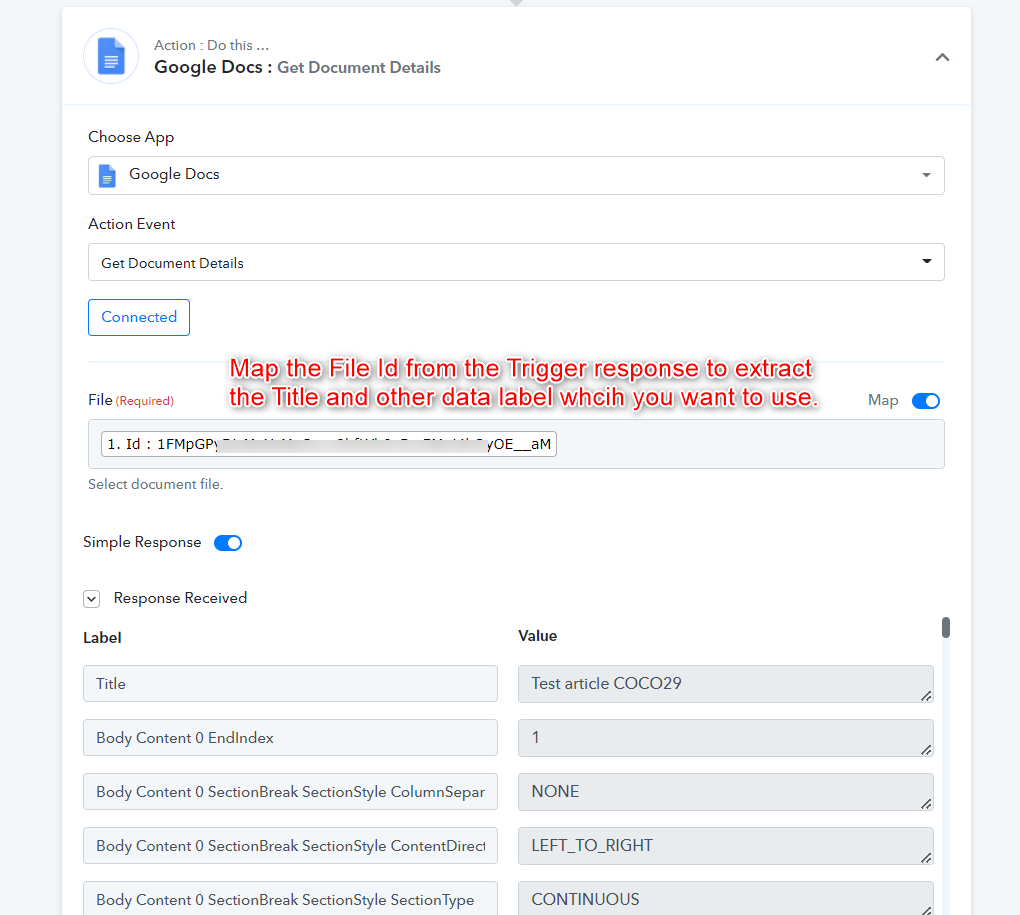
Gotcha... yes that brings the data in... thanks!
But jeez it will be a pain to map everything out... I might do the "Google Sheets to WordPress Integration" workflow instead