Google Drive (Developer) – Custom API Request (Beta) returns HTTP 500 only during live execution
Status: Closed · Asked by Yazan B on · 0 views
I'm experiencing inconsistent behavior with Google Drive (Developer) → Custom API Request (Beta).
Save & Send Test Request inside the step works correctly.
It returns the expected response
When the workflow executes normally from the trigger, the Data In shows the exact same URL:
But the response is always:
HTTP Status Code: 500
The application processed the request but returned a blank response.
Things we've already verified
- The URL in Data In is correct.
- The folder exists.
- Hardcoded value works in the step tester.
- Dynamic value resolves to the exact same text.
- Same Google Drive connection.
-
Same endpoint.
Why would Save & Send Test Request succeed, but the live workflow execution return HTTP 500
The application processed the request but returned a blank response.
Hello,
Could you please share the Workflow URL where you have this concern?
Arshil Ahmad
🌐 Pabbly.com
workflow: https://connect.pabbly.com/v2/app/workflow/mapping/IjU3NjcwNTY5MDYzZTA0MzI1MjZjNTUzNjUxMzAi_pc
Task history: IjU3NjYwNTZjMDYzMDA0MzE1MjZjNTUzNzUxMzc1MTY3NTQzMzBmMzki_pc
Thank you for sharing the Workflow URL and Task History ID. We have forwarded your concern to our technical team. We will get back to you as soon as we receive any updates from their end.
Thanks & Regards,Arshil Ahmad
🌐 Pabbly.com
Hi Yazan,
Thank you for your patience while our technical team looks into this issue.
To help us investigate and debug the HTTP 500 error effectively on live execution, could you please grant us your consent to test and make temporary necessary adjustments directly within your workflow?
Once we have your permission, we will proceed with the troubleshooting and update you as soon as possible.
Thanks & Regards,
Hrishabh
Customer Support Associate
🌐 Pabbly.com
👉 Rate your support
|

 [email hidden]
  https://www.yazmedia.com
  1210, DAMAC Executive Heights, Dubai
  Chat with our virtual receptionist




The content of this electronic communication is intended solely for the use of the individual or entity to whom it is addressed and any others who are specifically authorized to receive it. It may contain confidential or legally privileged information. If you are not the intended recipient you are hereby notified that any disclosure, copying, distribution or otherwise placing reliance on the contents of this information is prohibited and may be unlawful in certain legal jurisdictions. If you have received this communication in error please notify the sender immediately by responding to this email and then delete it from your system.
Hi Yazan,
Thank you for your patience while our technical team looks into this issue.
To help us investigate and debug the HTTP 500 error effectively on live execution, could you please grant us your consent to test and make temporary necessary adjustments directly within your workflow?
Once we have your permission, we will proceed with the troubleshooting and update you as soon as possible.
Thanks & Regards,
Hrishabh
Customer Support Associate
🌐 Pabbly.com
👉 Rate your support
Our technical team has made some changes to the backend. You should no longer encounter this issue during automation.
Thanks & Regards,Arshil Ahmad
🌐 Pabbly.com
even if Data out is empty it should continue as we have a router with status "error" and that is expected
in the same workflow
Hello Yazan B, This email is to notify you that for the workflow "Clickup - Creating Google Drive Folders" , a recent task was not executed due to following error - Task History ID: IjU3NjYwNTZjMDYzMDA0M2M1MjZjNTUzNTUxMzU1MTY0NTQzMjBmMzAi_pc |
Thank you for confirming that the previous issue has been resolved.
For this issue, we suggest enabling the Ignore Error feature in the JSON Extractor (Pabbly) action step. This will ensure that the subsequent steps are executed even if the JSON Extractor action encounters an error.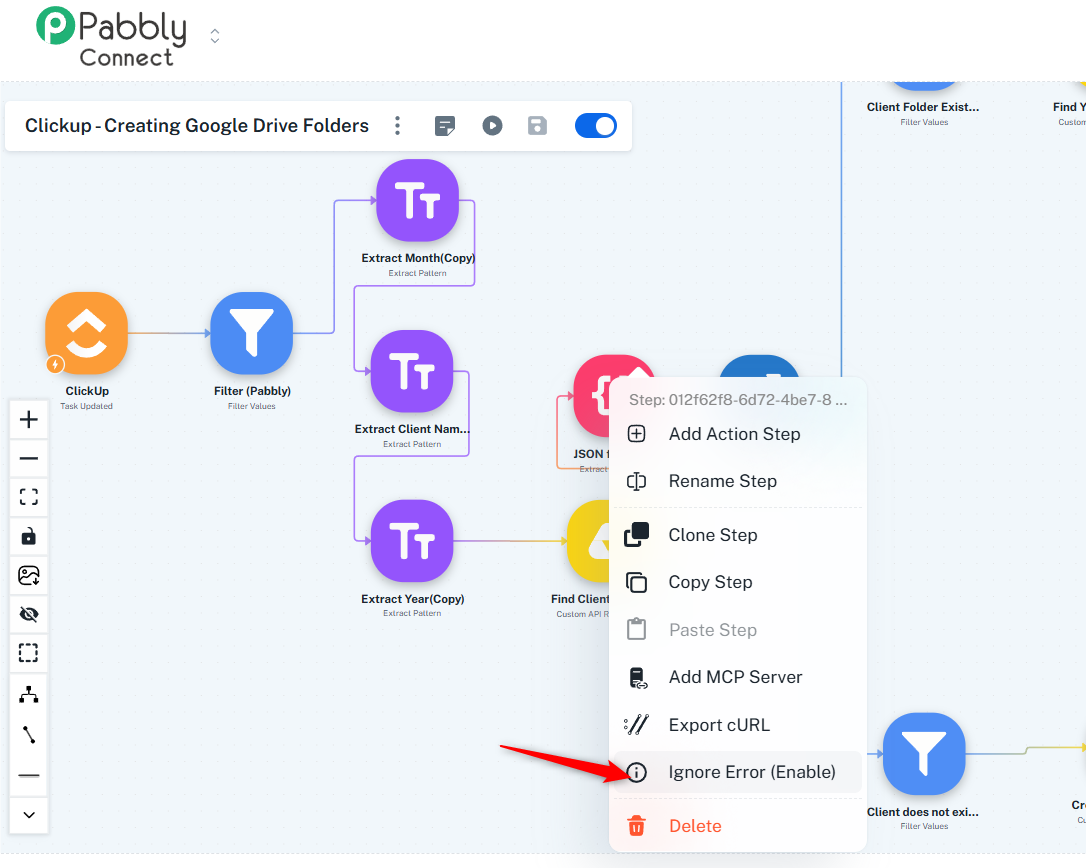
Arshil Ahmad
🌐 Pabbly.com
|
The content of this electronic communication is intended solely for the use of the individual or entity to whom it is addressed and any others who are specifically authorized to receive it. It may contain confidential or legally privileged information. If you are not the intended recipient you are hereby notified that any disclosure, copying, distribution or otherwise placing reliance on the contents of this information is prohibited and may be unlawful in certain legal jurisdictions. If you have received this communication in error please notify the sender immediately by responding to this email and then delete it from your system.
Thank you for confirming that the previous issue has been resolved.
For this issue, we suggest enabling the Ignore Error feature in the JSON Extractor (Pabbly) action step. This will ensure that the subsequent steps are executed even if the JSON Extractor action encounters an error.
Thanks & Regards,
Arshil Ahmad
🌐 Pabbly.com