Google Drive Search failed ( How to escape filenames for Google Drive API with apostrophe('))
Status: Closed · Asked by salasia on · 0 views
Hi, one of our workflows failed because it was searching for the following file on Google Drive:
1_They DON'T HAVE TO let us RACE! A MASSACRE_Pre-edit.mp4
Here's the "Data In" result:
And here's the "Data Out" response:
{
"Error Errors 0 Domain": "global",
"Error Errors 0 Reason": "invalid",
"Error Errors 0 Message": "Invalid Value",
"Error Errors 0 LocationType": "parameter",
"Error Errors 0 Location": "q",
"Error Code": 400,
"Error Message": "Invalid Value"
}
Is it due to the apostrophe in "DON'T"?
Thanks in advance!
Sergio
Hey @salasia
Could you please share the name of the workflow in which you are facing such an error?
Hi @Supreme
Affected workflow name is "Shared start of workflow".
Best regards
Sergio
Hey @salasia
We have tested the same on the Postman application and Google Drive is not accepting the apostrophe on the text.
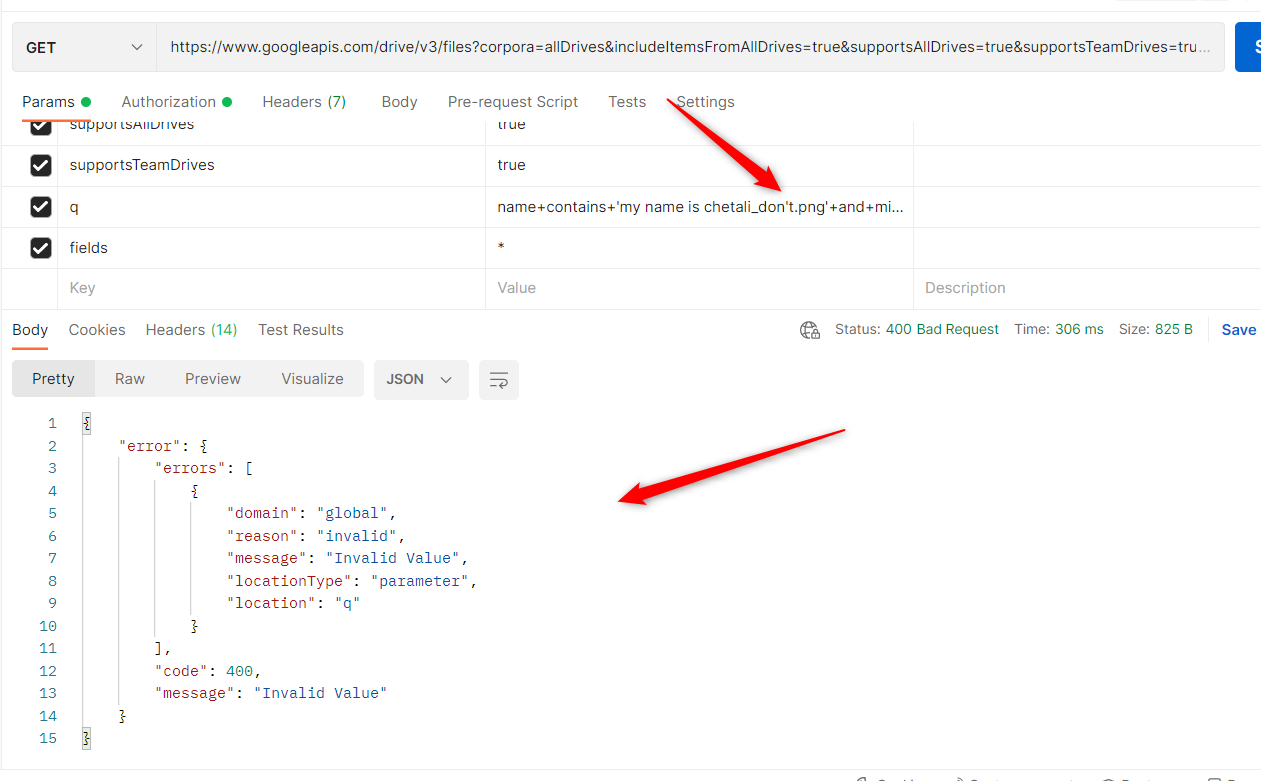
Though you can try searching the file by replacing the apostrophe with blank/nothing and can use "Substring" as a method.
Hi @Supreme
thank you for your reply. Is there any list of unaccepted characters I can refer to?
Kind regards
Sergio
Hey @salasia
You can refer to Google's API documentation perhaps they might have mentioned it. Else you can try reproducing the unaccepted characters.
Hi @Supreme
I've just found this thread https://stackoverflow.com/questions/67936627/how-to-escape-filenames-for-google-drive-api
It looks like you CAN search for a file name with an apostrophe, but it should be escaped, and I've just verified that it works with Pabbly, so I'll add an extra Text Replace step before the Google Drive search.
Best regards
Sergio