Google Search Console not working?
Status: Closed · Asked by MasterOfWeb on · 0 views
Hi
I tried to get data from Google Search Console. The connection is working, als it is showing all my available websites. But if I test the Search Analytics Connection I get an error as response: https://share.getcloudapp.com/2NubBmAW
Does anyone else have this problem?
Hey @MasterOfWeb
It appears that you are facing an issue because of the website you have entered in the "Site URL" field. This issue is likely due to the fact that you do not have the necessary permissions to perform this action on that particular website.
In order to resolve this issue, it will be necessary for you to contact the support team for the website and request the appropriate permissions.
Once you have obtained the necessary permissions, you should be able to perform the action without facing any issues.
Hi
I don't think it's a permission-issue. The user has access to the site, otherwise it would not be listed in the list of available site in pabbly to choose from.
I think something might be wrong with the URL you call. If I get the error mesage right, you call:
The requested URL <code>/webmasters/v3/sites/https://www.bomaoo.com//searchAnalytics/query</code> was not found on this server.
in the GSC Documentation, the API URL is: https://www.googleapis.com/webmasters/v3/sites/https%3A%2F%2Fwww.example.com%2F/searchAnalytics/query
So it might be something with url-decoing or with the double // after the domain?!?
Hey @MasterOfWeb
Can you please record a short video on searching the same content on your GSC once along with the configuration of the DNS which you have set?
It appears that you might have configured your GSC account in terms to use the action step.
Hey @MasterOfWeb
We have forwarded your concern to our technical team and they are currently looking into it.
As a workaround, you may refer to the following workaround to run the action step.
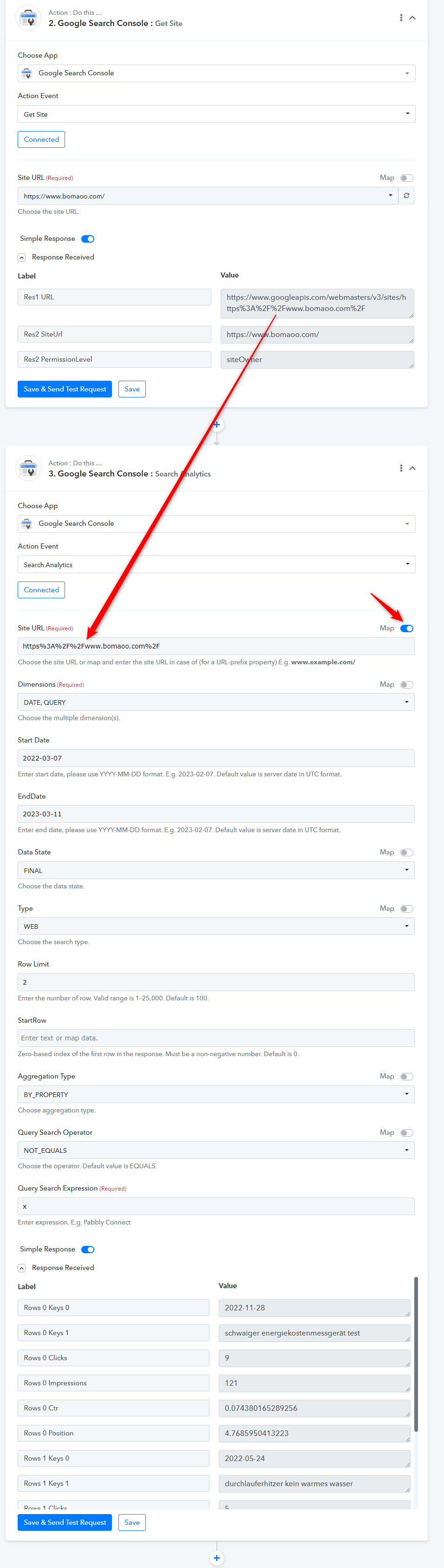
Hey @MasterOfWeb,
HiI tried to get data from Google Search Console. The connection is working, als it is showing all my available websites. But if I test the Search Analytics Connection I get an error as response: https://share.getcloudapp.com/2NubBmAW
Does anyone else have this problem?
Action step: "Search Analytics" your requirements have been taken into consideration and the necessary changes have been made.
Let us know if any questions or concerns occur.
Thanks!
Nivesh
Pabbly.com