Google sheet integration not working
Status: Closed · Asked by Elcom digital on · 0 views
I am connecting the google sheet with pabbly using the webhook url. Setup configuration is showing complete but when a new row is adding in the sheet, pabbly workflow is not working. Only works when I send a test entry. How to fix the issue?
Hey @Elcom digital
You need to use "Send On Event" when setting up Google Sheets if the data is coming from a Google application or if you manually enter it.
If the data is coming from a third-party application, however, you may need to choose "Auto Send On Schedule" which will forward the data in exactly one hour.
Please refer to the below video tutorial for a better understanding:
( Watch the first part of the video)
Hey
Tried this also but still the issue is there,
Kindly make sure that the data was getting filled till your triggering column or not.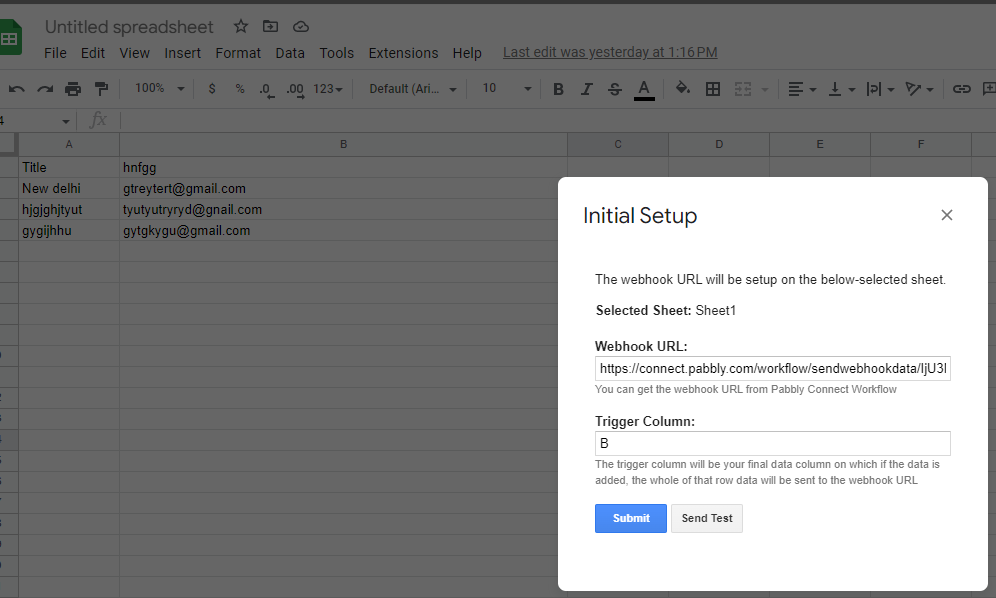
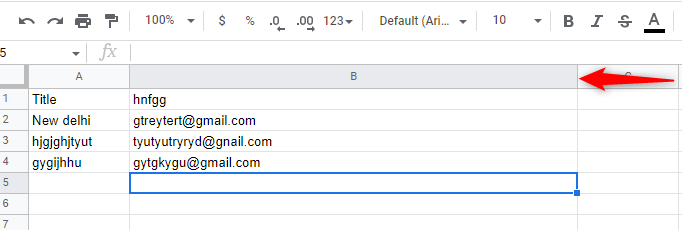
Also, could you please record a short video on your concern so that we can look into it and help you accordingly?
If there are 2 sheets in a google file, will pabbly automation work fine?
Hey @Elcom digital
If you want to receive the new row data in the same workflow from two Google Sheets then you need to configure the same webhook URL in both Google Sheets.
Hi
I don't mean two different google sheets. I mean, two sheets inside one google file.
Yes, if you want to receive the response from both of your Google Sheets (Sheet 1 and Sheet 2), you will need to configure the same webhook URL in both sheets. By doing so, you will be able to collect and process data from both sheets simultaneously.