Google Sheet integration set-up question
Status: Closed · Asked by Eisi101 on · 0 views
Hi,
i have a workflow with Google Sheets - Switchboard Canvas - Facebook and Instagram. It's a postin automation.
I have the following question:
I choosed
- Auto Send on Schedule
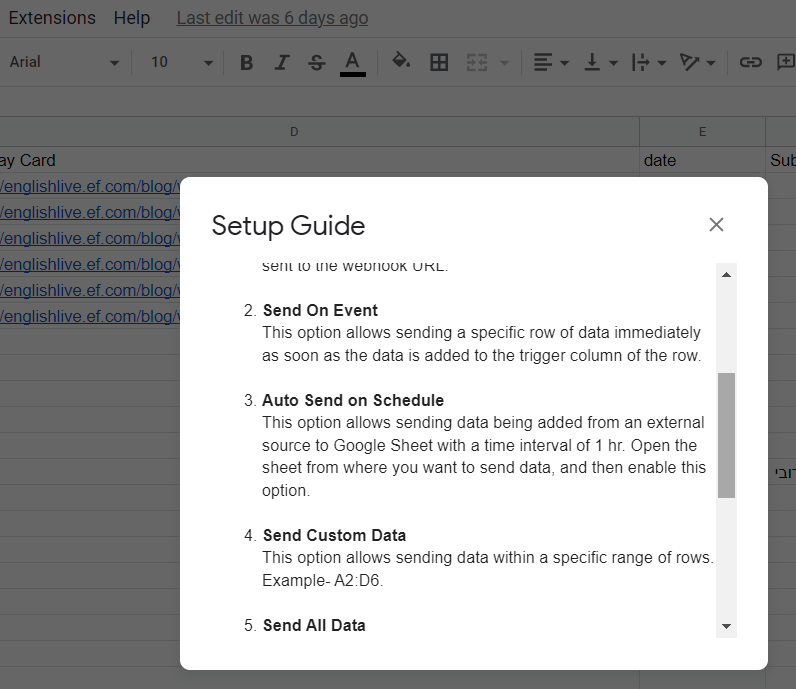
Select the option in case the data is being entered into Google Sheets via an external application. This option allows sending data being added from an external source to Google Sheet with a time interval of 1 hr.
How do i know at which time the data is beeing send to pabbly? so is it then every hour at 1, 2, 3 etc... or 1:30, 2:30 etc?
Can i define that anywhere?
Thank you,
Alex
You can't know that unless you trigger it one time and check workflow history to know the trigger time.
Hi @Fagun Shah - thx for your quick answer. I tested it yesterday. So the Trigger in Google Sheet is in Column H and there i have dynamic data depending on a if-formula. So i was not sure if this would work. But it worked. The Workflow started every hour at xx:47.
But today not, so that was the reason i wanted to know the last time pabbly checked the sheet....
Hi,
i want to understand theese two options better:
Send On Event: The data will be sent if there is something in the cell in the trigger column, right?
Auto Send on Schedule: Pabbly checks hourly if there is new content in the sheet? But will only send the data if there is something in the cell of the trigger column?
So i need the trigger for both options?
Any my main question is:
I am using a formular in the trigger cell. Depending on the time i want to have a x in the cell or not. So my plan is to use the google sheet as a instagram publish scheduler. I prepare everything (1 post per day) in the spreadsheet - i create an image with switchboard canvas and then post it to instagram. My plan is to show an x in the trigger cell daily for a new row. You know what i mean?
Please see the screenshot attached. Does it work with auto scheduler???
Attachments

Hey @Eisi101
You workflow should trigger as soon as any row is added or updated in the Google Sheet you integrated. If it is not triggering, possibly any row wasn't updated or added inside that sheet. Also, make sure that the data is being entered up to the trigger column. Kindly check for the same once and refer to the YouTube video below to troubleshoot the webhook setup.
Hey @Eisi101
If you've set up a formula in the trigger column of your Google Sheets, it might not work as expected. We recommend choosing a different column as the trigger, which will send the entire row at once. Also, remember to use 'Send On Event' only if your data is from a Google application or manually entered. For data from third-party apps, consider using 'Auto Send On Schedule' or 'Send on Event,' which will forward the data within an hour.
And, just double-check to ensure all required data is filled up to your trigger column for a smooth process.
Hi - thank you! But choosing a different one for the trigger is not what i want. Because i want to manage the triggers with a formula in order to schedule the posts. You know what i mean?
Please see my screenshot. I can define in Column I and J the day and time when the x should appear in the trigger column h. But somehow it doesn't work. Yesterday it worked with the schedule option in pabbly.
The general question is: Does a if formula work for pabbly connect if i choose the auto send on schedule option?
Got it @Luv - but maybe you can read my post here as well https://forum.pabbly.com/threads/google-sheet-trigger-formula.21105/
Maybe then you understand better what my problem is.
The general question is: Does a if formula work as a trigger for pabbly connect if i choose the auto send on schedule option?
Anyone can help? :)
Anyone can help? :)
Hey @Eisi101
The general question is: Does a if formula work for pabbly connect if i choose the auto send on schedule option?
Currently, we do not support formula-based updates in the trigger column. I am afraid we don't have any workaround for this concern.
hi @Supreme
ok the strange thing is that it worked sometimes already.....i definie a date and time in cell I4 and compare it with the current datea and time.
This is the formular =IF((I4)For some automations it wors - for some not.....strange!
Is there any way to schedule it if i have already all the information in the google sheet?
Example:
I have 100 rows with all the needed information for the automation in the google sheet. But i want to send to pabbly daily only one row for example. Is there a way to do it?
Hey @Eisi101
I went through your replies on the other thread and you stated the example clearly with your sheets containing 100 rows and you want to send one row to Pabbly each day. We already have a video prepared for this use case. Kindly follow the instructions mentioned in this video up to 6:50.
youtube.com/watch?v=OeAKUvIBCKc
Let us know in case you face any further queries.
Hi @Luv sounds great i will try it - many thanks! I always started with sheets as a trigger and not as an action. Now i will start with the scheduler trigger from pabbly - lets see!
Hey @Eisi101
That is great! Let us know if it works for you.
Hi @Luv it works totally fine - many many thanks!!
One other question. Do you know how i can add line breaks to the text in a cell in google sheets in order to have the line breaks in instagram then? Is this possible or do i need the data transformer somehow?
thx!!
Hey @Eisi101
You may insert a
tag where you wish to create a line break in your Google Sheet, enabling it to translate into a line break in your Instagram caption. Please attempt a trial to confirm if it functions as expected for you.
Hi @Luv - i tried it with line breaks in google sheets with al+enter and with CHAR(10) in a formula. But both got transformed by instagram to \\n\\n --> what is this and do you know why?
I tried it with
in the cell as well...but no success...
oh wait - now it worked with
- thank you again @Luv