

• Instructions to Ask a Question

    For any assistance, please click the "Ask a Question" button and select the Pabbly product for which you require support.

    We offer seven comprehensive applications designed to help you efficiently manage and grow your business:

    Our support team endeavors to respond within 24 business hours (Monday to Friday, 10:00 AM to 6:00 PM IST). We appreciate your understanding and patience.

  • Due to Holi celebrations, our team will have limited availability. While we’ll continue to monitor threads, responses may be slightly delayed. Normal operations will resume on Thursday, 5th March 2026.

Google Sheet integration stuck on initial setup

Status
Not open for further replies.
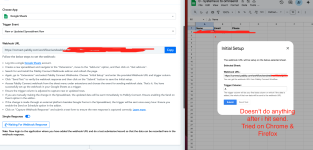
I have set up another Pabbly to Google Sheets so I've done it property before. This is a new google sheet with a new Webhook URL. I copy & paste the URL into the Webhook URL & type row 'A' & hit send like the instructions state, but nothing ever changes. I have tried this with Chrome & Firefix. I have the same problem. The connection is never made.
 

Attachments

  • Screenshot 2025-03-06 at 11.43.46 PM.png
    Screenshot 2025-03-06 at 11.43.46 PM.png
    353.9 KB · Views: 129

Preeti Paryani

Well-known member
Staff member
Hello @sbarealtyllc,

Please try clearing your browser cache and setting it up in an incognito tab. Let us know if this helps resolve the issue. However, if the issue persists, kindly provide a short screen recording of the problem so we can better analyze it and assist you further.
 
Status
Not open for further replies.
Top