Google Sheet Search base on todays date to GoHighLevel Workflow email
Status: Closed · Asked by rob13579 on · 0 views
I have data on a google sheet Date; URL1, URL2.
The sheet is already populated with data and it is not being updated regularly
I created a workflow on GHL to send a welcome email and then a daily email.
I want to be able to set tags in the email in the GHL workflow to pull the correct URLs each day from the google spreadsheet.
Thank you
Hey @rob13579
Please inform us of the workflow ID so that we can investigate and provide assistance accordingly. You can locate the ID at the end of the workflow URL.
I havent set up a workflow yet i tried and deleted b/c it wasnt working. I would be willing to sign up with Pabbly if I can see that I can get this flow working
Hey @rob13579
Your use case seems to be possible with Pabbly Connect. We have a few videos which can help you with this. Kindly refer to this video below which explains the basic use case for sending emails for new GHL leads.
youtube.com/watch?v=WLwtOsE2neo
Further, you will have to add another step in between these for Google Sheets "Lookup Spreadsheet Rows". This action will get the relevant URL from your sheet and you can send the same through email. Please refer to the video below for instructions related to Lookup Rows action.
youtube.com/watch?v=_2zfrxZ4C-U
Kindly set up your workflow accordingly and let us know if you get stuck at any step.
so I did this workflow
https://connect.pabbly.com/workflow/share/XRVUZlQDA2BTGQBqA1AAJ19LAwdXDQc_UUhWRFVaAHgATgNGDUxaMAxAUHIFQgNiUxoCaAJeBj8JHVBUUgQHdFJLVXkAA1UvWxYIOwNGADNdA1R8VDU#
and when I set it up in GoHighLevel and see that mapping i get this
{
"queryParams": {
"Date": "06/06/2024"
},
"headers": {
"host": "backend.leadconnectorhq.com",
"cdn-loop": "cloudflare",
"cf-ipcountry": "US",
"accept-encoding": "gzip, br",
"x-forwarded-for": "44.224.102.169,10.10.0.30",
"cf-ray": "893be6a12e62a35f-SEA",
"x-forwarded-proto": "https",
"cf-visitor": {
"scheme": "https"
},
"user-agent": "Pabbly Connect",
"masechta": "Sukkah",
"amud": "2a",
"shiur": "Http:/test.com/1",
"iyun": "Http:/test.com/1b",
"accept": "application/json",
"cf-connecting-ip": "44.224.102.169",
"x-envoy-external-address": "10.10.0.30",
"x-request-id": "88fd9387-eecb-46e0-a150-79ad59771040",
"x-envoy-attempt-count": "1",
"x-forwarded-client-cert": "By=spiffe://cluster.local/ns/default/sa/default-automation-workflows;Hash=3b612344076d08617a4a55c7fc8cf59a564070ab6e34097722ecd99a2c6f2291;Subject=\"\";URI=spiffe://cluster.local/ns/istio-system/sa/istio-ingressgateway-service-account",
"x-b3-traceid": "e275240b7f79a0921d721974a11280d0",
"x-b3-spanid": "926649cdeb11fdcc",
"x-b3-parentspanid": "1d721974a11280d0",
"x-b3-sampled": "0"
}
}
so it seems like its grabbing the information
but when I do a test email in GHL with the tags
{{inboundWebhookRequest.headers.shiur}}
{{inboundWebhookRequest.headers.iyun}}
nothing shows up
Just to clarify.
the data on the google sheet is only updated once a quarter.
so for example I will have rows from date
June 14 to Sept 14
when someone fills out the optin form they will get a welcome email with the current days Url's
then everyday following they will get an email with the urls for that day.
Thank you for your help
Hey @rob13579
Could you please elaborate on the complete use case that you are attempting to implement?
Hey @rob13579Could you please elaborate on the complete use case that you are attempting to implement?
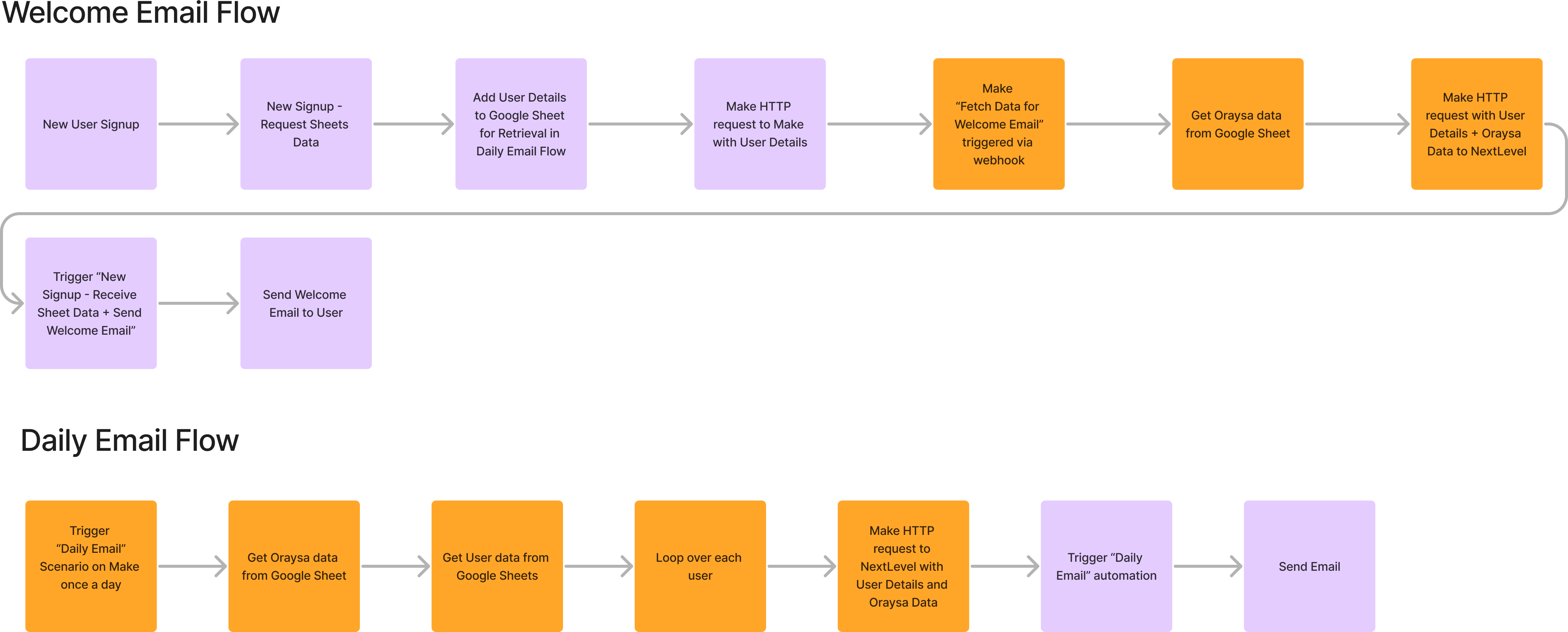
see attachment. It was set up on make. But I would prefer to keep more of the process on GHL. I want a way to just extract the data from the google sheet and add it to my GHL email workflow.
Attachments
Hey @rob13579
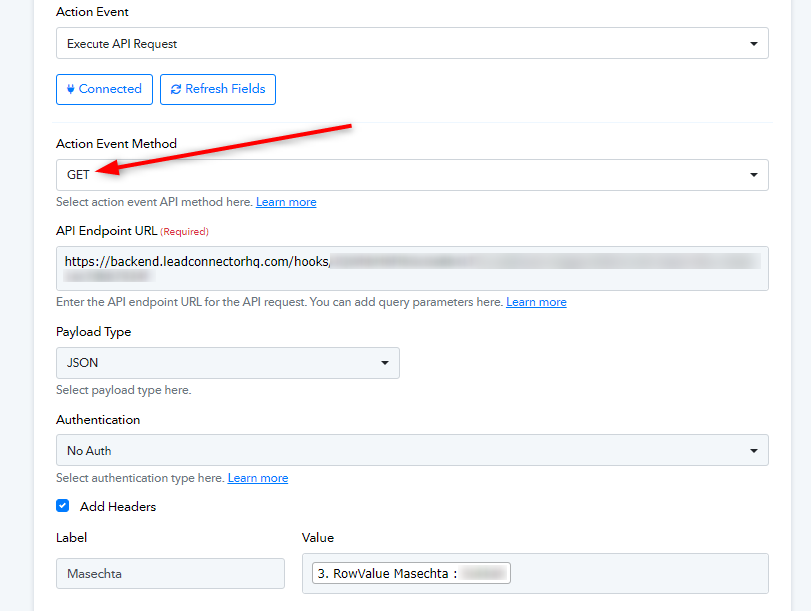
It seems that the use case you previously described differs somewhat from your current approach. Additionally, you are using the GET method, but for sending an email, you should use the POST method and a different endpoint.
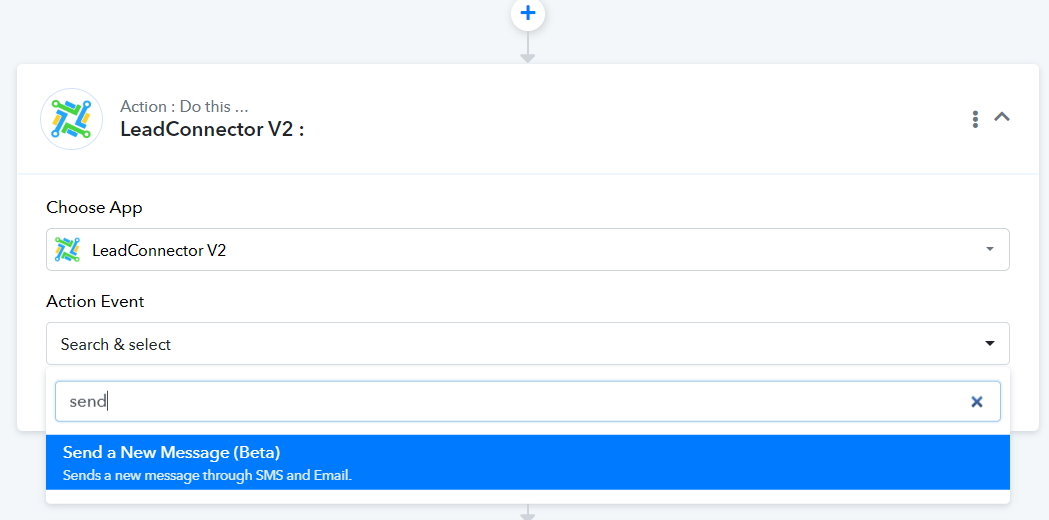
The initial steps (Schedule, Iterator, and Google Sheets) are all functioning correctly. Please use the appropriate endpoint or any provided endpoint for GoHighLevel (Lead Connector V2) within Pabbly Connect.
Let us know if it works for you.