Google Sheets "New or Updated Row" Trigger not working
Status: Closed · Asked by santoshgsk on · 0 views
I have a workflow connecting Google Sheets to Google Sheets.
In the source Sheet, a new row is added when a payment is completed by our user.
I have added the Webhook and Last column as Trigger column in the Initial Setup of Pabbly Connect Webhooks extension and activated Send on Event
However, whenever a new row is added from the backend, the workflow is not Triggered.
But when I manually copy & paste a row or manually type in values in the Source Sheet, the workflow gets Triggered and my destination Sheet is populated.
Please help me out as in what might be the issue here.
Read the part in red rectangle -
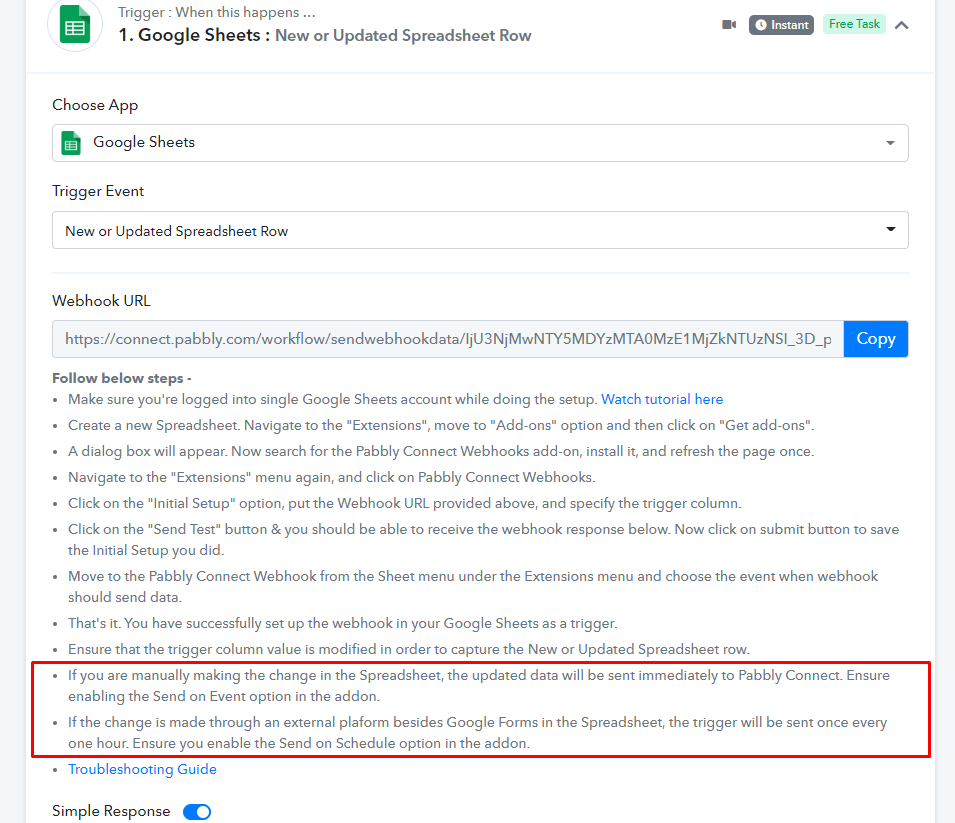
Understood. So it not real-time yet.
If you add data manually or via Google Form then it is instant else it will take upto 1 hour
Instead of google form, if i'm using say, JotFrom, and the the data is being exported to sheets directly with pabbly's webhook linked.
Will it not be instant in this case ?
Also, I'm trying to add the data manually, and yet it's not being triggered
Instead of google form, if i'm using say, JotFrom, and the the data is being exported to sheets directly with pabbly's webhook linked.
Will it not be instant in this case
Also, I'm trying to add the data manually, and yet it's not being triggered
Start another thread for this, so their team can help better.
Hi im having a similar problem, except my data is not being added by a third party application, its data thats input into a side bar in google sheets and then written to a cell by a google sheets function. It still seems to be treating it like its a thirid party application though?>