Google Sheets Pabbly Webhooks
Status: Closed · Asked by Vico on · 0 views
Hello guys, I need help, trying to make google sheets work with pabbly, I want each line added, trigger a webhook for pabbly, I am filling out the spreadsheet and I am not triggering the webhook when I finish, how do I solve it?
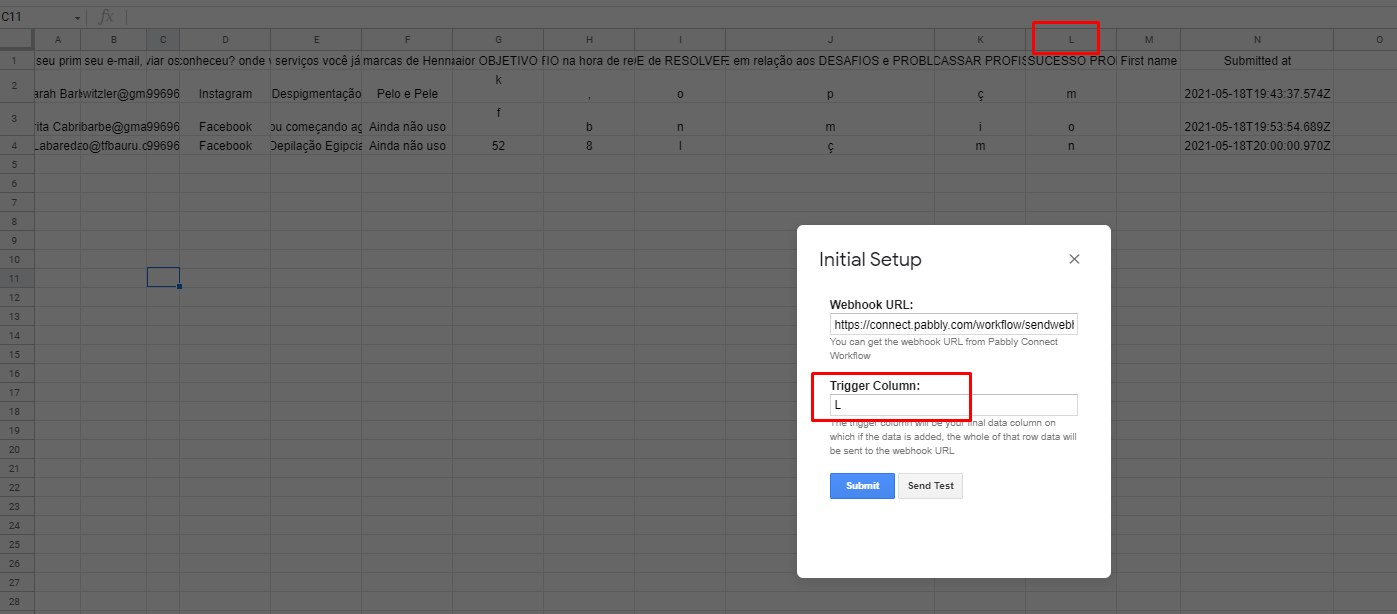
note that column L is my last information I need, I left enabled SEND ON EVENT but even so it does not fire, it only fires when I go manually and do a test ...
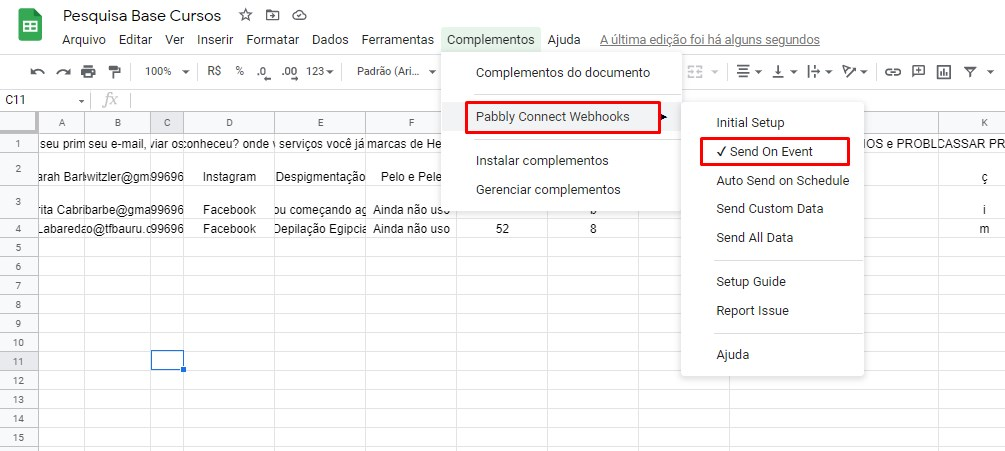
How is data added in google sheet Via some app or you type manually
If it is via some pp then check mar Send On Schedule also and wait 1 hour to see if data sent to pabbly or not.
I need help, trying to make google sheets work with pabbly, I want each line added, trigger a webhook for pabbly, I am filling out the spreadsheet and I am not triggering the webhook when I finish, how do I solve it?
note that column L is my last information I need, I left enabled SEND ON EVENT but even so it does not fire, it only fires when I go manually and do a test ...
Hey @Vico
Could you please confirm that the data in Google Sheet is getting data from some platform or are you just filling it manually?
Also as I can see in your workflow, you have only captured the webhook with three initial fields, if you want to capture the whole data from the "A to L" column, please do the initial setup again and send a test, click on " Capture Webhook Response "before capturing the data from Google Sheets.
Moreover, please refer to our tutorial video on Google Sheets for a better understanding of the addons (Please watch the first part of the video)-
youtube.com/watch?v=FkS-t6vjRq0
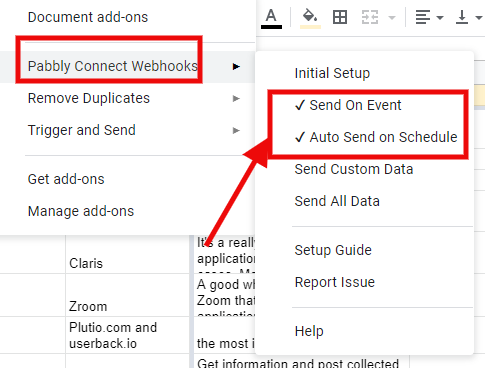
Further you need to tick both "Send On Event" and "Auto Send on Schedule" as shown below -
Olá, [USER = 397] @Vico [/ USER]Você poderia confirmar se os dados do Planilhas Google estão obtendo dados de alguma plataforma ou você está apenas preenchendo manualmente?
Também como posso ver em seu fluxo de trabalho, você capturou apenas o webhook com três campos iniciais, se quiser capturar todos os dados da coluna "A a L", faça a configuração inicial novamente e envie um teste, clique em "Capture Webhook Response " antes de capturar os dados do Planilhas Google.
Além disso, consulte nosso vídeo tutorial no Planilhas Google para uma melhor compreensão dos complementos (assista à primeira parte do vídeo) -
[MEDIA = youtube] FkS-t6vjRq0 [/ MEDIA]Além disso, você precisa marcar "Enviar no evento" e "Enviar automaticamente na programação" conforme mostrado abaixo -
Hi, Yes, I am using TYPEBOT, after completing the flow correctly it fills the spreadsheet's row.
Yes, I captured the webhook again by placing the last column ...
When I answer the Typebot it adds correctly in the ROW of the spreadsheet, but the data does not reach the pabbly, it is configured as in the photo ...
I need you to send the data at the same time that the ROW is filled out.
Hey @Vico
Please note that if you're adding data to Google Sheets through an external application then it will take 1 hr for the data to be transferred to your Pabbly Connect workflow. The data will not be added immediately if the data is being added from an external application.
In case you're adding data manually in the Google Sheets, then those data will be transferred to the Google Sheets immediately.
@Supreme Verma Why "Send On Event" does not work with external applications? How can we make it work?
Hey @david
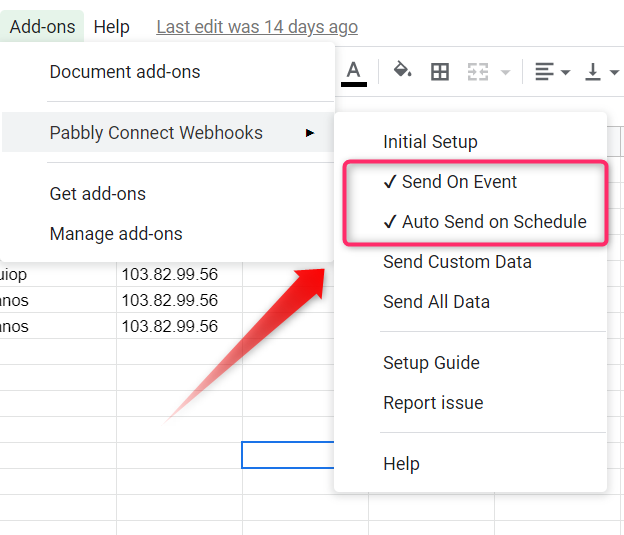
If you are using Google Sheet the data is coming from an external source other than Google's. You need to check 2 things in Pabbly
connects Add-on in "Send on Event" and "Auto Send on Schedule" which will take an exact 1 hr to send data.
@Supreme Verma When does the 1 hour starts? From event or from a specific time that we can determine?
Hey @david
When does the 1 hour starts? From event or from a specific time that we can determine?
When the data entered on the spreadsheet the time starts.
@Supreme Verma Do you mean it works like this?
New data entered on row 1 at 1pm + 1 hour to send on schedule (2pm sent out from Pabbly)
New data entered on row 2 at 1:30pm + 1 hour to send on schedule (2:30pm sent out from Pabbly)
New data entered on row 3 at 1:45pm + 1 hour to send on schedule (2:40pm sent out from Pabbly)
Are the data send individually after 1 hour for each row or sent together as a whole bundle after 1 hour?
@Supreme Verma Do you mean it works like thisNew data entered on row 1 at 1pm + 1 hour to send on schedule (2pm sent out from Pabbly)
New data entered on row 2 at 1:30pm + 1 hour to send on schedule (2:30pm sent out from Pabbly)
New data entered on row 3 at 1:45pm + 1 hour to send on schedule (2:40pm sent out from Pabbly)Are the data send individually after 1 hour for each row or sent together as a whole bundle after 1 hour
Hi @david , you can not decide the exact time of when 1 hour starts, it does not start exactly from first data arrived in the sheet. It is totally random.
But when ever the one hour schedule will run it will send all new data added to Gsheet to Pabbly one by one.
Let's say for example next 1 hour schedule will run on 2:05 pm.
You added data using external software in google sheet at 1:25pm, 1:45pm, 1:47pm.
Then it will send all those 3 new data added in GSheet in last 1hour to pabbly at 2:05pm one-by-one.
Any data added after 2:05pm will be send after one hour.
I hope this clears up the confusion for you.
I have followed instructions and successfully send on Google sheets on schedule but I received this error:
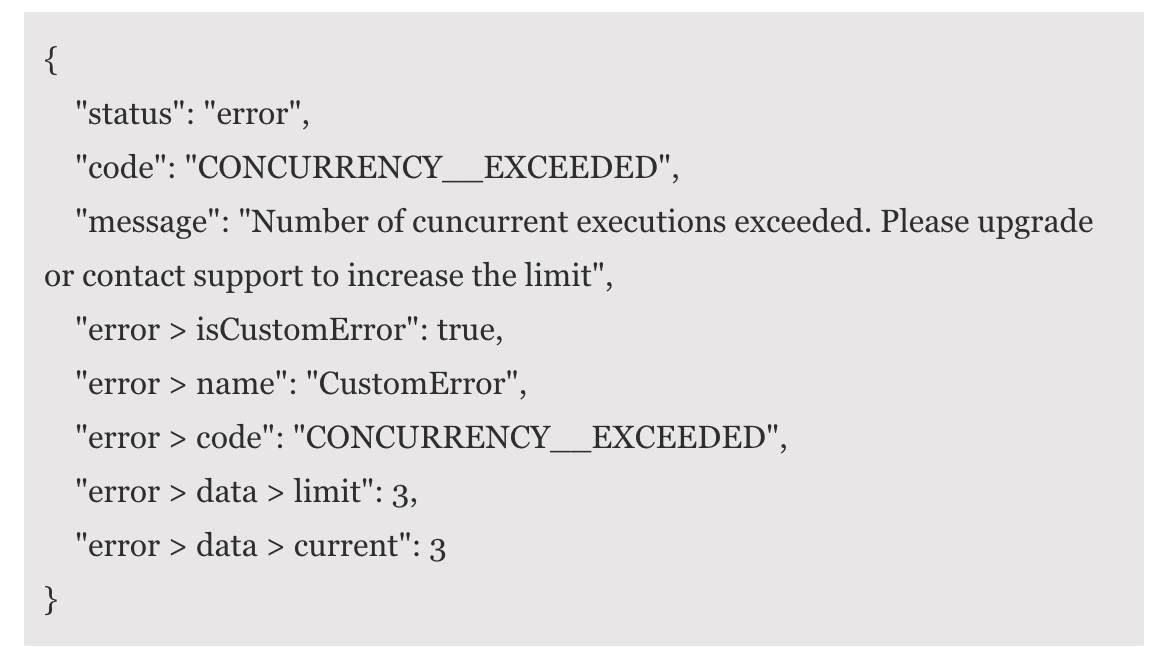
I have followed instructions and successfully send on Google sheets on schedule but I received this error:
Which application is sending this Concurrency Exceeded upgrade message?
It seems that it is coming as a response from one of the action steps applications that you have on your workflow?
Which application is sending this Concurrency Exceeded upgrade message?It seems that it is coming as a response from one of the action steps applications that you have on your workflow?
I have it fixed now. Thanks