Google Sheets trigger is not sending data to Pabbly Connect workflow
Status: Open · Asked by Rajesha H B on · 0 views
I am facing an issue where adding or updating a new row in Google Sheets is not triggering my Pabbly Connect workflow.
Steps & Setup Completed:
Installed the Pabbly Connect Webhook add-on in Google Sheets.
Configured the Webhook URL and set the Trigger Column
Enabled "Send on Event" under the add-on settings.
Tested sending data during initial setup, which worked successfully.
What is happening:
When new data is added or existing rows are updated in the Google Sheet, the webhook does not fire, and no new task/event is recorded in Pabbly Connect history.
What I have checked so far:
Verified that "Send on Event" is checked in Google Sheets.
Verified that data is entered up to the designated Trigger Column.
Could you please advise what might be causing this issue or how to resolve it?
Hello Rajesha,
Thank you for reaching out.
To help us investigate the issue, could you please share the following:
The Workflow URL of the affected Pabbly Connect workflow.
Access to the Google Sheet where the issue is occurring. You can share it with us at anushka.sahu@pabbly.com.
Additionally, please confirm whether the data is being:
Entered manually into the Google Sheet, or
Added automatically via another application, API, or automation.
Once we have these details, we'll review the setup and assist you further.
Thanks & Regards,Anushka Sahu
Customer Support Associate
🌐 Pabbly.com
Mailed to anushka.sahu@pabbly.com
Hello Rajesha,
Thank you for reaching out.
To help us investigate the issue, could you please share the Workflow URL of the affected Pabbly Connect workflow.
Once we have these details, we'll review the setup and help identify why the Google Sheets events are not triggering your workflow automatically. We look forward to your response.
Thanks & Regards,Anushka Sahu
Customer Support Associate
🌐 Pabbly.com
attached in mail . check anushka.sahu@pabbly.com mail
Hello Rajesha,
Thank you for sharing the Google Sheet.
However, we couldn't find the Workflow URL in your email. To investigate the issue further, we also need the Workflow URL of the affected Pabbly Connect workflow.
Please copy the Workflow URL from your Pabbly Connect dashboard for the workflow where you're facing this issue and share it with us.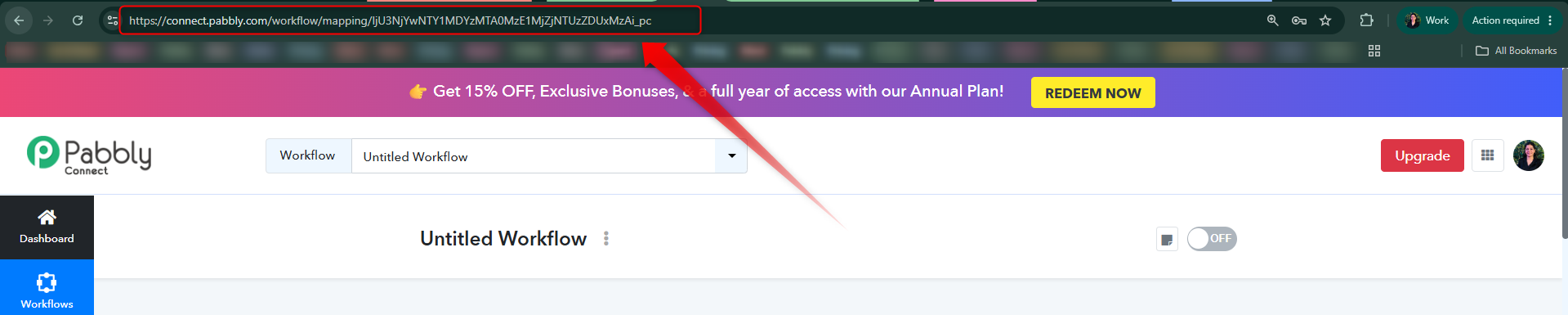
Once we receive the Workflow URL, we'll review your workflow configuration and help identify why the Google Sheets events are not triggering automatically.
Thanks & Regards,Anushka Sahu
Customer Support Associate
🌐 Pabbly.com
Hello Rajesha,
To help us investigate the issue further, could you please clarify a few details about your Google Sheets trigger?
Are you using Send on Event or Auto Send on Schedule in the Google Sheets trigger?
Is the data being added to the Google Sheet automatically through another automation/application, or are you manually entering the data into the sheet?
Please let us know how the data is being added to the sheet and which trigger configuration you're using. This information will help us identify the cause of the issue more accurately.
Thanks & Regards,Anushka Sahu
Customer Support Associate
🌐 Pabbly.com
send on event
automatically by form filling
Hello,
Thank you for the clarification.
Since the data is being added to the Google Sheet automatically through a form, you should use Auto Send on Schedule instead of Send on Event.
Please note that Auto Send on Schedule checks for new data periodically, so it may take up to approximately 1 hour for newly added rows to trigger the workflow.
Once you've changed the trigger to Auto Send on Schedule and configured the required settings, the data will start flowing into the workflow automatically whenever new form responses are added to the sheet.
If you'd like to reduce this delay and have the workflow trigger much faster, you'll need to configure the 1-minute Google Apps Script in your Google Sheet.
You can follow this documentation to configure it in your sheet: https://forum.pabbly.com/threads/google-sheets-1-minute-trigger.12927/
We hope this clarifies the behavior. Please make these changes and let us know if you face any issues. We'll be happy to assist you further.
Thanks & Regards,Anushka Sahu
Customer Support Associate
🌐 Pabbly.com