virsingh77
Member
- Your Workflow URL
- https://connect.pabbly.com/workflow/mapping/IjU3NjcwNTZhMDYzNzA0MzU1MjZjNTUzMCI_3D_pc
- Your Task History ID
- IjU3NjcwNTZhMDYzNzA0MzU1MjZjNTUzMCI_3D_pc#
- Consent to Access & Modify
- I authorize Pabbly Support to log in to my account and make changes to the specified workflow for troubleshooting.
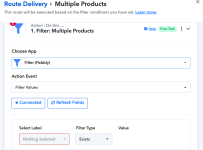
I am facing a problem in using null values in my workflow. I have created a step no 3 in the workflow to check if a customer has ordered for a second product at the time of placing the order. The field I have used is 'items 1 id' which is only available if there is a second item in the order. If there is no second item, this field does not appear in the response received by pabbly and the result of set no 3 should be '0'. However, insted of returning '0' step no 3 returns the value from the last succesfully run , i.e, 'multiple'
So my requirement is that if there is no second order, the result of step 3 should be '0' and if there is a second order the result should be 'multiple'
How do I solve this?
So my requirement is that if there is no second order, the result of step 3 should be '0' and if there is a second order the result should be 'multiple'
How do I solve this?