Help, how can I create this Workflow (Active Campaign and Google Sheets)?
Status: Closed · Asked by The_One_Piece_Is_Real on · 0 views
I need to use a new tag on Active Campaign as a trigger.
Then, I have to copy the contact data of Active Campaign to a Google Sheets.
This Google Sheets has to be continuously updated (always with Active Campaign data), so I have to check the rows in Google Sheets. If the row is not there I have to create it, otherwise I just have to update it.
How should i do this?
Please explain it to me very very detailed. Thank you very much for your help. ?
For 1st part of your workflow watch this video -
youtube.com/watch v=_KNlv-SGldU
For 2nd part of workflow you need to use Lookup Row action of GSheet and based on its results you need to setup Router for Creating or Updating row -
For 1st part of your workflow watch this video -youtube.com/watch?v=_KNlv-SGldU
For 2nd part of workflow you need to use Lookup Row action of GSheet and based on its results you need to setup Router for Creating or Updating row -
Thanks Fagun Shah,
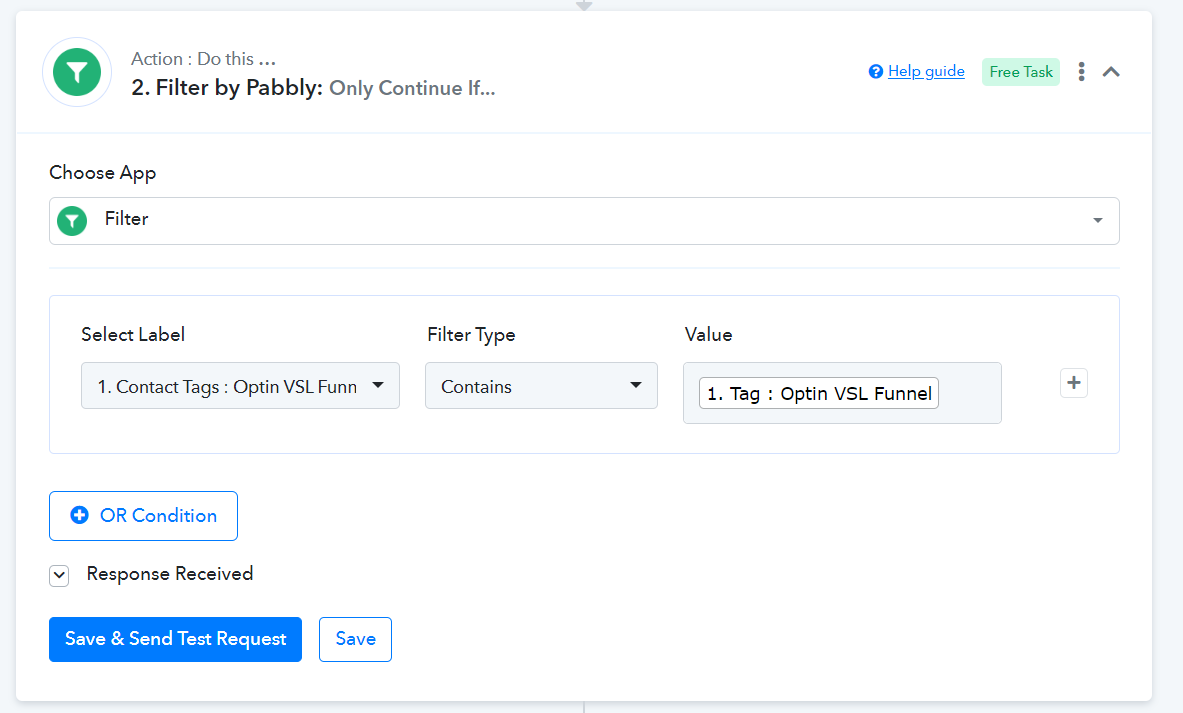
I just have one last question. the active campaign trigger in the video starts for every tag that is added, instead i would only need it for specific tags.
How do I get the action to start only when a specific tag is added?
Try setting up filter as 2nd step of the workflow.
Or the way I would do is to setup an automation in AC to send data to pabbly webhook when by selecting a particular tag as a automation trigger.
Try setting up filter as 2nd step of the workflow.Or the way I would do is to setup an automation in AC to send data to pabbly webhook when by selecting a particular tag as a automation trigger.
Yes the problem that we have so many tags which start the triggers.
Approximately 20 workflows with active campaign tags.
Can I use the "contains" filter because a contact can have multiple tags? Can the "contains" filter be okay?
Attached example.