HighLevel - Phone number not transferring
Status: Closed · Asked by Paul Hilse on · 0 views
Hello, I'm using the trigger for Jotform survey submission and would like to use the "Create or Update Contact" action for HighLevel (LeadConnector).
I've mapped all my standard and custom fields I'm pulling in from Jotform, however, when I attempt to do a test to send the lead into HighLevel, the "Phone Number" field doesn't transfer.
The phone number from JotForm is (810) 494-1970. I'm not sure if using the Phone Formattor field is the best option because it requires you to select a country code. This will work for US-based numbers, but we have people who take the Jotform survey optin from other countries also.
So how can we design this to be sure that phone numbers from our Jotform (from any country) are able to get sent into GoHighLevel?
Hey @PaulHilse
We recommend that you utilize the "Number Formatter" action step to transform the phone number from one format to another.
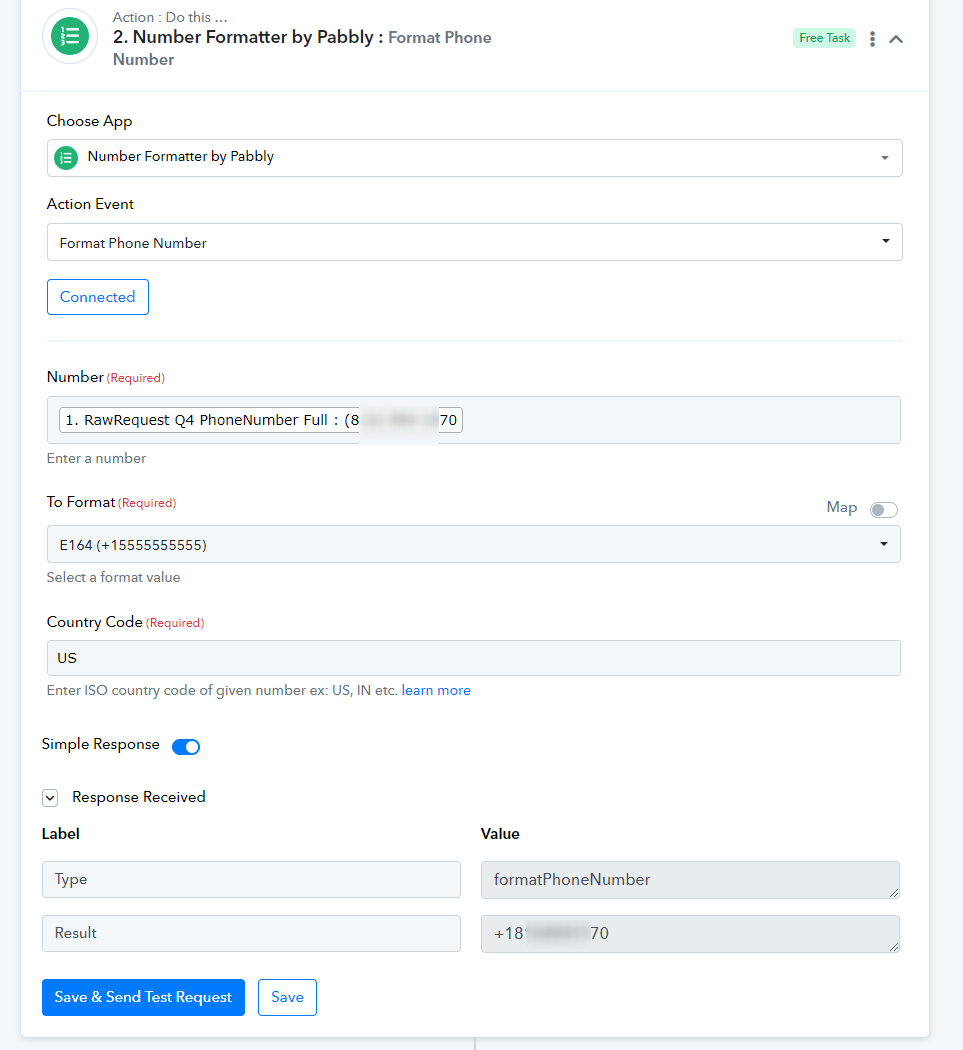
Hey @PaulHilseWe recommend that you utilize the "Number Formatter" action step to transform the phone number from one format to another.
If I do this and put the Country Code as "US", it will work for US numbers.
But what if someone opt's with a phone number from another country code, say 91 (IN)?
If I use this formatter step from your screenshot, it will incorrectly change their phone number to the wrong country code.
Hey @PaulHilse
Then we changed the Phone Format to your LeadConnector as it will now post the phone number without the country code.