How can I create new spreadsheet in Google Sheets from model ?
Status: Closed · Asked by Carlos Melo on · 0 views
Hello guys,
I need to create a new spreadsheet from a pre-existing template.
It is possible ?
I only see the option to "create a spreadsheet" with the Google Sheet step in Pabbly, but I don't see the option to create from a template spreadsheet, as we can do with Google Docs, which allows us to create new documents from of a template document.
The "Create a spreadsheet" option doesn't suit me because I need a template with a predefined header, in which I would send the data that will come from the JotForm.
Or is there any way I can create the header in the new spreadsheet using this option ?
So I need some orientation about this, please.
Thanks,
Carlos Melo.
Hey @Carlos Melo
It is possible ?
I only see the option to "create a spreadsheet" with the Google Sheet step in Pabbly, but I don't see the option to create from a template spreadsheet, as we can do with Google Docs, which allows us to create new documents from of a template document.
I am afraid that is not possible to create the sheet from a template or to add/update the columns.
Hello guys,I need to create a new spreadsheet from a pre-existing template.
It is possible
I only see the option to "create a spreadsheet" with the Google Sheet step in Pabbly, but I don't see the option to create from a template spreadsheet, as we can do with Google Docs, which allows us to create new documents from of a template document.The "Create a spreadsheet" option doesn't suit me because I need a template with a predefined header, in which I would send the data that will come from the JotForm.
Or is there any way I can create the header in the new spreadsheet using this optionSo I need some orientation about this, please.
Thanks,
Carlos Melo.
You can use Gdrive action for Copy a File
You can use Gdrive action for Copy a File
Later how the columns can be updated?
Later how the columns can be updated?
Yes, I would like to know too.
Later how the columns can be updated
@Supreme @Carlos Melo to update header row values after copying the file you can use Gsheet action - "Update Row Values"
Ok, this is the solution I got:
1. Email Parser: receives data from JotForm
2. Google Drive: copies the template file with the new name got in step 1.
3. Google Sheet > Add New Row: insert the file ID you got on step 2 by maping it in Select Spreadsheet field
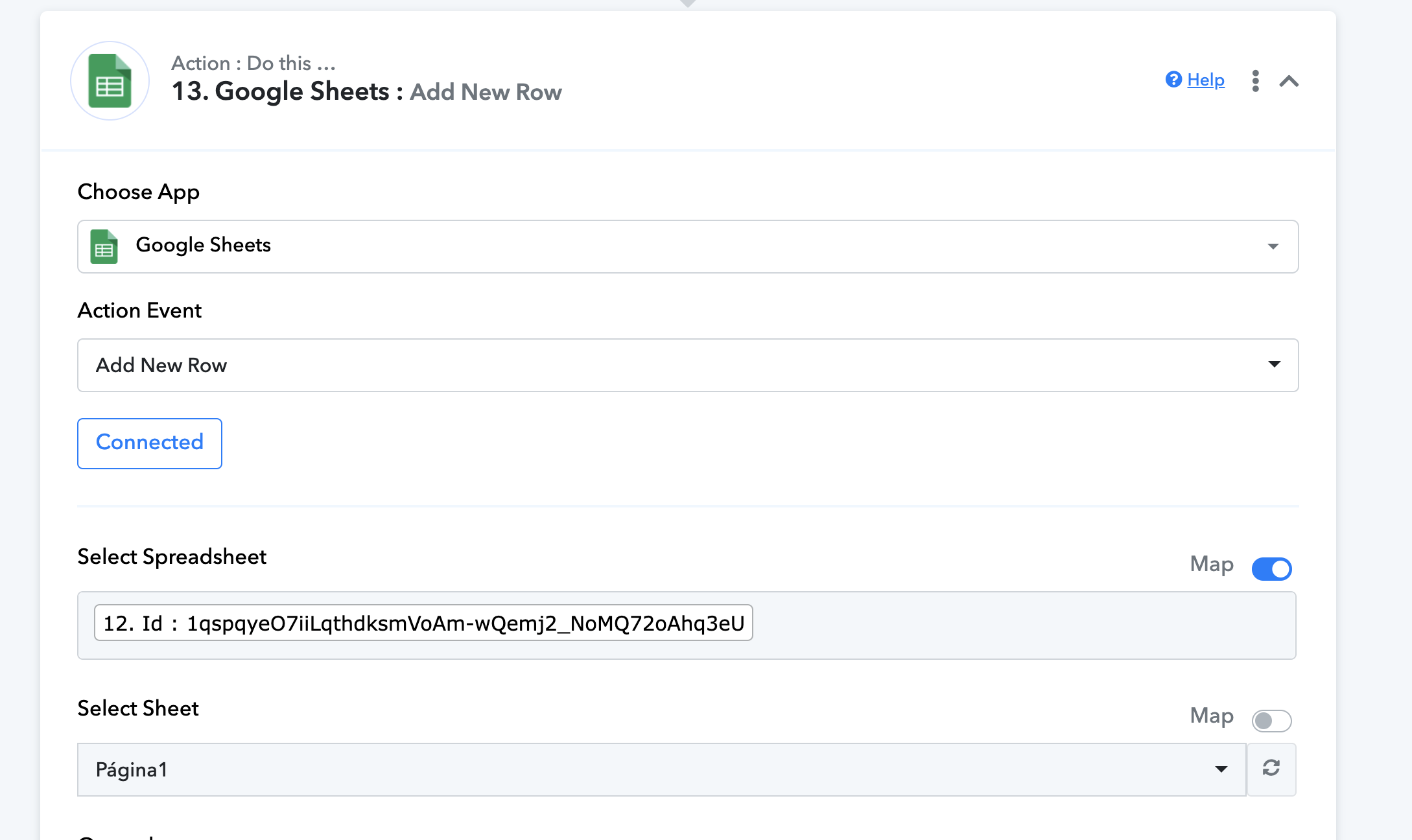
4. Fill all columns with the data formatted in step 1.
Now every time a new form is submitted I get a new spreadsheet with the data allocated according to the header of the model worksheet.