How can we edit the Attribution Source tag?
Status: Closed · Asked by Uyen on · 0 views
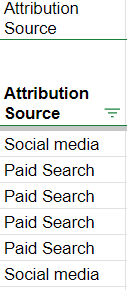
Right now, whenever a lead comes in from GHL, it will tag the lead as:
- Social Media - if the lead comes from a FB ad.
- Paid Search - if the lead comes from a Google ad.
We want to change Social Media -> Facebook. Paid Search -> Google.
How can we edit the Attribution Source tag at GHL or make changes on Pabbly Connect to show "Facebook" or "Google"?
Thank you.
Attachments
Hey @Uyen
Kindly provide us the workflow name in which you are getting issues so we can check on it and guide you further.
Hey @Uyen
Thank you for sharing the workflow.
Could you please provide a more detailed explanation of on your concern with a short video or screenshots?
This will help us better understand your issue and provide you with the correct solution.