How do I get Livewebinar working with Office 365 please?
Status: Closed · Asked by Casey on · 0 views
Hey there,
I have tried connecting livewebinar to pabbly and then sending an email from office 365 but I am stuck on waiting for a webhook response. I have added a registrant but this just keeps going around and is waiting for a response.
Any help greatly appreciated.
Thanks
Please check this first part video showing how to capture the trigger response for the Livewebinar application -
Thanks for this. I did what it is doing in the video. It seems a bit hit and miss with the capture as I tried it again and it worked.
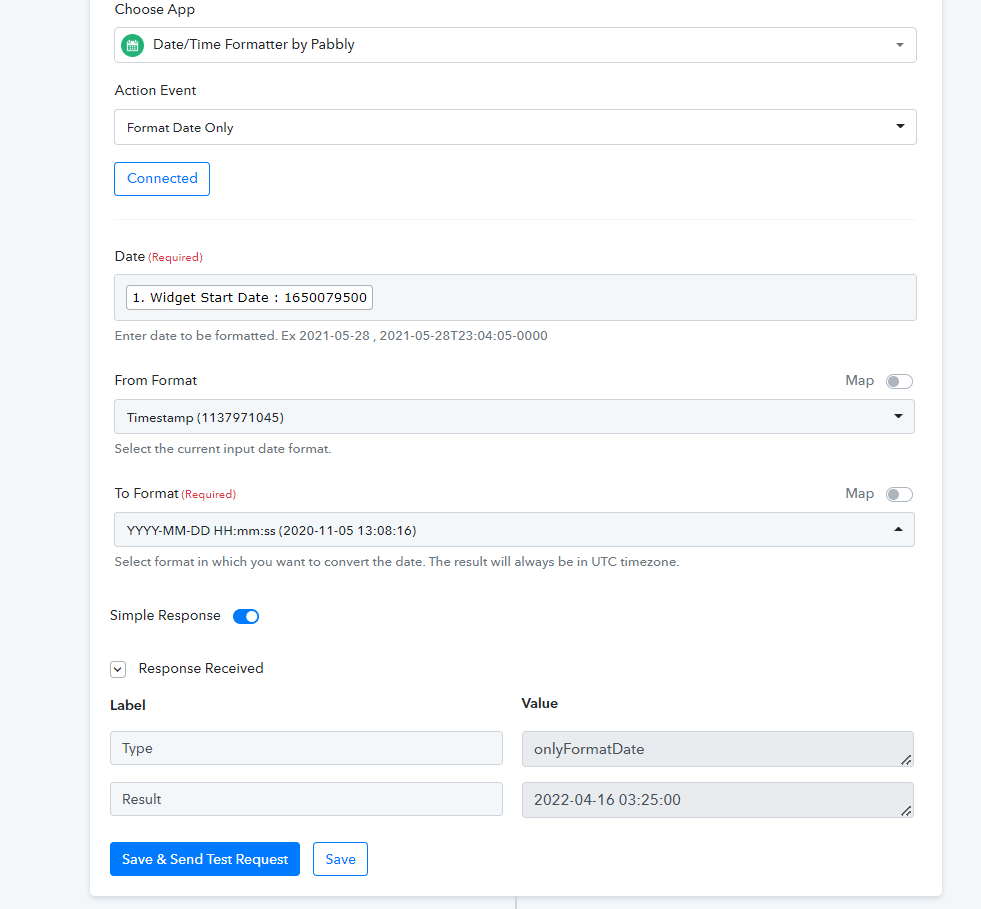
Do you know how you change the date provided by livewebinar which is a long number into an actual date? Is there a way of doing this? It appears that all dates are long numbers and looks similar to how excel works with dates which are actually stored as numbers.
Thanks
Hey @ETC
Do you know how you change the date provided by livewebinar which is a long number into an actual date? Is there a way of doing this? It appears that all dates are long numbers and looks similar to how excel works with dates which are actually stored as numbers.Thanks
Yes, you can convert the TImeStamp into the standard date-time format with the help of "Text Formatter".
Kindly try this in your workflow and map its response in your email content accordingly.
That is fantastic. Thank you very much :-)