How Do I Solve This Issue I am Getting With Failed Tasks Using Kartra and Sendy Integrations: Internal Server Error 500
Status: Open · Asked by NewRockStars on · 0 views
Hello!
I am trying to use Pabbly to add a workflow between my Kartra and Sendy accounts. I set up the triggers and added the webhook on Kartra. The tasks are failing with this message: The response received from Sendy app is below: The application processed the request but returned a blank response. Refer to the HTTP status code 500 above for details.
I have included the workflow url below.
There are six failed task histories. I have included one example below as well.
Please advise. Thank you!
Hi @NewRockStars,
Please grant me access to your workflow by adding me as a team member. This will allow me to gain a better understanding of your issue.
Once you have added me as a Team Member, do let us know the name of your workflow.
Email: arshil.ahmad@pabbly.com
Also, remember to revoke access once your query has been resolved.
Attaching a video for your reference:
Hi @NewRockStars,Please grant me access to your workflow by adding me as a team member. This will allow me to gain a better understanding of your issue.
Once you have added me as a Team Member, do let us know the name of your workflow.
Email: [EMAIL]arshil.ahmad@pabbly.com[/EMAIL]
Also, remember to revoke access once your query has been resolved.Attaching a video for your reference:
Hi there! Thank you for your quick response. I have added your email as a team member to all of my workflows. Please advise on your findings. Thanks again for your help!
Hi there! Thank you for your quick response. I have added your email as a team member to all of my workflows. Please advise on your findings. Thanks again for your help!
Please re-establish the connection with your Sendy account and try again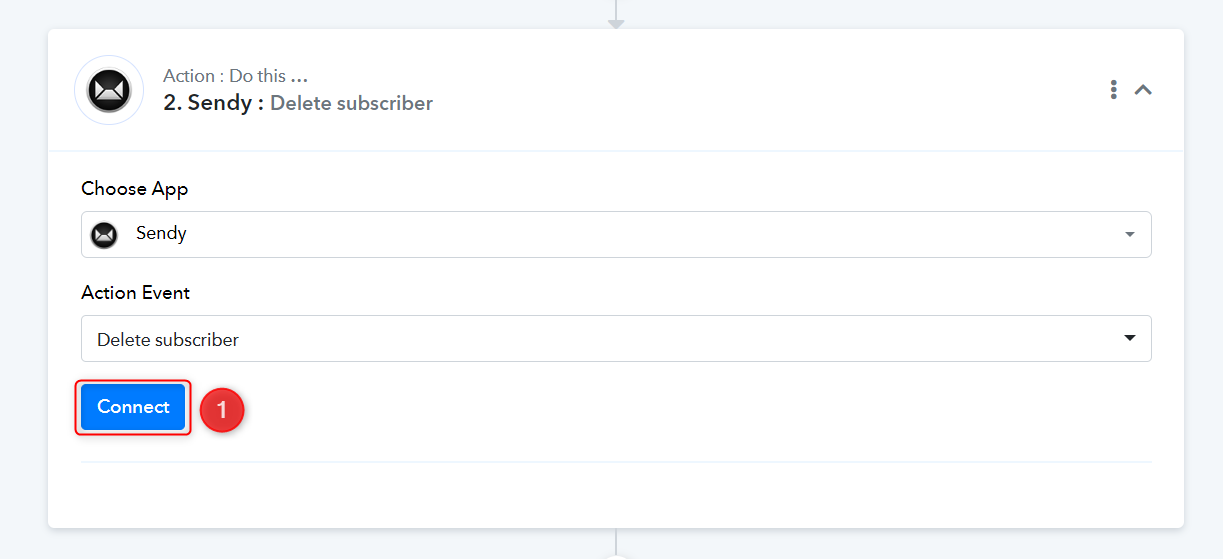
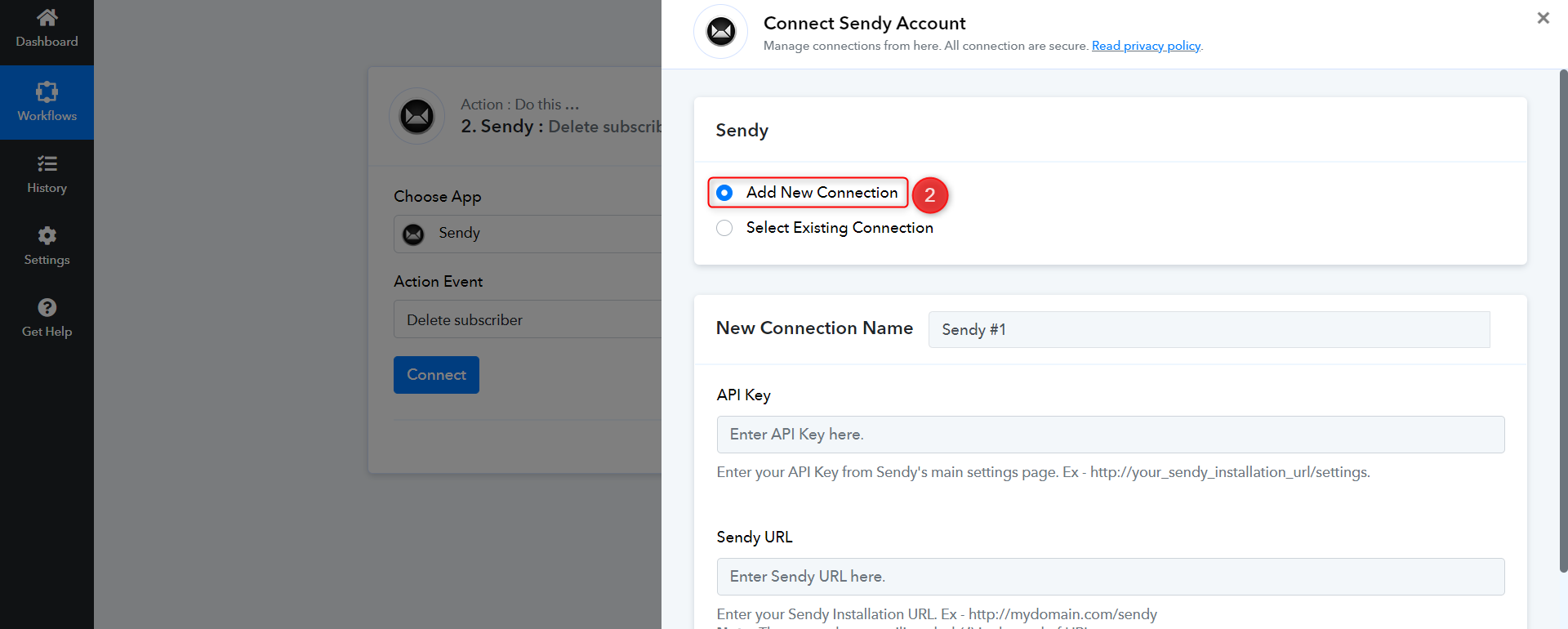
How do I re-establish the connection? Do I need to delete the old connection and the webhook and go into my Pabbly account to delete the current Kartra workflow and connection? I am confused. Please provide more details on how to re-establish a connection. Also, the video you sent me is not relevant for me since I do not use Sendy with WooCommerce, nor am I trying to add subscribers, I am trying to delete subscribers from a Sendy list when they purchase a Kartra product. Not sure why you sent it. But please advise on how to re-establish the connection step-by-step. Thank you!
@NewRockStars, You don't have to delete anything. Please follow the instructions given below:
1. Select Sendy as you action application, choose Delete subscriber as your action event, and click on Connect.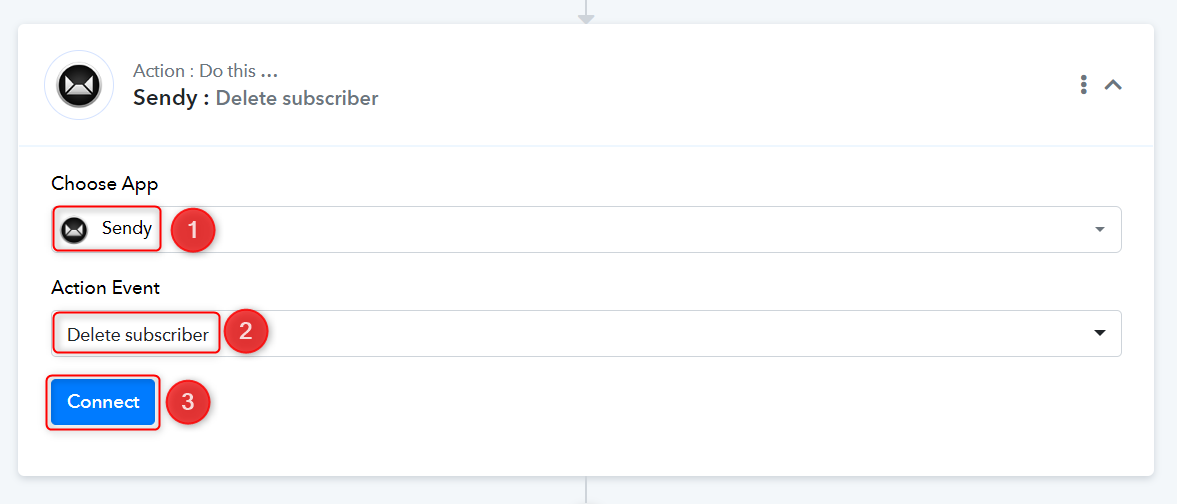
2. Select Add New Connection, enter the API Key and Sendy URL, then click on Save.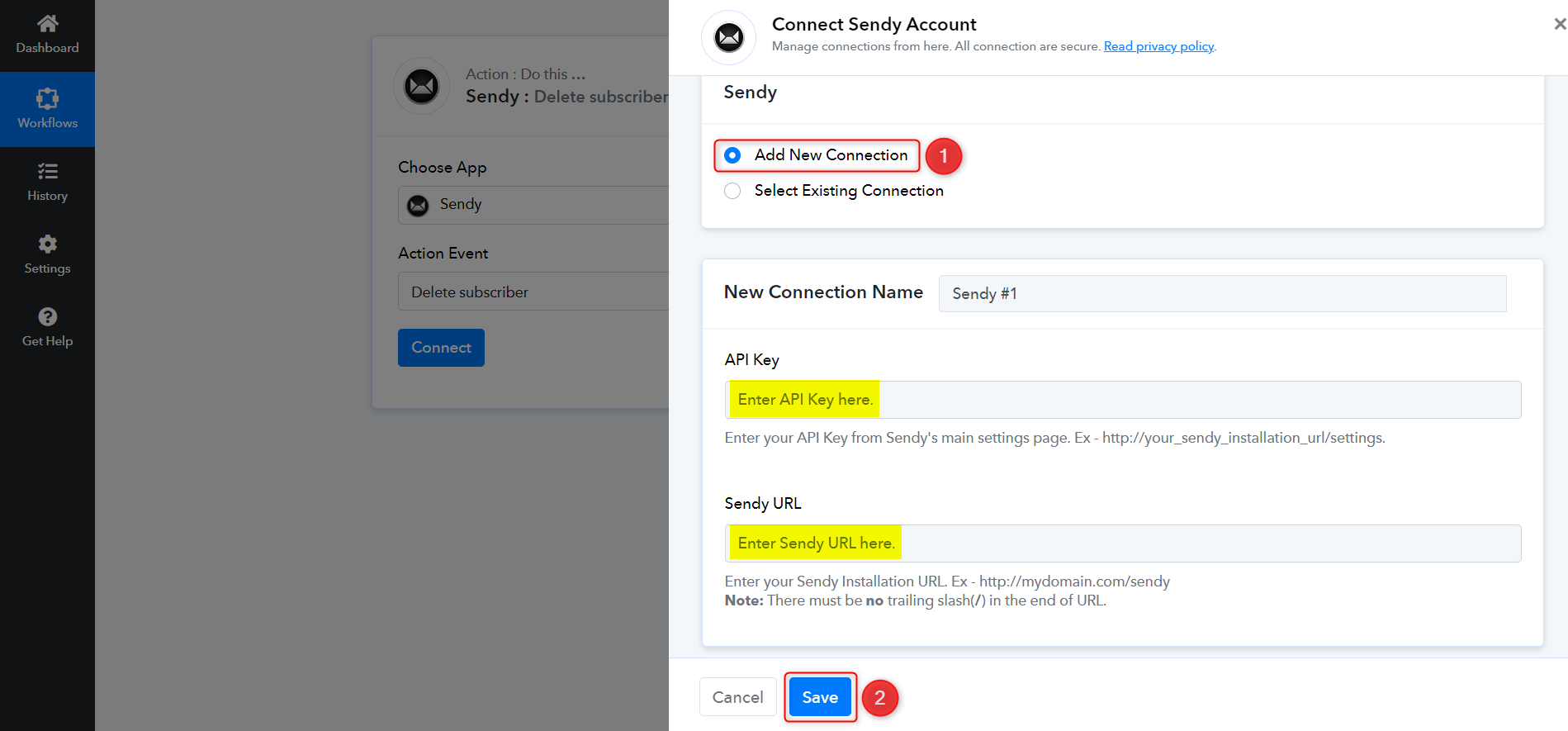
The video I have shared is just to show you where you can find your API Key and Sendy URL. Please ignore the use case demonstrated in the video.
I am confused. I have already done this though. So what do you mean when you say to do it again? Seems like I would need to delete the setup I have already activated. Also, the video you shared is not helpful at all and makes no sense for my situation. I am using Kartra with Sendy, not WordPress with WooCommerce. Please send a video specifically for Karta and Sendy integrations. This has confused me even more.
Do you mean enter in the exact same information and hit save?
Yes, enter the exact same API key and Sendy URL, and click on the 'Save' button.
Yes, enter the exact same API key and Sendy URL, and click on the 'Save' button.
Okay, got it. I have done this but why is it asking for a list ID? it won't let me save the connection without adding a list ID and email. Your system wont allow me to create a workflow for Sendy with delete subscriber as the trigger. It only allows add new unsubscriber or new subscriber. There is no option for delete subscriber when choosing Sendy as the first step of the task.
Okay, got it. I have done this but why is it asking for a list ID? it won't let me save the connection without adding a list ID and email.
Sendy's API requires us to enter the List ID and Email address that is supposed to be deleted. Therefore, we cannot Save without that information.
https://sendy.co/api
Sendy's API requires us to enter the List ID and Email address that is supposed to be deleted. Therefore, we cannot Save without that information.
https://sendy.co/api
That makes no sense and is impossible to predict! How am I supposed to know which emails are going to buy my kartra products and that will need to be deleted from a sendy list??? That means I have to do it manually. What is the purpose of this integration if it can not delete emails from any list I have in sendy whenever that contact buys a kartra product through a link I send them in an email campaign??? How do I set that up?
I need Pabbly to delete any user on my lists in Sendy whenever that user buys my Kartra when I send out an email campaign with a link to my Kartra product. How do I set this up???
How do I get the mapped data? It says it needs mapped data but Sendy is not providing any options like Kartra does.
You are supposed to map the email received from the Kartra trigger step response. I would once again suggest that you watch the video I shared before. Even though the use case is not the same, you can still clearly understand the concept of mapping by watching that video.
You are supposed to map the email received from the Kartra trigger step response. I would once again suggest that you watch the video I shared before. Even though the use case is not the same, you can still clearly understand the concept of mapping by watching that video
Please set this up for me because what you are saying makes no sense and you didnt even mention mapping until I brought it up. Kindly please create a video for me that shows me exactly how to do this. None of your suggestions have worked. Thank you in advance for your help!
You didnt explain how to set up my trigger. please provide me with a video. It does not work for me when I try to set up this trigger. thank you.
It seems like you were able to set up Kartra as your trigger step.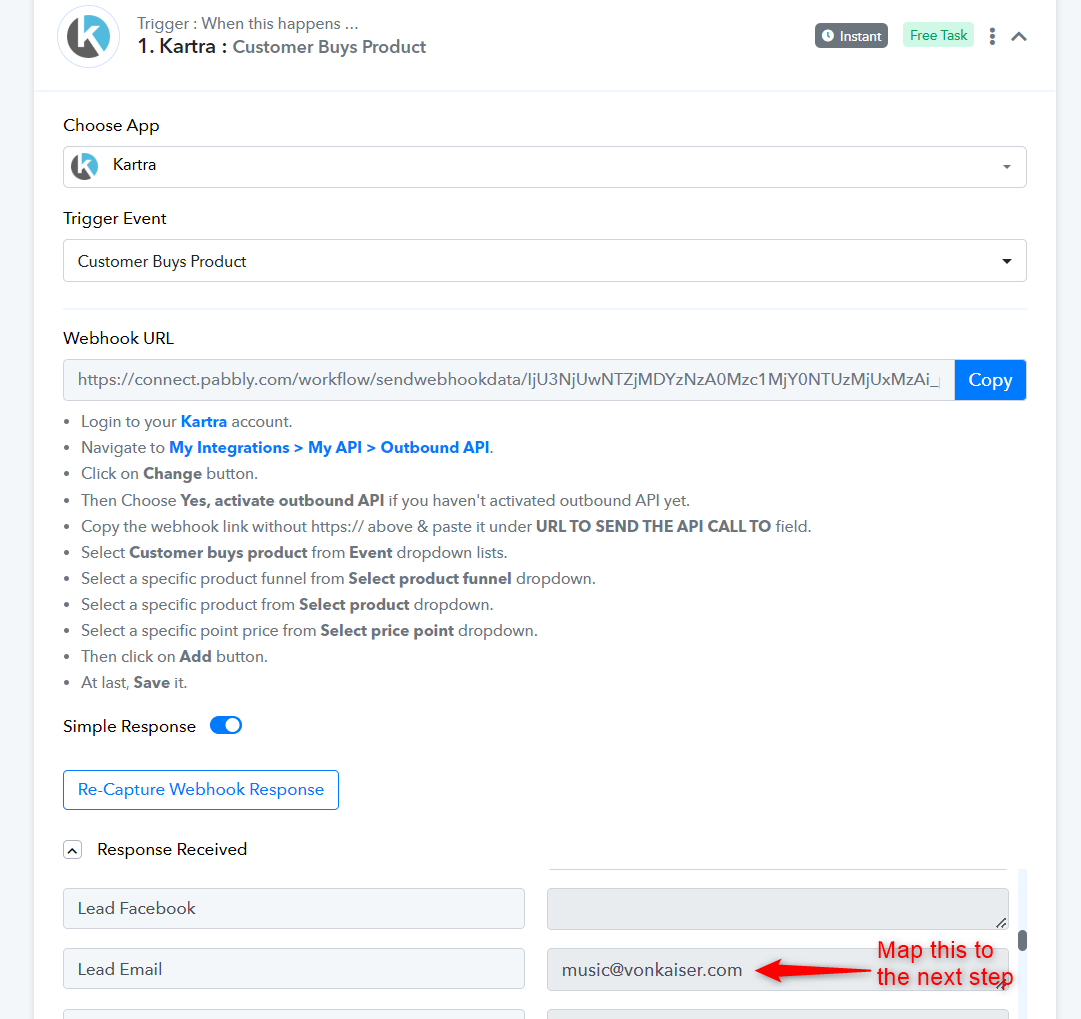
You can now map the email address from the trigger step.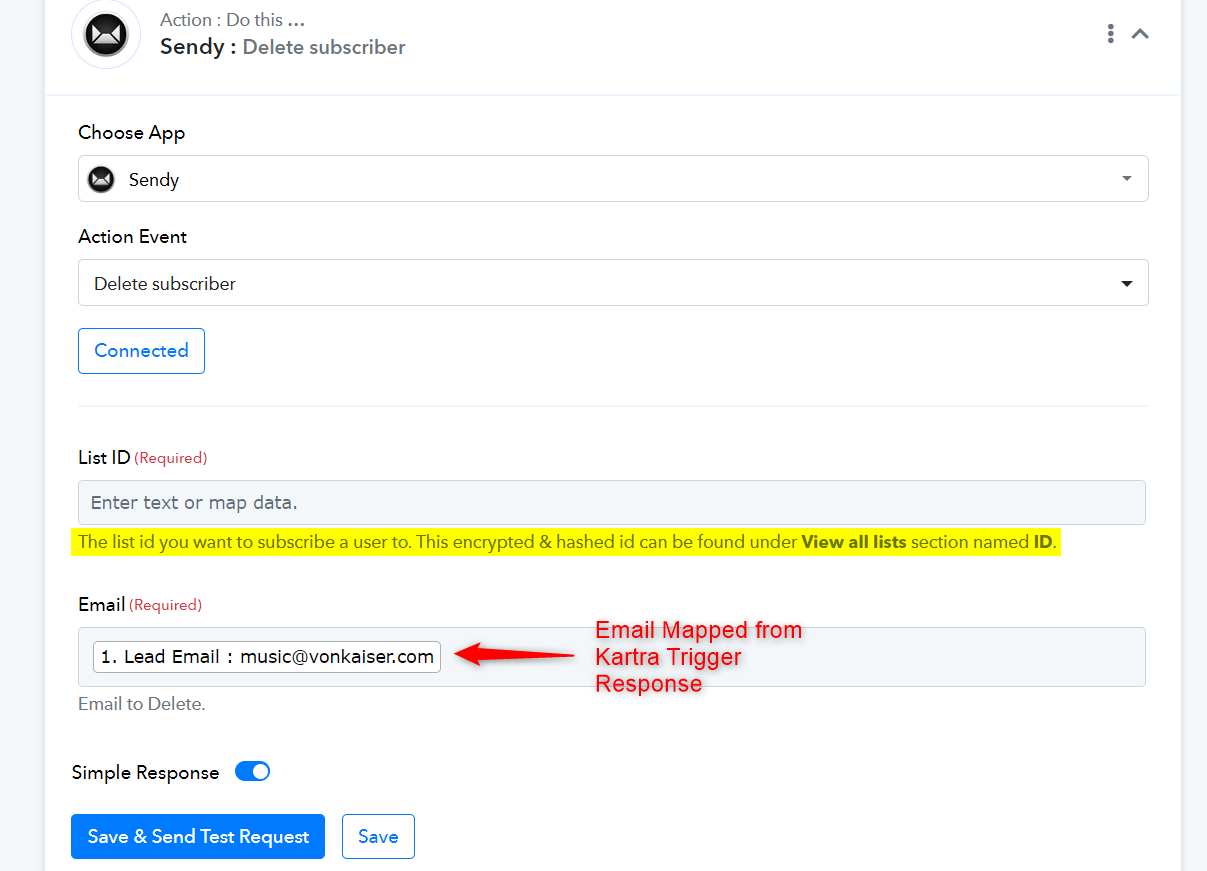
Hi. Thanks. It is still not working. Please be advised that I want to DELETE A SUBSCRIBER, and not SUBSCRIBE them to a list like the yellow highligted example you provided me. I am not sure if we are having an English problem but this is still no working. There are no mapping options available for deleting that lead from my Sendy account. It doesn't bring up any lists from my Sendy account or options to do that,. I am not being provided any mapping options to choose from so I can not select anything. I need your tool to delete an email from my sendy account whenever that email subscriber buys a kartra product. That email is not on the same sendy list. I need the the email to be deleted from my sendy account, not a list. How do I do that? Your integration will not allow me to select any mapping options.
Hey @NewRockStars
Please allow us some time, we are currently looking into it.
Hey @NewRockStarsPlease allow us some time, we are currently looking into it.
Okay, thanks so much! I finally figured out how to set up a connection to delete a subscriber from a sendy list, but I need to be able to delete the subscriber from my sendy account, so that its not limited to just one single list. I send campaigns from multiple lists in Sendy, so unless I am able to create individual webhooks for each list in Sendy, I will need a connection that deletes the lead from all lists in Sendy. Thanks in advance for all of your kind help!
Hey @NewRockStars
As per the API documentation of Sendy, there is no such option to delete the subscriber from the account directly instead of a list.
Hey @NewRockStarsAs per the API documentation of Sendy, there is no such option to delete the subscriber from the account directly instead of a list.
Okay thank you for confirming. Am I able to set up multiple API connections for each Sendy list I send email to then?
Yes, you can set up different workflows for different Sendy lists.