How to activate a workflow after the test is done?
Status: Open · Asked by zabouloum on · 0 views
Hello,
I have created a workflow sitejet-> brevo.
The test is ok but how can I activate this workflow now? What do I put in the section Email since I can't put the email that I have used for the test? I am completly lost.
Please help me.
Thanks
Hello @zabouloum,
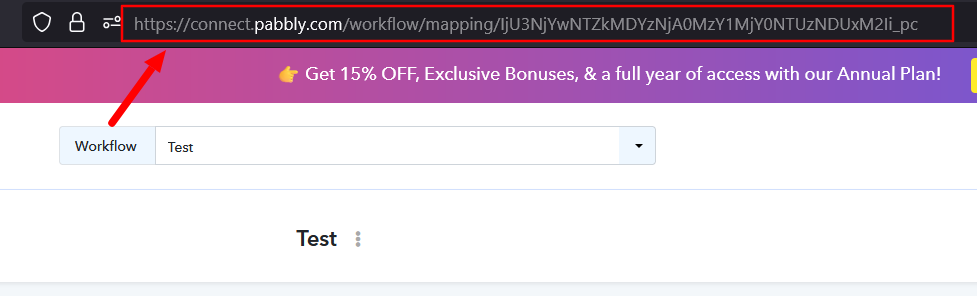
Could you please provide us with the Workflow URL where you are facing this issue This will help us investigate the problem more effectively and assist you accordingly.
Please be aware that to assist you effectively, we may need to access your Pabbly Connect account. If you're comfortable with this, please grant us permission by stating in your next reply:
"You have my permission to log into my Pabbly Connect account and edit the workflow, if required. Here is the registered email address associated with it."
Looking forward to assisting you further.
Hello
https://connect.pabbly.com/workflow/mapping/IjU3NjYwNTY4MDYzMDA0MzQ1MjZjNTUzMDUxMzci_pc
You have my permission to log into my Pabbly Connect account and edit the workflow, if required. But I prefer to not leave my email here. Can I sent it to you by email?
Hello @zabouloum,
You can use any email address from a friend or colleague to test the workflow in real-time. When users fill out the form, they will need to enter their own email addresses. Please note that a valid email address must be added when creating a contact in Brevo; otherwise, you will continue to encounter the "Invalid email address" error.
i have already test the workflow and it worked but I don't know what to put in the Email section for the workflow to work in real life.
Hello @zabouloum,
Just map the email coming from the trigger in the Brevo step, and as a form is filled, the email will be used dynamically to create the contact.
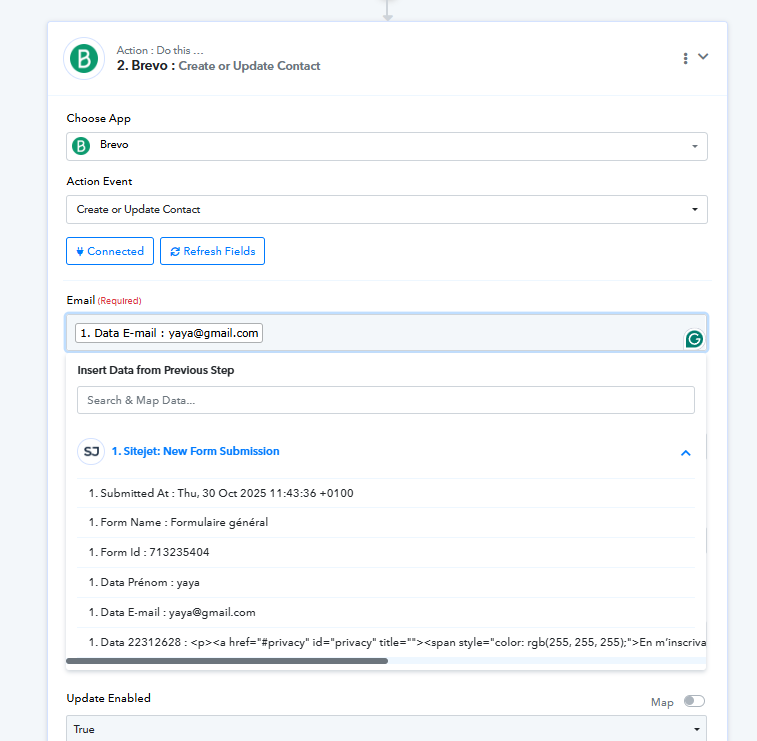
Kindly do the changes and let us know how it goes.
For a better understanding refer to this tutorial -
thanks a lot it works
Thank you for the update. We're glad we were able to help.
Thanks & Regards,
Arshil Ahmad
Customer Support Associate
Pabbly.com
?Rate your support