how to append the shopify abonded cart url ?utm-souorce=pabbly
Status: Closed · Asked by nuo sai on · 0 views
how to append the shopify abonded cart url ?utm-souorce=pabbly
Hey @berrysmith
The webhook trigger used in Shopify is descriptive-based and captures the data sent by the application. We have no control over the data sent from Shopify to Pabbly Connect. If Shopify sends the UTM data in their response with Cart Abondend, that data will also be forwarded.
Hey @berrysmithThe webhook trigger used in Shopify is descriptive-based and captures the data sent by the application. We have no control over the data sent from Shopify to Pabbly Connect. If Shopify sends the UTM data in their response with Cart Abondend, that data will also be forwarded.
You didn’t understand what I mean. What I mean is to add UTM and other parameter data to the shopify URL. For example, change this link
my workflow is:
https://connect.pabbly.com/workflow/mapping/IjU3NjUwNTZkMDYzMDA0MzY1MjY1NTUzNTUxMzAi_pc
how to add UTM and other parameter data to the shopify URL. For example, change this link
how to append the shopify abonded cart url ?utm-souorce=pabbly
If you wish to append additional UTM parameters to your workflow, you can utilize the Spreadsheet formula action step to concatenate the URL with the provided UTM parameters.
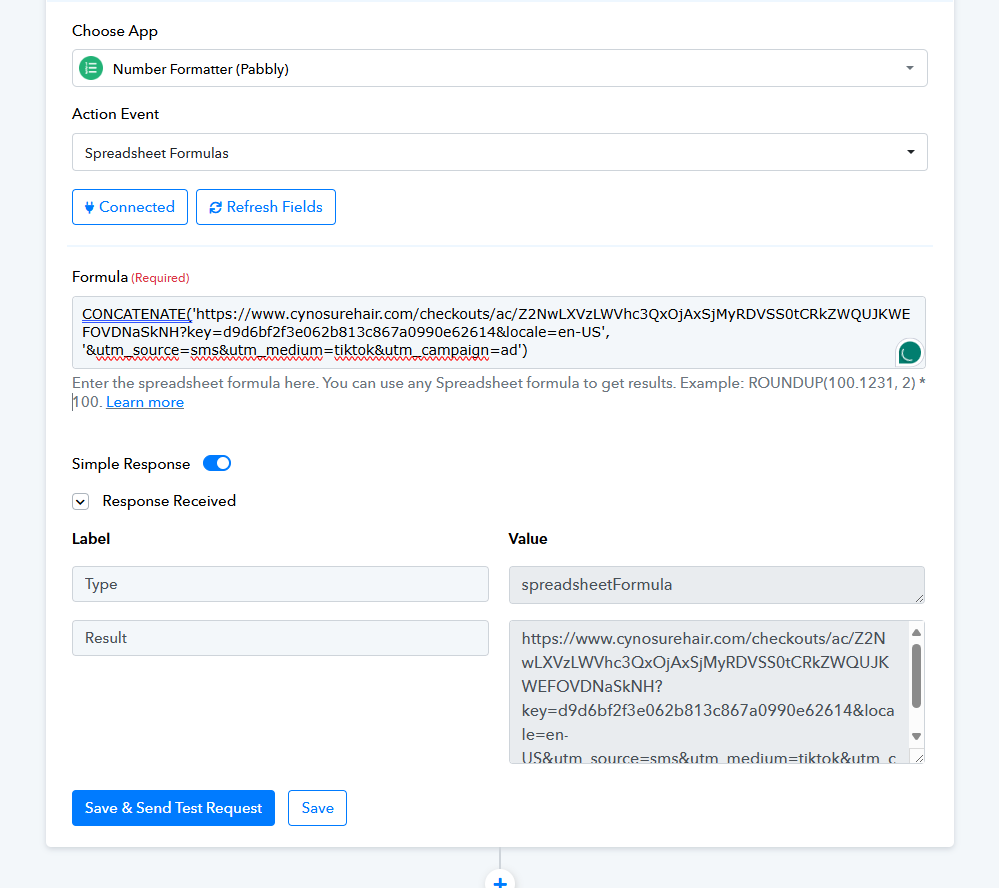
Additionally, if you attempt to retrieve the source URL of cart abandonment with the UTM parameter from a Shopify trigger event, it is not feasible. This is because the trigger event is a polling-based trigger that only captures the response from Shopify once it is sent by their application.