• ⚠️ Important: This forum is being discontinued.

    We've moved community discussion to a new platform — better search, faster replies, and tighter integration with the Pabbly apps you already use.

    • Sunset date: 23 July 2026 (this forum will go offline after that)
    • Until then: Login remains available for 30 days
    • Continue the conversation: https://sales.pabbly.com/forum

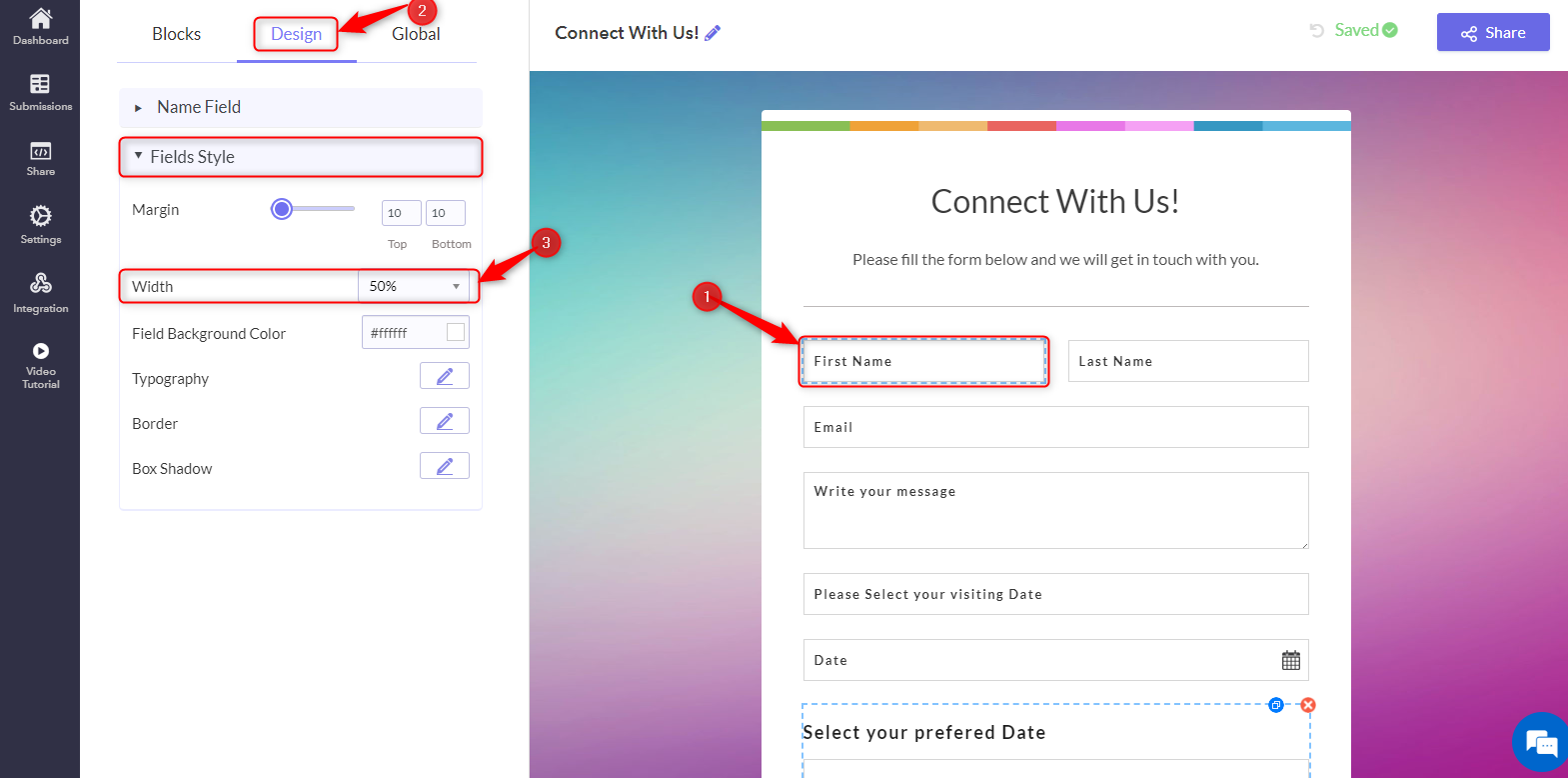
How to change Field Width?

  • Thread starter Deleted member 6149
  • Start date
D

Deleted member 6149

Guest
After selecting the field, a Design field will appear on the left side of the screen. From there, navigate to the Field Style settings and adjust them according to your requirements.

_C4ztkScpJw6537XTgrhgVP4cGpXuB-kNsZLFKlgkWxUVqYe8Hk0VS1WDrLDep5Uc6OqRSPwY0dpazeZSfqGbPjlEKERFrZIEZ8QhjySPDji1CPe1W4S9Z2Wp3S1Gzs2T9c6hsec5F8O5V1KTH3BKys
 
Top