How to get the JPG/PNG file from Google Drive?
Status: Closed · Asked by PRPA on · 0 views
Hi, I have set up a workflow that creates an image and saves it to Google Drive.
In the next step, I want to send the image to WooCommerce and I map the address of the image from the previous step.
It looks like this:
https://drive.google.com/file/d/xxxxsomethingxxxxx/view?usp=drivesdk
WooCommerce however refuses to accept it, saying it is not in the right format (woocommerce_product_image_upload_error, Invalid image: Sorry, you are not allowed to upload this file type).
Obviously, it wants a file ending with jpg/png... but how do you get it from the Google Drive?
(The workflow ID ends with 68464841258)
Thanks
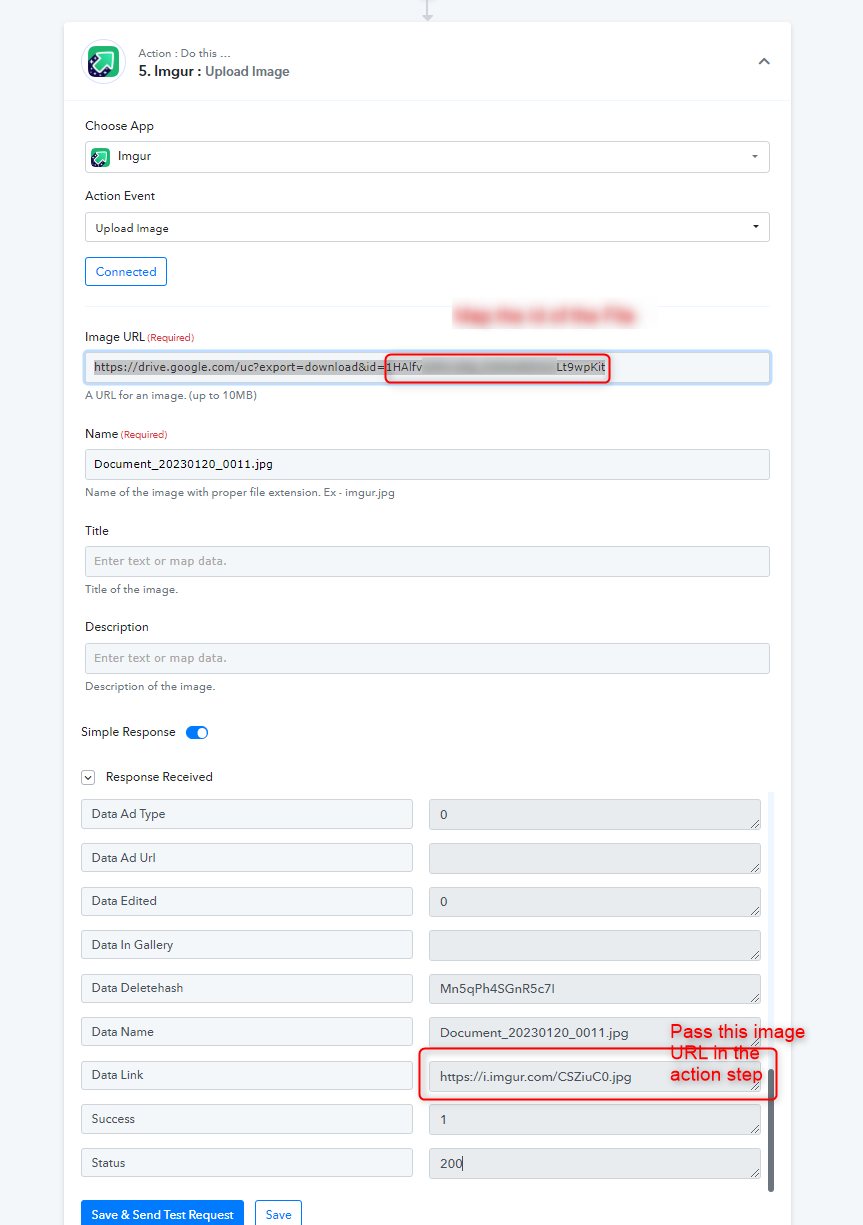
As you are not getting the file URL in the proper extension, kindly upload the image first in the Imgur application to convert the proper file extension and then pass its generated file URL further.
Thanks for that!
However, where do you get the drive.google.com/uc?export=downloadXXXXX file please?
My steps are:
1. Google slides: Create presentation
2. Google slides: Get thumbnail
3. Google drive: Upload a file
4. Google drive: Share a file with anyone
5. Imgur: Upload image
... but the in step 5 I only get the
Res2 WebViewLink: https://drive.google.com/file/d/xxxxnamexxx/view?usp=drivesdk
and not the
https://drive.google.com/uc?export=downloadxxxxx
as in the screenshot above.
As a result, Imgur gives me the error File type invalid.
(If you want to have a look at the workflow, it ends with 89494984)
However, where do you get the drive.google.com/uc?export=downloadXXXXX file please?
That was just a sample URL from Google Drive.
Can you please check from your WooCommerce account once whether you have permission to upload an image?
Hey @PRPA
Please check your workflow now, we have made some adjustments and it looks like the image is uploading.
I tried it and now it works, thanks.
For anyone else with theis problem:
Upload the image to you Google Drive, Share file with anyone and in the Imgur step, copy the following text into the Image URL ste: https://drive.google.com/uc?export=download&id=
...and append to it the "Res2 ID" from the previous Google Drive: Share file with anyone step