how to pick random row in google sheet
Status: Open · Asked by serwar habib on · 0 views
how can i pick a random row in google sheet everytime workflow runs.
I got this. I used Random number to get a row of spreadsheet. thank you!
hi can you tell me how you did this?
Hey @serwar24554,
You can generate a random number using Number Formatter (Pabbly) → Spreadsheet Formulas by applying the formula:
[TABLE]
[TR]
[TD]RANDBETWEEN[/TD]
[TD]RANDBETWEEN(-1, 1)[/TD]
[TD][Random integer between bottom and top][/TD]
[/TR]
[/TABLE]
This will return a random integer between the specified bottom and top values. Once the random number is generated, you can map it in the Google Sheets: Get Row(s) action to fetch the corresponding row from your sheet.
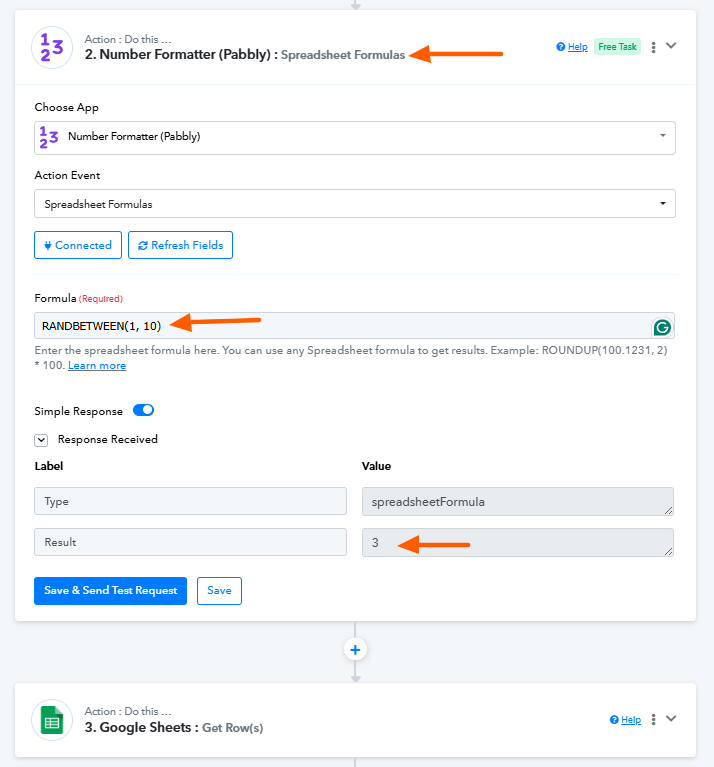
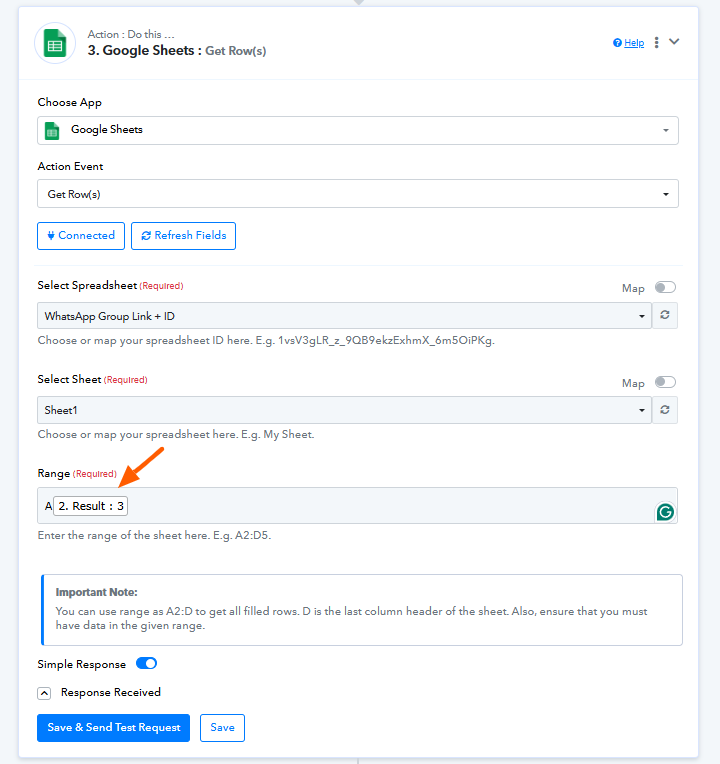
Please try this approach and let us know if you need any further clarification.
thank you. i was able to generate a random row. now how do i map the row by generated random number to delete exact row. because i believe if i have to delete row 8 then i would have to mention two numbers 7 and 8. then it will delete row 8. i have the number 8 but i dont have any number 7 that i could map. so i dont know how i delete the row 8. please advise.
i resolved it. i used subtraction to get 1 number lower.
Hey @serwar24554,
Thanks for the update.