How to search & edit a database page in Notion?
Status: Closed · Asked by gunhudson on · 0 views
Could you please explain to me how to lookup a Notion database, and then:
- edit a field
- continue only if checkbox is checked
I can't figure out how to use the Notion Actions, apart from 'create a new database item' is very straightforward, but the user interface for the searching is super complicated.
A video explanation, or a dummy workflow that I could examine would be amazing ?
I have shared a test database here:
https://www.notion.so/gunhudson/72ac1465b21d4a558fd9dc73a6835ed2?v=de17125d7b2e4c959375075c8d836a54
and a dummy workflow here:
https://connect.pabbly.com/workflow/share/D0cENlMACGxSGAVBAWQAJwsfAQIBSwVTXDsEFg##
Hey @gunhudson
Could you please explain to me how to lookup a Notion database, and then:- edit a field
- continue only if checkbox is checkedI can't figure out how to use the Notion Actions, apart from 'create a new database item' is very straightforward, but the user interface for the searching is super complicated.
A video explanation, or a dummy workflow that I could examine would be amazing ?
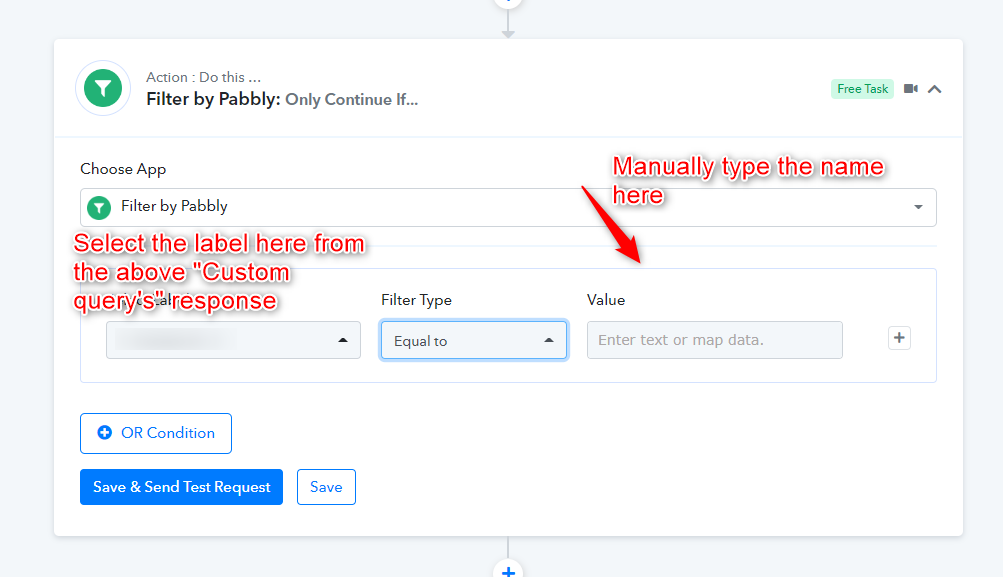
As we can see from your workflow you have used Notion's database in the correct format and to configure the filter condition you can use the "Filter" action step to continue only if the checkbox is checked.
for anyone else searching this forum I made a working procedure for my team after figuring it out:
https://macurex.notion.site/wp-pabbly-notion-automation-tips-531e89f1298e498cb244d3410035ad14