How to set up Pabbly to trigger from a specified event from calendly?
Status: Closed · Asked by CWW on · 0 views
Hi,
I have multiple events set up at Calendly. Can I setup a Pabbly's workflow that is only triggered by one specified Calendly's event? Thanks.
Hey @CWW
Yes, you can setup automation via a single event that you created in Pabbly. Please check the video for integrating Pabbly with Calendy.
youtube.com/watch?v=aFgfEBPzA-4
Also, could you please let us know the events that you created for calendly so that we will check and suggest you best solution for your need?
Hi team,
I have set up the following automation: new event in calendly creates a new row in Google Sheets, for 2 different accounts. Its working perfectly, I was able to map everything except 2 things:
1) The event date comes in 2022-09-26T23:30:00.000000Z format, can you kindly guide me on how to change it? For example, into something like September 26, 2022 at 11:30PM
2) One of the calendly-sheets automation, duplicates the rows upon each event! It's strange, because I set them up the same way...
Any assistance would be appreciated! :)
Hey @oleksandr !
1) The event date comes in 2022-09-26T23:30:00.000000Z format, can you kindly guide me on how to change it? For example, into something like September 26, 2022 at 11:30PM
You can use "Date/Time Formatter" step after your Calendly step to change the time as per your requirement-
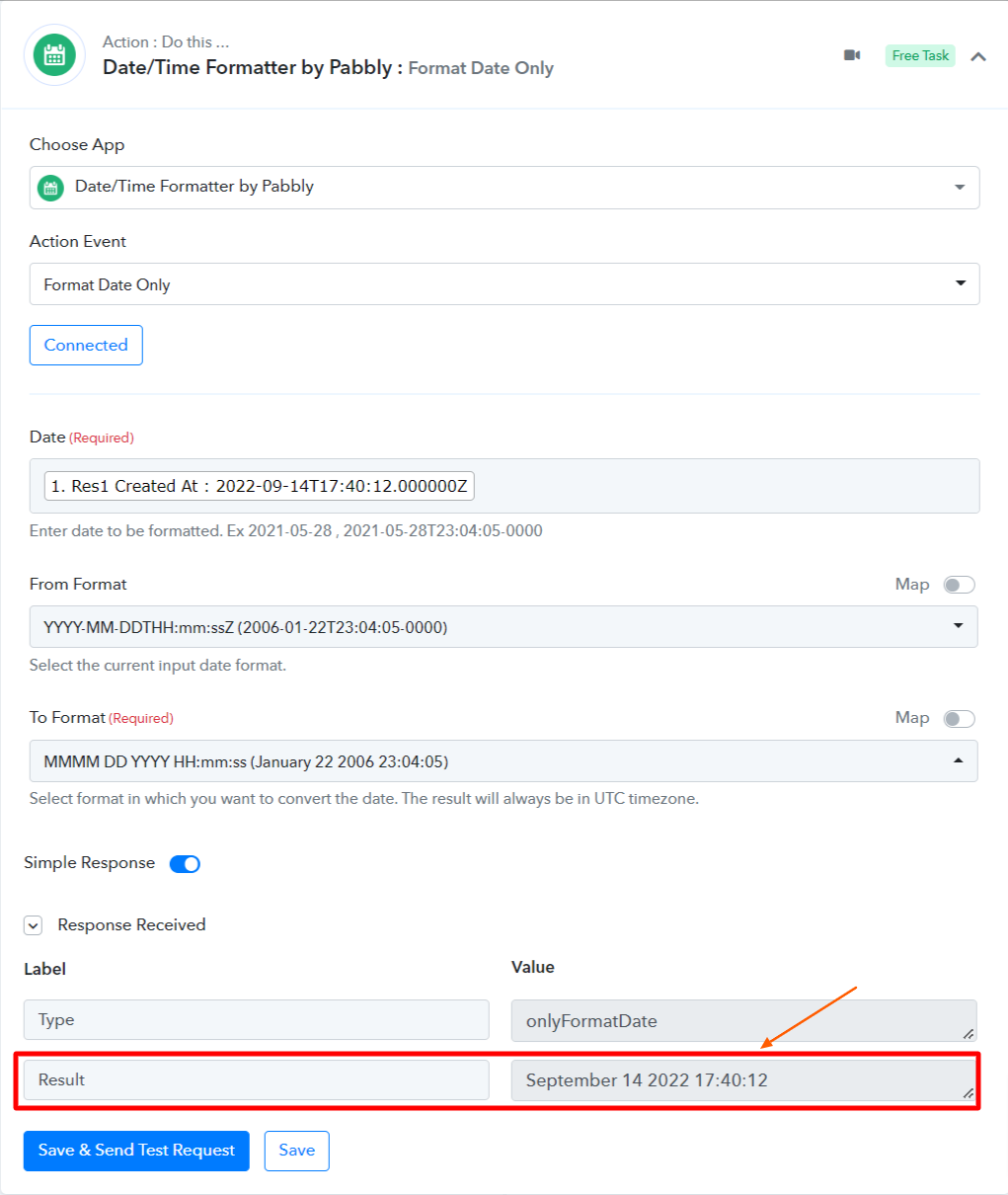
2) One of the calendly-sheets automation, duplicates the rows upon each event! It's strange, because I set them up the same way...
Can you let us know the workflow name which is duplicating for you? So we can check on it and guide you further.
Hope, to hear from you soon.
Hi @Subin and thank you!? The date formatter was a nice trick, I'm new to pabbly, so I'm still exploring, but your advice solved the issue! Thanks
As for the duplicates, this is one of the workflows, again, I have this exact same workflow for 2 different calendars, and 1 is working fine (just creating 1 row), while this one, simply creates 2 rows: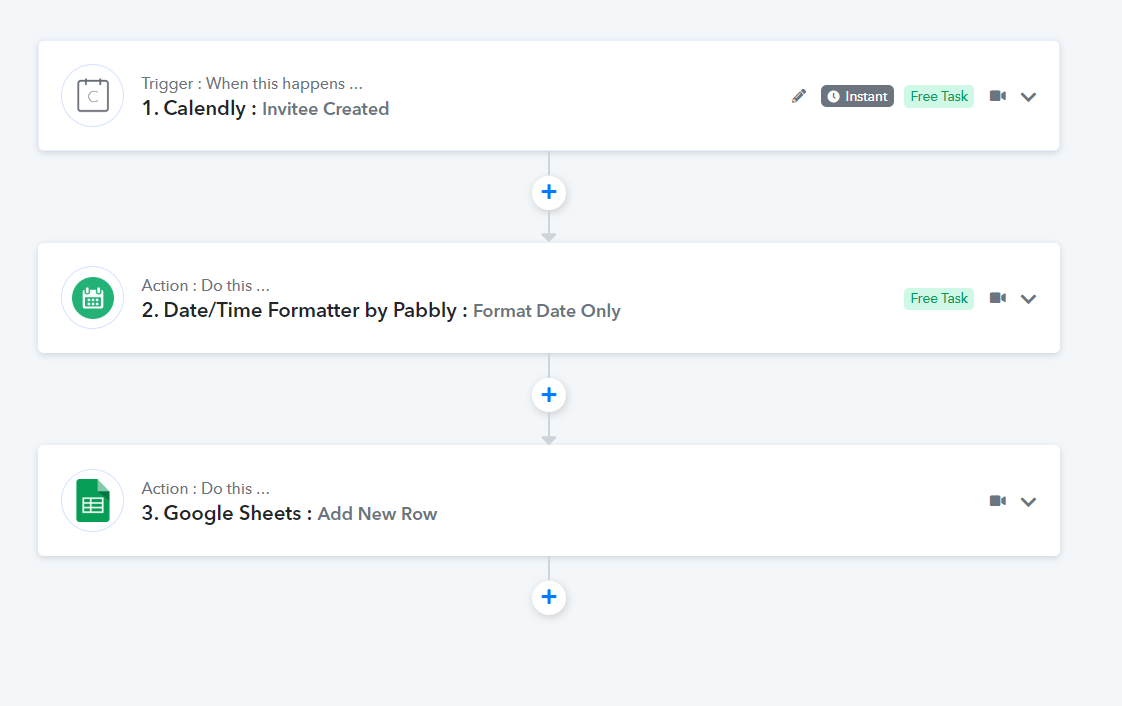
Hey @CWWYes, you can setup automation via a single event that you created in Pabbly. Please check the video for integrating Pabbly with Calendy.
youtube.com/watch?v=aFgfEBPzA-4
Also, could you please let us know the events that you created for calendly so that we will check and suggest you best solution for your need?
Hi Kunal, thanks for the information.
I can't find the API v1 information from the Calendly website since it has already migrated to v2. Could you share with me the updated training material so that I can follow it to create a workflow? Thanks.
https://developer.calendly.com/how-to-migrate-from-api-v1-to-api-v2
https://calendly.stoplight.io/docs/api-docs/c1ddc06ce1f1b-create-webhook-subscription
Hi everyone,
Bumping up this thread. Does anyone know why there might be duplicate entries?
Hi Kunal, thanks for the information.I can't find the API v1 information from the Calendly website since it has already migrated to v2. Could you share with me the updated training material so that I can follow it to create a workflow? Thanks.
https://developer.calendly.com/how-to-migrate-from-api-v1-to-api-v2
https://calendly.stoplight.io/docs/api-docs/c1ddc06ce1f1b-create-webhook-subscription
You can refer to the following video tutorial for the creating the sample workflow and to make a live automation.
Bumping up this thread. Does anyone know why there might be duplicate entries?
Share the task history Id of your duplicate executions.
just tried once again right now, same issue...:
Task ID -
IjU3NjYwNTY4MDYzMzA0MzQ1MjZhNTUzZDUxM2E1MTYyNTQzOSI_3D_pc
executed at
Sep 19, 2022 12:48:26
Hey @oleksandr
We are unable to find the task id in your Pabbly account. Kindly let us know if you are registered on Pabbly with different email address in which the task history Id exists.
Hi team, the email is the same.
When receiving updates to the google sheet, I noticed the date difference: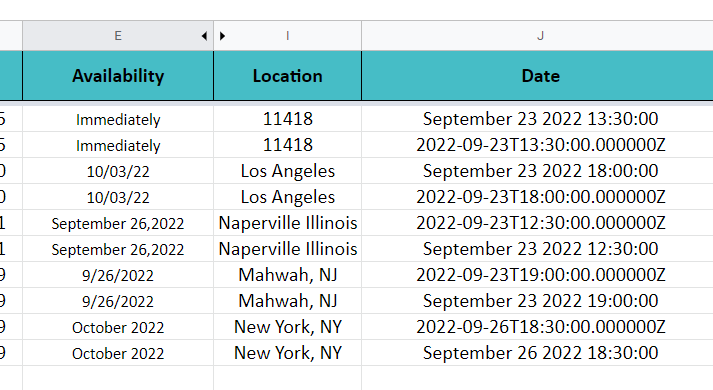
so for some reason, every entry comes with a by default date value, as well as the one I formatted it to.
Hi team, the email is the same.
When receiving updates to the google sheet, I noticed the date difference:
so for some reason, every entry comes with a by default date value, as well as the one I formatted it to.
As we can see from your workflow you have set up the date time formatted incorrectly and because of that, it wasn't working correctly.
Though we have corrected it for you and it should work now. Please review your workflow now and let us know if that works for you.
Unfortunately, it failed:
Task ID -
IjU3NjYwNTY4MDYzZjA0MzE1MjZmNTUzZDUxMzc1MTY2NTQzOSI_3D_pc
executed at
Sep 23, 2022 09:13:52

Unfortunately, it failed:Task ID -
IjU3NjYwNTY4MDYzZjA0MzE1MjZmNTUzZDUxMzc1MTY2NTQzOSI_3D_pc
executed atSep 23, 2022 09:13:52
We have made the change in this workflow(MZA Create Google Sheets rows from new scheduled Calendly events ), pelase review that.
And make the changes in your other workflow accordingly.
Hi team, I can confirm that the issue is solved now.
Thanks!