

The Time Zone settings in Pabbly Hook allow you to synchronize connections, requests, events, and transformations according to your local time. This ensures all execution times and logs reflect the correct time for your location, making it easier to manage and analyze data.
Steps to Set Your Time Zone:
Steps to Set Your Time Zone:
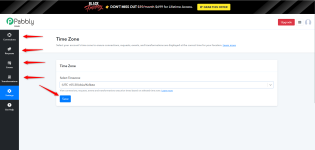
- Navigate to the Settings section in the left-hand menu.
- Under the "Time Zone" tab, you’ll find a dropdown to select your desired time zone.
- Pick your local time zone from the dropdown list (for e.g., Asia/Kolkata (UTC +05:30)).
- Click the Save button to apply the changes.
Why Is This Important?
By setting your time zone:- All timestamps in your connections, requests, events, and transformations will match your local time.
- It improves clarity while troubleshooting or analyzing historical data.
- Scheduled operations will run accurately based on your chosen time zone.
Attachments
Last edited:
