HTTP Status Code 204
Status: Closed · Asked by ciaranhyde on · 0 views
Hi I have set up an integration with Pabbly Connect between Bookeo and Mailchimp and at the router stage I am getting an error
[TABLE]
[TR]
[TD]HTTP Status Code[/TD]
[TD]204[/TD]
[/TR]
[/TABLE]
Message
The application processed the request but returned a blank response. Refer to the HTTP status code above for details.
This means that the 'Action: Add Mailchimp Member Tag' is not being completed when members make a booking. None of the new bookings are being tagged with the date of the event. I'm not sure where I am making an error in the workflow. Please see attached screenshot and workflow URL, task history id.
Attachments
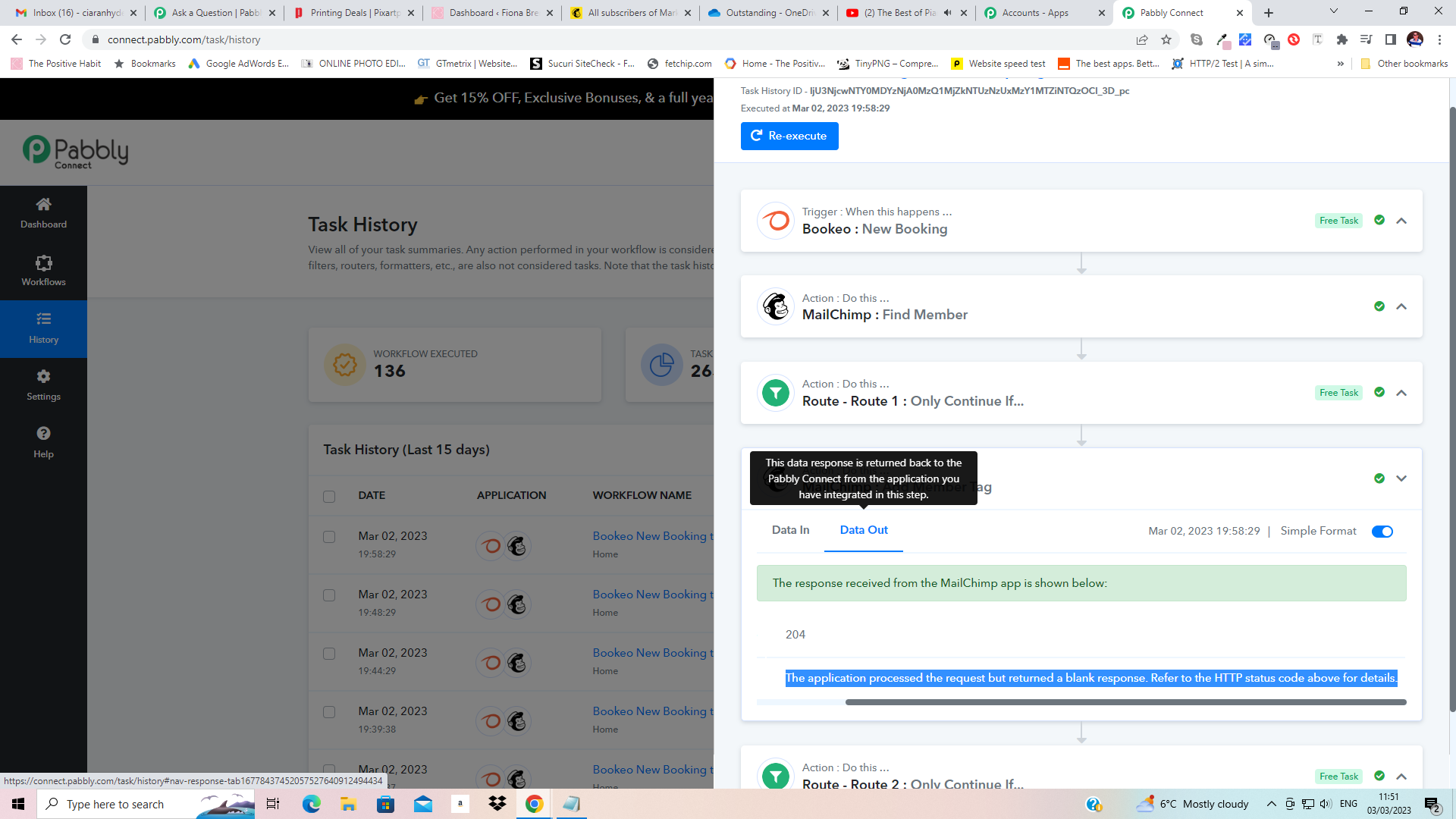
Hey @ciaranhyde
The status code which you are getting in the API response is a success status of the API call.
Further, this is the status code coming from the API which states that the application has processed your request successfully but is unable to show the response.
The application processed the request but returned a blank response. Refer to the HTTP status code above for details.
This means that the 'Action: Add Mailchimp Member Tag' is not being completed when members make a booking. None of the new bookings are being tagged with the date of the event. I'm not sure where I am making an error in the workflow. Please see attached screenshot and workflow URL, task history id.
And please reconnect the action step once and then try again.
Hi I did what you suggested and reconnected the action step i.e. the Mailchimp connection using the existing connection rather than a new one but it still doesn't add the tag to new booking member in Mailchimp....the only person it has added the tag to is me when I was testing...am I missing something here or does this workflow just not work/make sense?
Hey @ciaranhyde
We have tried passing the tags from our end and it is passing the data accordingly to the MailChimp dashboard accordingly.
Please refer to the following video tutorial once and then try again.
Thanks for your reply and video. It looks different to the setup I have which is as follows:
Trigger. 1. Bookeo: New Booking
Action. 2. Mailchimp: Find Member
Action. 3. Router by Pabbly - Route 1. Action. Filter by Pabbly > Action. 2. Mailchimp: Add Member Tag
Route 2. Action. Filter by Pabbly > Mailchimp: Add New Member with Custom Fields
I am using the Router since New Bookings can only be made by Customers in Bookeo but they might not already be in Mailchimp. If they are already in Mailchimp then they should be tagged with the date of the event they have booked for. If they are not already in Mailchimp then they should be added as a New member with the tag for the date of the event they have booked for.
Can you give me the exact steps of how to achieve this please.
Hey @ciaranhyde
We have configured the workflow as per your condition, please review it once and then try accordingly.
Thanks, that seems to be working fine now.