I don't want to Duplicate entry in Google sheets there is any filter
Status: Open · Asked by Naman Bhawsar on · 0 views
which filter do i need to use to avoid duplicate entry in google sheet... i want whosoever once filled form is only submitted one time, next time if user try to fill his/her details (SAME PHONE,SAME EMAIL) i don't want to pass that data to google sheet again
Hi @naman bhawsar,
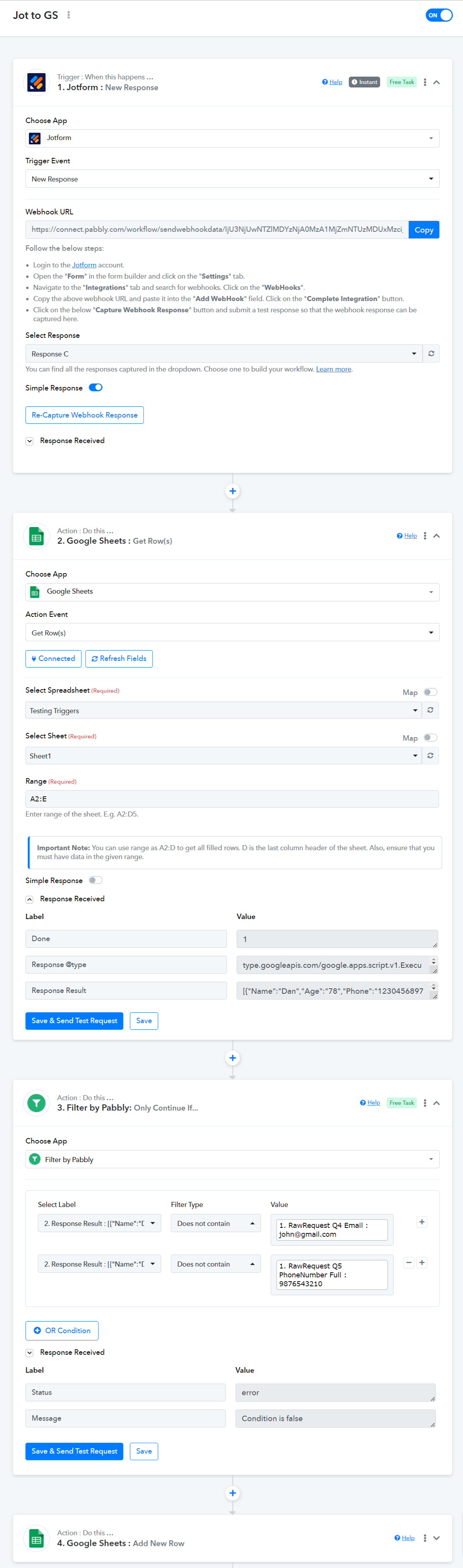
Please follow the steps below to achieve your use case. You can use any trigger step as needed; Jotform is provided as an example.
- 'Get Row(s)' will help you capture the entire data from your spreadsheet.
- 'Iterator' will iterate through each row.
- 'Filter' will check the phone and email captured from the trigger response and the Iterator. If either of them matches (duplicate entry), the contact will not be added to Google Sheets.

in this entire case, 2 tasks are consumed? or 1 ?
Please set up your workflow as follows: It is much more task-efficient. For each execution, it will consume 2 paid tasks if the contact does not already exist in your Google Sheets. Only 1 paid task will be consumed if the contact already exists in your Google Sheets spreadsheet.