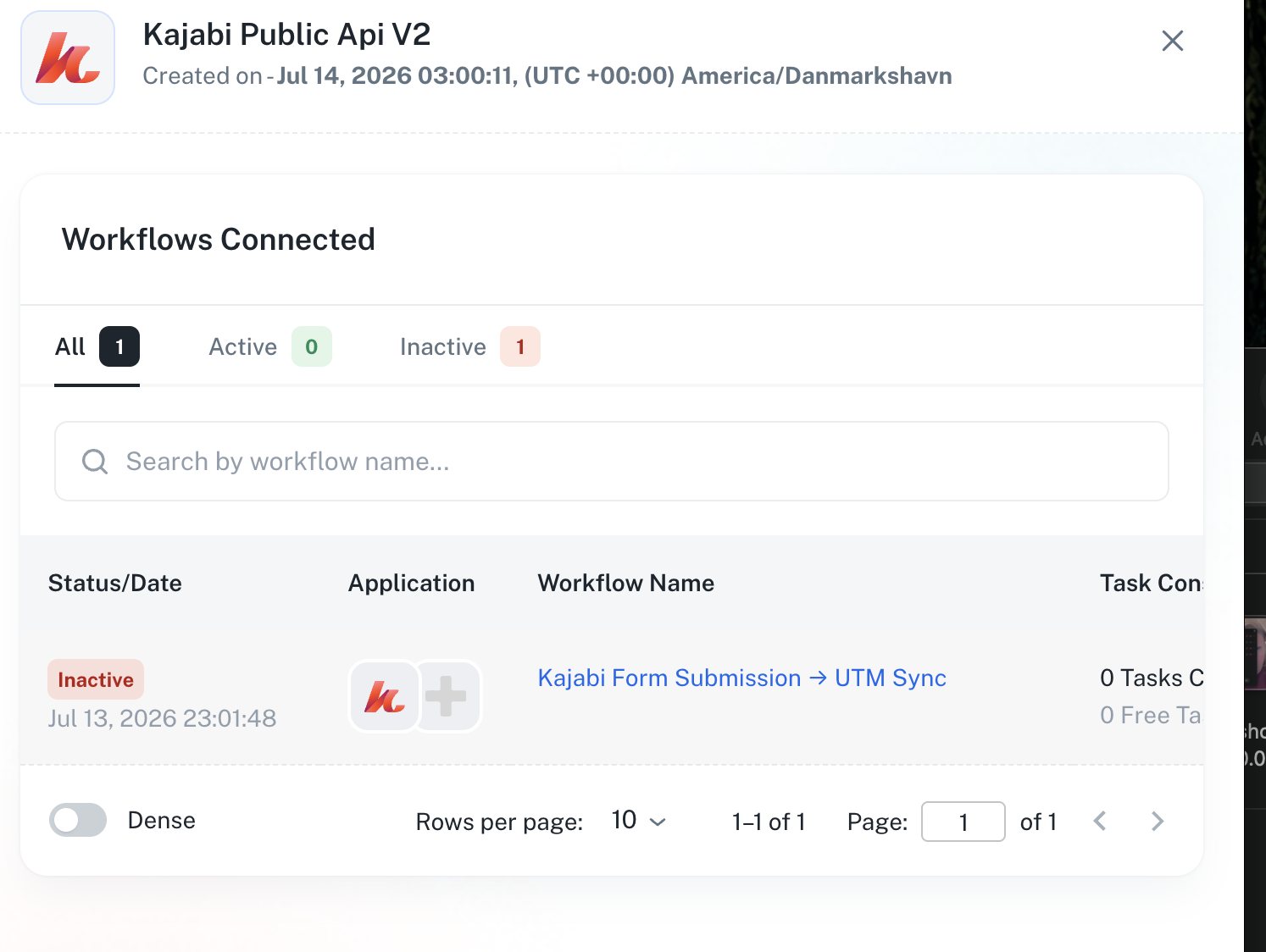
I have three Kajabi Connects to new public api and cannot delete them
Status: Open · Asked by Jeffery Ingram on · 0 views

Hello Jeffery,
Thank you for reaching out and for sharing the detailed information.
As mentioned in your query, you were able to use the same Kajabi API credentials outside of Pabbly Connect and the request worked successfully. To help us better understand the difference in behavior, could you please share a screenshot of the successful API request and response from the external platform or tool where you tested it?
This will allow us to compare the request configuration and investigate what might be causing the 403 Forbidden error within Pabbly Connect.
Once we receive the screenshot, we'll review it and assist you further.
Thanks and Regards,Preeti Paryani
Customer Success Associate,
Pabbly.com
Hello Jeffery,
Thank you for reaching out and for sharing the detailed information.
As mentioned in your query, you were able to use the same Kajabi API credentials outside of Pabbly Connect and the request worked successfully. To help us better understand the difference in behavior, could you please share a screenshot of the successful API request and response from the external platform or tool where you tested it?
This will allow us to compare the request configuration and investigate what might be causing the 403 Forbidden error within Pabbly Connect.
Once we receive the screenshot, we'll review it and assist you further.
Thanks and Regards,
Hello Jeffery,
Thank you for the update.
We would like to confirm one detail regarding your Kajabi account. To use Kajabi with Pabbly Connect, the Kajabi account must be on a paid Kajabi plan, as API access is not available on all Kajabi plans.
Could you please let us know whether the Kajabi account that is returning the 403 error is currently on a paid Kajabi plan? If possible, please also share the specific Kajabi plan name.
This information will help us determine whether the issue is related to account-level API access restrictions or if further investigation is required.
We look forward to your response.
Thanks and Regards,Preeti Paryani
Customer Success Associate,
Pabbly.com
Hello Jeffery,
Thank you for the update.
We would like to confirm one detail regarding your Kajabi account. To use Kajabi with Pabbly Connect, the Kajabi account must be on a paid Kajabi plan, as API access is not available on all Kajabi plans.
Could you please let us know whether the Kajabi account that is returning the 403 error is currently on a paid Kajabi plan? If possible, please also share the specific Kajabi plan name.
This information will help us determine whether the issue is related to account-level API access restrictions or if further investigation is required.
We look forward to your response.
Thanks and Regards,
Hello Jeffery,
Thank you for the clarification.
Kajabi has recently changed its API requirements. Previously, some API functionality worked on non-paid plans, but API access is now restricted to eligible paid Kajabi plans.
Since the Kajabi app in Pabbly Connect relies on Kajabi's API, a qualifying paid Kajabi plan is required. If the account is not on a supported paid plan, Kajabi will return a 403 Forbidden error even if the connection is successfully established.
Please confirm the Kajabi plan associated with the account returning the 403 error so we can verify this further.
Thanks and Regards,Preeti Paryani
Customer Success Associate,
Pabbly.com
To be clear on which credentials this is about: Kajabi has two separate systems. I have access to both their older legacy API Key/API Secret (used for things like their original Zapier integration) and, after paying for the upgrade above, their newer Public API, which uses an OAuth Client ID and Client Secret. This issue is specifically about the Public API / Client ID and Client Secret connection, not the legacy API Key/API Secret.
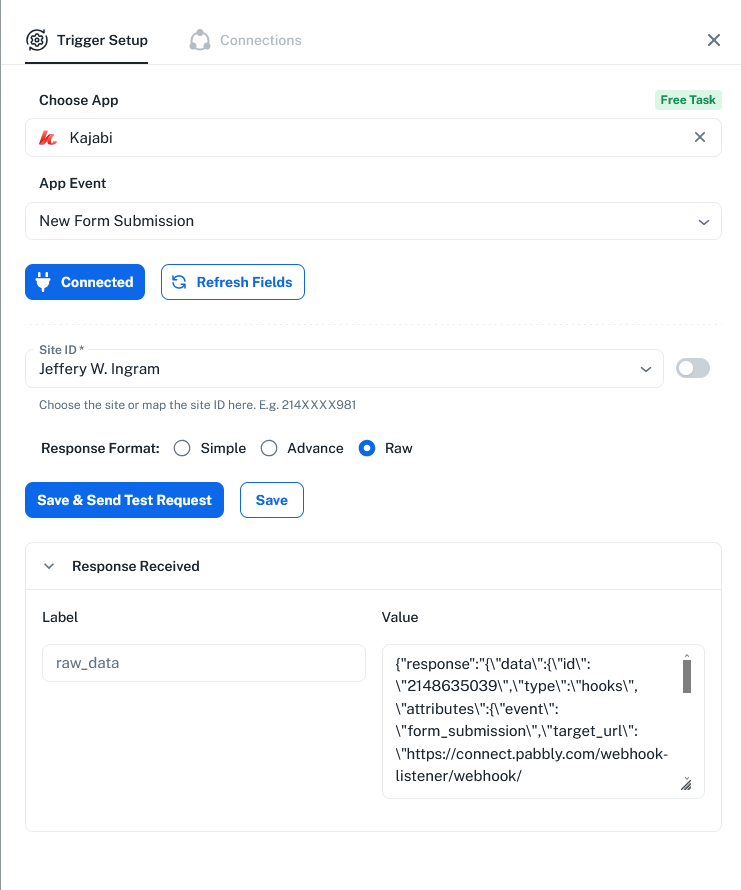
After paying for the Public API upgrade, Kajabi issued me a Client ID and Client Secret. I entered those into Pabbly Connect's Kajabi trigger setup, and it shows "Connected" successfully, so the credentials themselves are being accepted.
The problem is what happens next: when I click "Save & Send Test Request" on a New Form Submission trigger, it returns this error:
{"errors":[{"status":"403","source":null,"title":"Forbidden","detail":"You are not allowed to access this resource."}]}
So to be clear: I do have paid Public API access from Kajabi, the connection authenticates successfully, and I've confirmed the API key works when I test it directly against Kajabi's Public API outside of Pabbly. The rejection is happening specifically when Pabbly tries to pull the actual data, not at the connection/authentication step.
The key's permission scope includes view:form_submissions, view:forms, and view:sites, among others, so this doesn't look like a scope gap on my end either.
I tried this three separate times, creating three different Kajabi Public API connections in Pabbly. All three show as "Connected," but all three return this same 403 error on the actual trigger test.
I then deleted all three workflows that used these connections, but I'm now unable to delete the orphaned connections themselves. Pabbly says they are "in use," even though no workflow references them anymore.
Can you help with:
1. Why the Kajabi Public API trigger returns 403 when pulling data, despite a successfully connected, properly-scoped, paid Public API key that works directly against Kajabi outside of Pabbly
2. How to delete these orphaned connections that are stuck showing as "in use" with no workflow attached to them
Hello Jeffery,
Thank you for the clarification.
Kajabi has recently changed its API requirements. Previously, some API functionality worked on non-paid plans, but API access is now restricted to eligible paid Kajabi plans.
Since the Kajabi app in Pabbly Connect relies on Kajabi's API, a qualifying paid Kajabi plan is required. If the account is not on a supported paid plan, Kajabi will return a 403 Forbidden error even if the connection is successfully established.
Please confirm the Kajabi plan associated with the account returning the 403 error so we can verify this further.
Thanks and Regards,
Hello Jeffery,
Thank you for providing the detailed information.
To help resolve this issue more efficiently, it would be best if we could connect over a Google Meet and investigate it together. This will allow us to review the Kajabi Public API connection, the 403 error, and the orphaned connections in real time.
Kindly book a convenient time slot using the following link:
https://calendly.com/d/dv25-32y-jd2
Once the meeting is scheduled, our team will be happy to assist you further.
Thanks and Regards,Preeti Paryani
Customer Success Associate,
Pabbly.com
Hello Jeffery,
Thank you for the detailed information and for confirming the issue.
It seems that the meeting has not been booked yet. To investigate this issue further, we'll need to review the setup together in real time.
Kindly book a convenient Google Meet slot using the link below:
https://calendly.com/d/dv25-32y-jd2
Once you've booked the meeting, please let us know. Our team will then connect with you and assist you in troubleshooting the Kajabi Public API issue accordingly.
We look forward to helping you resolve this.
Hello Jeffery,
Thank you for providing the detailed information.
To help resolve this issue more efficiently, it would be best if we could connect over a Google Meet and investigate it together. This will allow us to review the Kajabi Public API connection, the 403 error, and the orphaned connections in real time.
Kindly book a convenient time slot using the following link:
https://calendly.com/d/dv25-32y-jd2
Once the meeting is scheduled, our team will be happy to assist you further.
Thanks and Regards,
Preeti Paryani
Customer Success Associate,
Pabbly.com
Thanks and Regards,
Preeti Paryani
Customer Success Associate,
Pabbly.com