IF THEN ELSE ENDIF
Status: Closed · Asked by Peter Stulcbauer on · 0 views
I'm trying to work out how to have a conditional set up and then continue with other processing.
Maybe a bit of pseudo code may help better describe what I'm trying to achieve.
- Search contact
- IF not found then
- create contact
- ELSE
- update contact
- ENDIF
- Search account (ie organisation)
- IF not found then
- create account
- ELSE
- update account
- ENDIF
- link contact (created or updated) to account (created or updated)
- create DEAL
- link account (created or updated) to DEAL
Checking Pabbly I can only see to use ROUTER. However, if using ROUTER means duplicating all the steps for the path if contact is not found, and then for updating the contact.
I also thought to create module calls that could be called in several places.
Any suggestions would be appreciated.
Thanks
Hey @martarna
For applying login of if..else you should use Router and put the condition in the router and then put the action event in it. The workflow will call every router step and whenever the condition is true then it will execute the action step. The calling to the router and its condition will come under free task calculation.
Thanks
Kunal
Hi @Kunal Valuskar
Thanks for assistance.
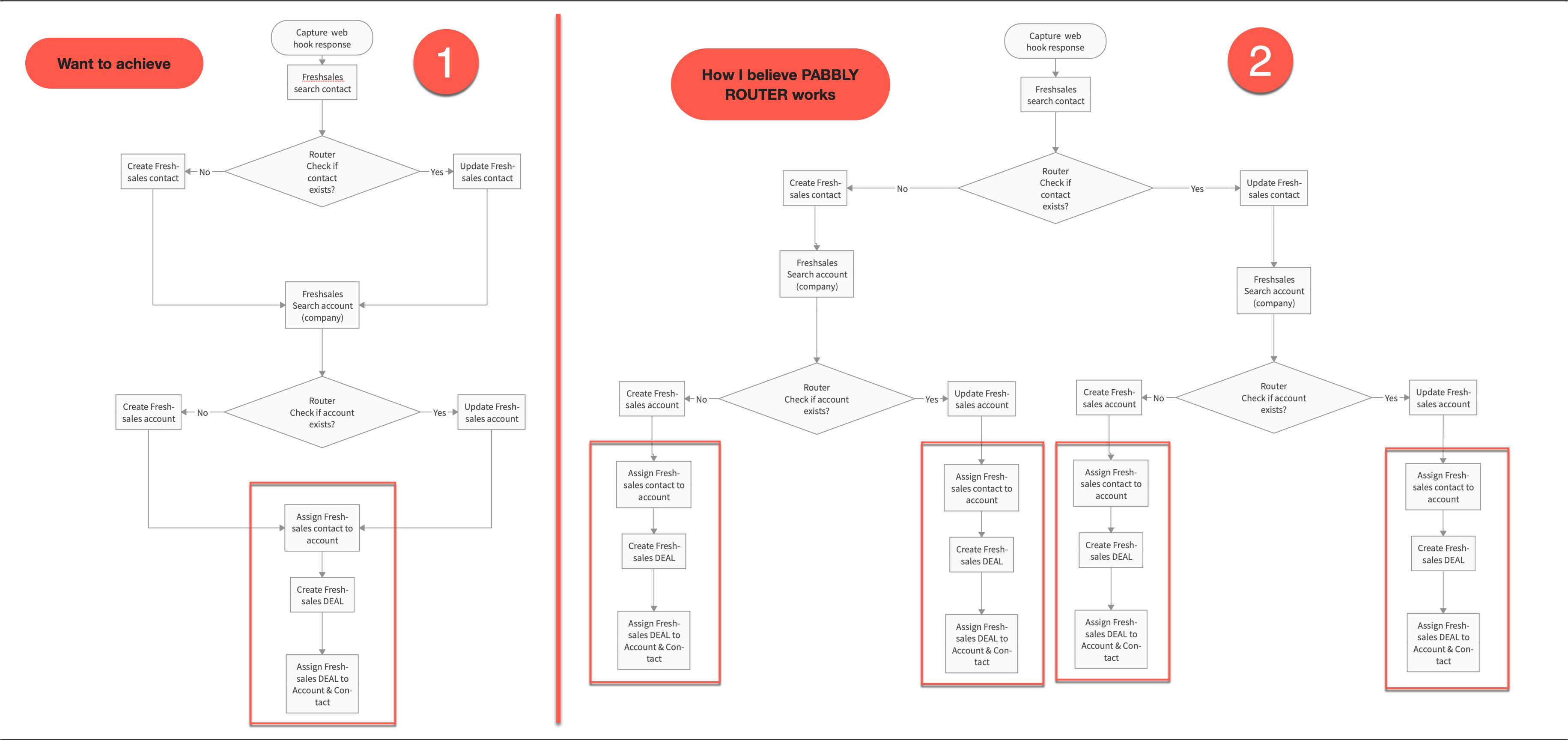
Maybe I am not understanding how Pabbly Router will work, or I haven't explained myself clearly on what I want to achieve. I have created a flowchart. The attached image has two flowchart images. On the left hand side, labelled 1, is what I want to achieve. On the right hand side, labelled 2, is what I believe the Pabbly router will do. On each side, I have put a rectangle around one part as an example that would appear once on the left hand side and on the right hand side appear 4 times.
I hope the flowcharts help to explain the efficiency I want and if my understanding is incorrect on using the Router you can explain how I can achieve 1 (left hand side) using the Pabbly Router or some other method.
Thanks
hey @martarna
You can simply use the Router and apply the if and else logic.
Router 1:- Check if your contact exists >> Update contact in Freshsales account >> Perform the next actions..
Router 2:- Check if your contact does not exist>> Create a contact in the Freshsales account >> Perform the next actions..
Please check the above steps and let me know if you have any questions or comments.
Hi @Kunal Valuskar
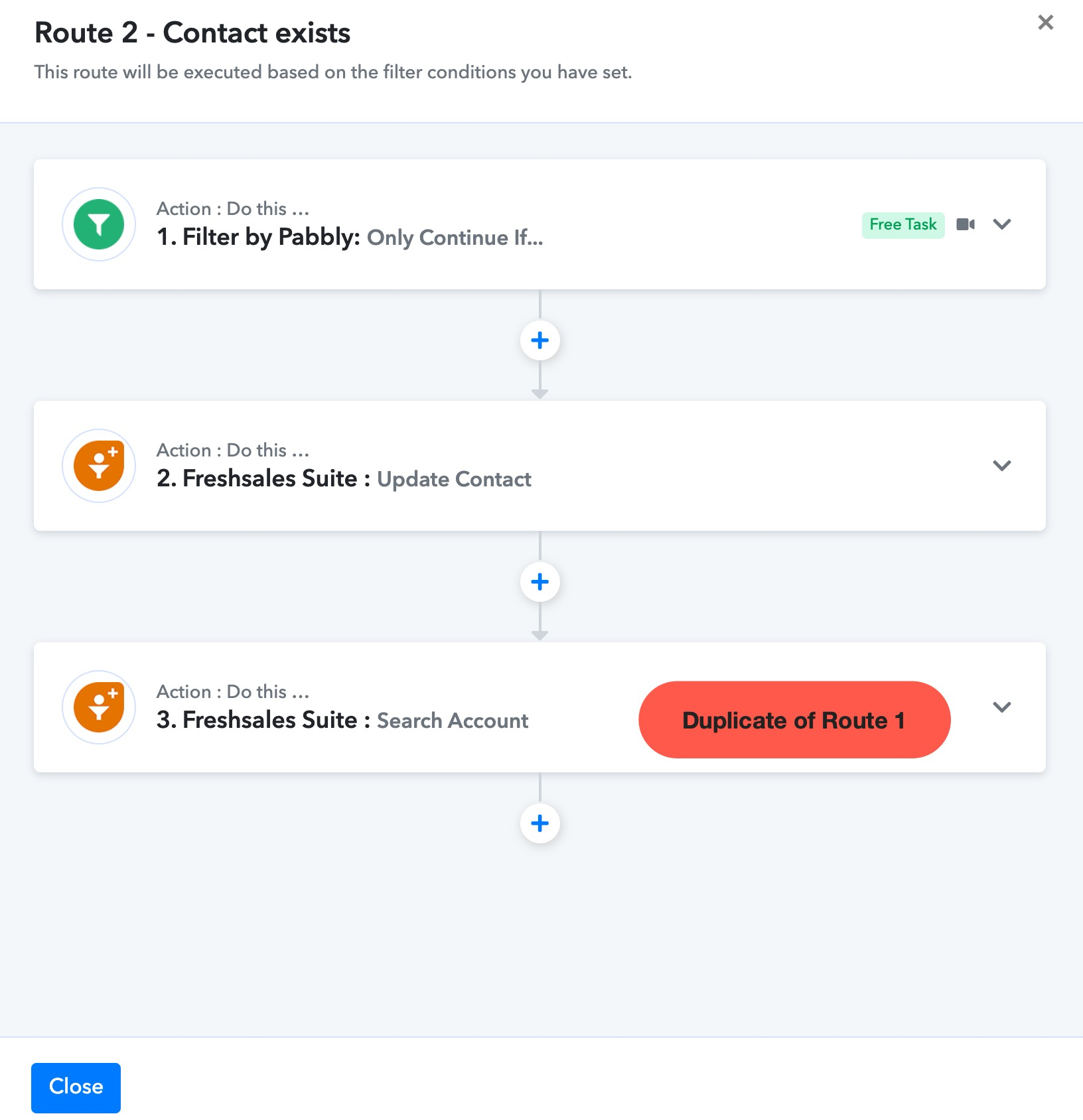
I have done as you suggested and completed the steps as per my number 1 flowchart. However, i do not find any plus sign to amalgamate the two route forks back into the one main workflow to continue with the next steps.
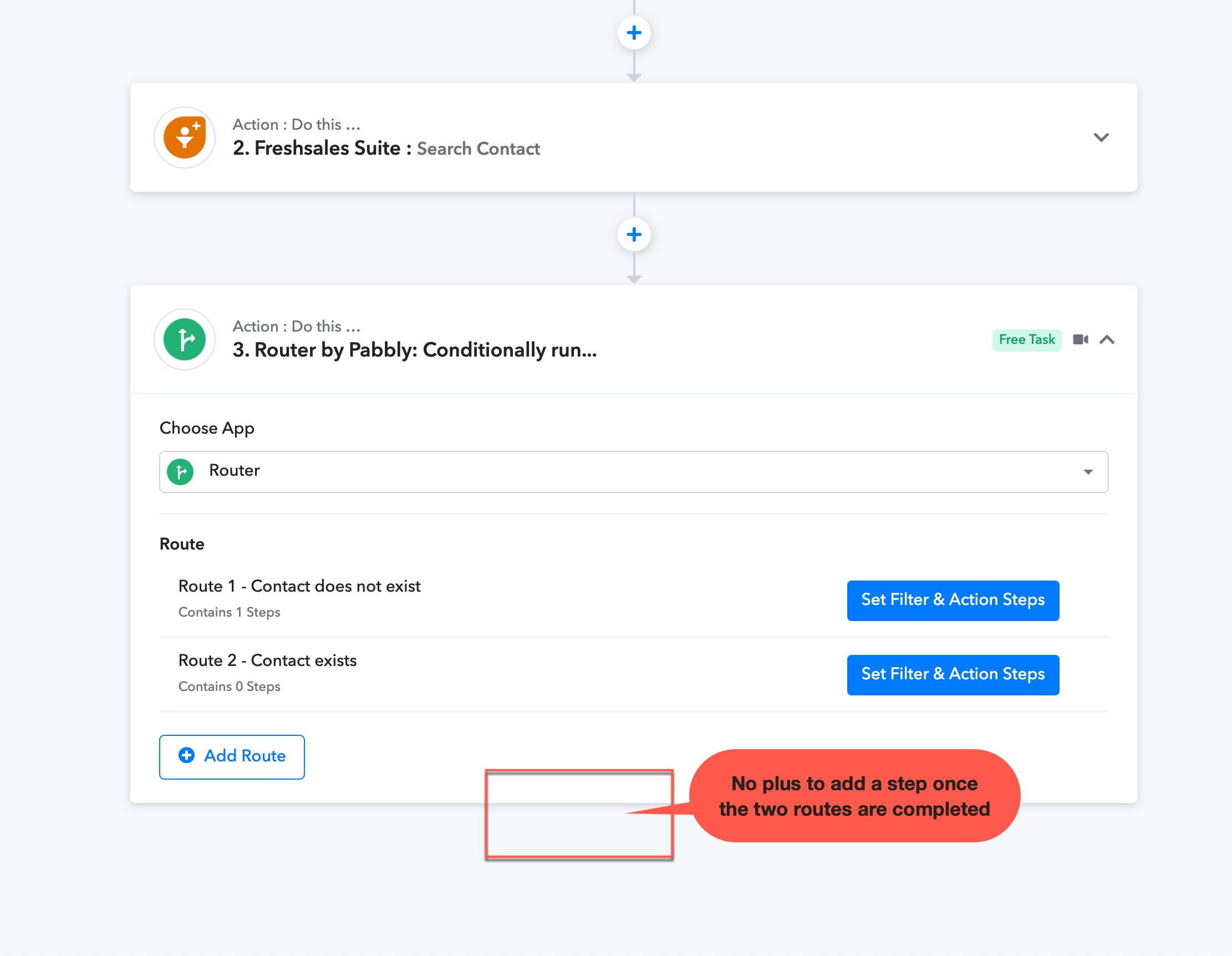
If I continue down Route 1 and add the further steps after creating the contact, I am creating a messy and unmanageable workflow to support.
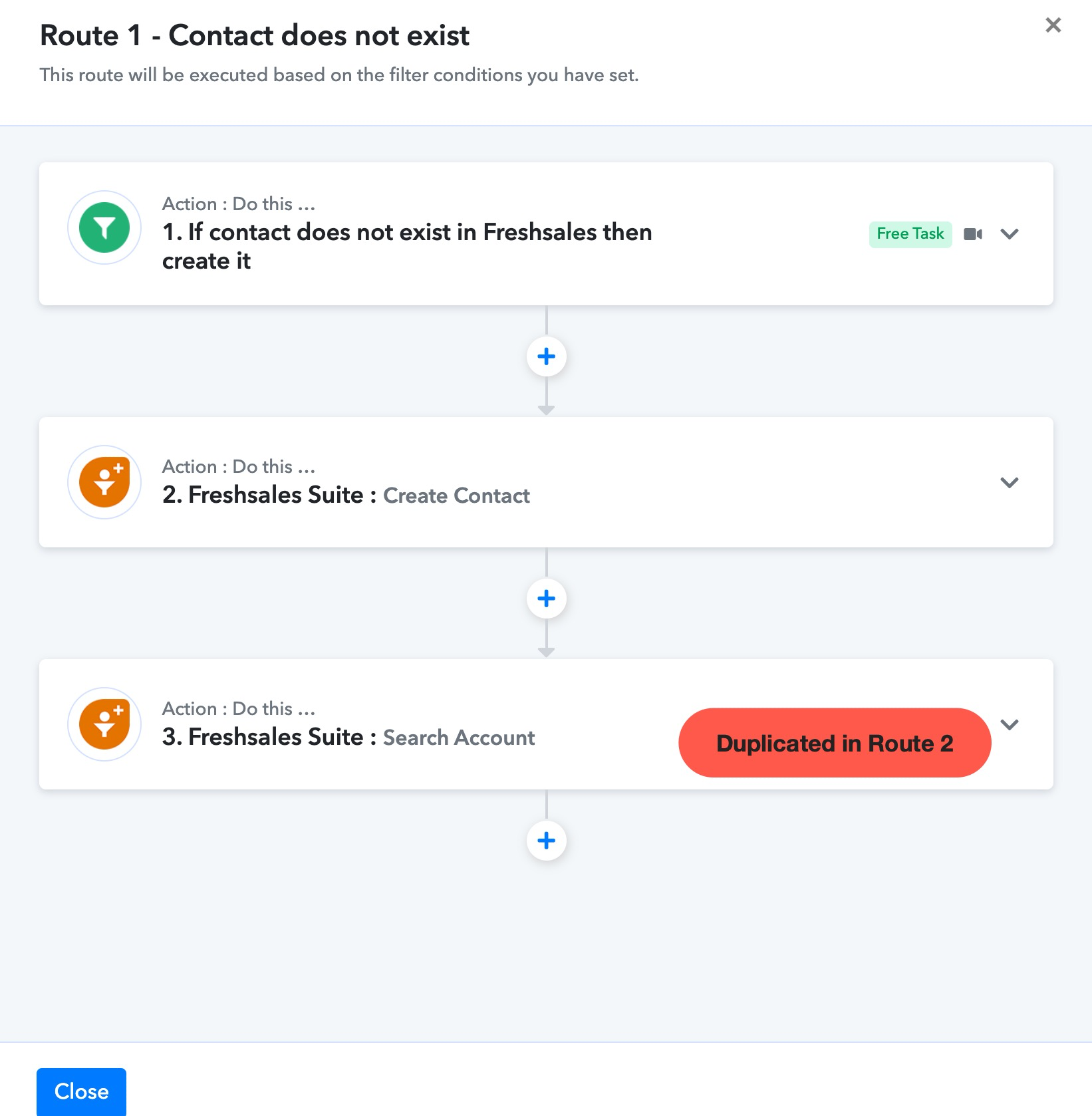
I continued to enter a step in Route 1 and then duplicated in Route 2. However, this is inefficient. Is there a better way?
Thanks
Hey @martarna
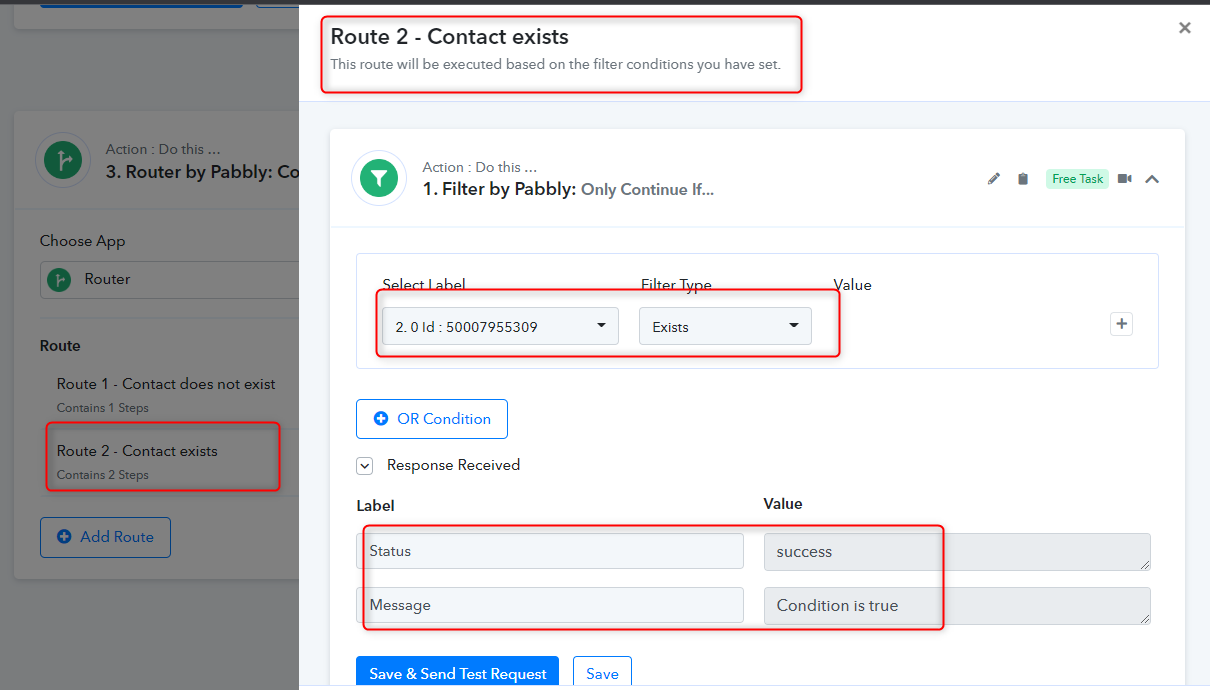
We have checked your workflow and corrected the If condition (when contact does not exist) and else condition (contact exists). Kindly check the below screenshot and add the further actions in your workflow.
Thanks
Kunal
Hi @Kunal Valuskar
Thanks for the fix.
I guess Pabbly doesn't have the concept of workflow modules.
I did see an email about a new enhancement that allows you to copy actions. Create one and then copy it to the other nodes.
Regards
Hey @martarna
Could you please eleborate on "the concept of workflow modules"?
Yes, we have recently released the new feature of copy and paste actions steps.
Hi @Kunal Valuskar,
I couldn't think what else to call them. In programming languages, there are modules. Whereby it contains code that allows the programmer to call upon at different points in a program.
If you look at the flowchart I posted back on the 12 Dec 2022 20:11 on label 2, you will find four red boxes. If the three items in the red box were a separate module, let's say we call them "FreshDesk_Account_Deal_Assignment". Then each time you want to process those same steps, you call the module "FreshDesk_Account_Deal_Assignment". Each time the module is called, you may send different values to the module to be used within the module steps.
The image below starts with the label 2 image from the 12 Dec 2022 20:11, and to the right two new images labelled 3 & 4. In label 2, you still have the four red boxes with three workflow steps. In the label 3 you find four calls to the module "FreshDesk_Account_Deal_Assignment". In label 4, is the module "FreshDesk_Account_Deal_Assignment" with the three steps.
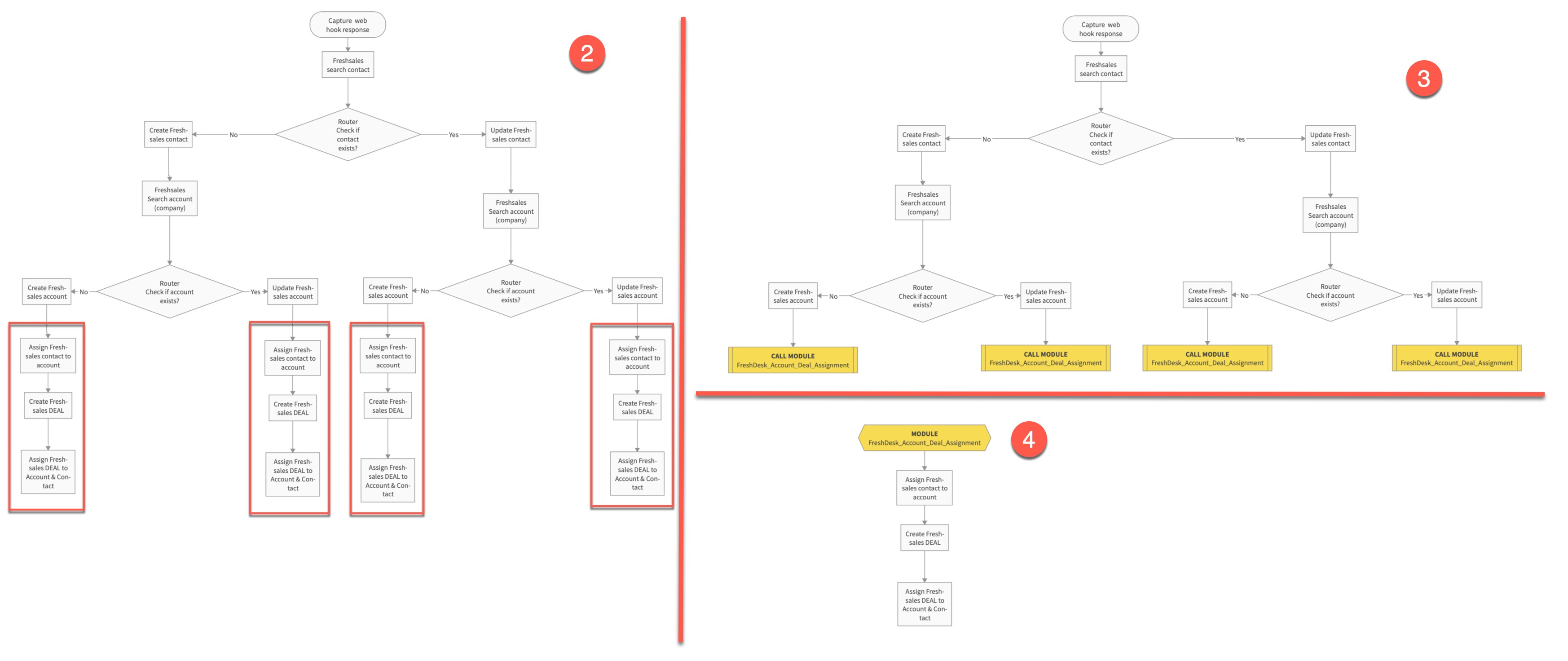
You see from the image that there is a saving of placing the same three steps in four different areas.
Regards
Peter
Hey @martarna
Sorry, we are not aware of this module's concepts in Pabbly Connect.
Please let me know if you have any questions or comments.
Hi there,
I have the same problem, what I want to do is very simple.
1. Action triggered by Email Parser
2. Router
- If attachment exists => upload to Google Drive
- If attachment doe snot exist => skip this step
3. Insert Row in Google Spreadsheet
- Date, Sender Name, Sender Email Address, Email Text
- File URL of the Attachment(s)
4. Trigger Email Reply to the Sender
What I am missing is to nest certain action steps in two different series of action steps for a while, then continue with the main process again and do more things.
At the end of the Day this is basic IF THEN ELSE logic.
I think this is avery useful feature and this is very much needed. Otherwise, all these workflows remain basic. If you could kindly recheck this thread and see if you can come up with a solution or a slightly modified version of the Router Action step which allows you to continue with more actions later on.
Thank you
I'm trying to work out how to have a conditional set up and then continue with other processing.Maybe a bit of pseudo code may help better describe what I'm trying to achieve.
- Search contact
- IF not found then
- create contact
- ELSE
- update contact
- ENDIF
- Search account (ie organisation)
- IF not found then
- create account
- ELSE
- update account
- ENDIF
- link contact (created or updated) to account (created or updated)
- create DEAL
- link account (created or updated) to DEAL
Checking Pabbly I can only see to use ROUTER. However, if using ROUTER means duplicating all the steps for the path if contact is not found, and then for updating the contact.I also thought to create module calls that could be called in several places.
Any suggestions would be appreciated.
Thanks
Same problem here
Considering the complexity of your use case, I will highly advisable to enlist the services of an automation expert. This professional can adeptly design the required automation for your workflow and take care of all management aspects on your behalf.
This is not complex at all. This is simple
IF (Condition) (
Then (execute Tasks 1,2,3,...)
Else (execute Tasks 100,101,102,...)
)
Proceed with Tasks 200,201,202....
This is not complex and you can find this logic in any programming language. It would be worthwile if you could check this again without dismissing this suggestion too soon.
All you have to do is to specify which tasks are executed within the THEN and the ELSE and then allow to continue the process. Certainly something which can be done.
Cheers
This is not complex and you can find this logic in any programming language. It would be worthwile if you could check this again without dismissing this suggestion too soon.
Engaging in this step necessitates programming expertise and a robust coding skill set. You're welcome to delve into it independently. It's important to understand that we cannot provide assistance for errors or building on code-related concerns. Moreover, kindly be informed that we do not provide support for matters related to coding.
3. Insert Row in Google Spreadsheet
- Date, Sender Name, Sender Email Address, Email Text
- File URL of the Attachment(s)
4. Trigger Email Reply to the Sender
So, regarding your concern, we can only suggest your use the insert row and Reply action step to the mail in the nested routes.
Inside individual routes -
You may check the following shared workflow for the same - https://connect.pabbly.com/workflow/share/AEhXZVUCCGtQGgNpVgVRdgkdUlZQCQVmVE0GFFFeUytRCwRvUBEPZV0RVHZfDAdmB04JYwJeUG0MGFFVAVdTIAQdCDRUV1MpUh8JcgRNX2wAXld_VTQ#
Attachments