Image didn't posted in Twitter from dropbox
Status: Closed · Asked by vinay on · 0 views
Image not posted in Twitter from dropbox. Only it is happening in twitter social channel
Hey @vinay
As I can check that you were able to successfully post an image on your Twitter account.
However, you are facing an issue when attempting to post an image on your LinkedIn account. The reason for this failure was a lack of sufficient permissions to post on your LinkedIn account.
To resolve this issue and be able to post, you need to reconnect your LinkedIn account and try to post again.
Please let me know if the issue still persists.
Hello @Arshita
We need to integrate LinkedIn account that we are working on that, But we are facing an issue in twitter as the image is not getting posted in account.
I am attaching the link of twitter post for your reference and also the workflow URL , task history ID
1635642092419706880
https://connect.pabbly.com/workflow/mapping/IjU3NmMwNTY4MDYzZjA0M2Q1MjY1NTUzMCI_3D_pc
IjU3NjcwNTY0MDYzZTA0MzU1MjZiNTUzZDUxMzE1MTYxNTQzNSI_3D_pc
Hey @vinay
Please make sure that the media file size should not exceed 5 MB and should be in a jpg or png format. To resolve this issue, we suggest that you confirm that the file meets these requirements.
If the file is not in the required format, we recommend that you attempt to convert it to the other format. For instance, if the file is currently in jpg format, you can try converting it to png format and vice versa. This should help to ensure that the file is compatible with the system and can be processed successfully.
We hope that these suggestions will help you to resolve the issue. Please let me know if you are still facing the same issue.
File is less than 5MB, its Even less than 1MB Sometimes. Pabbly Seems to be inconsistent. Same image url being used for other platforms in this automation, yet it only fails to add image for twitter. Still we are facing an issue even though we converted into jpg to png and vice versa.
Attachments

Please allow me some time to check your concern. I will get back to you soon.
Hey @vinay
Based on my observations, it appears that the media file you are attempting to use is not supported directly on Twitter.
As a solution, I would like to request you to use an application like Imgur to host the media file.
Once the file has been uploaded to Imgur, you can then attempt to map it on Twitter again. By doing so, you will be able to ensure that the media file is properly supported and that it can be shared on Twitter as intended.
Screenshot for your reference: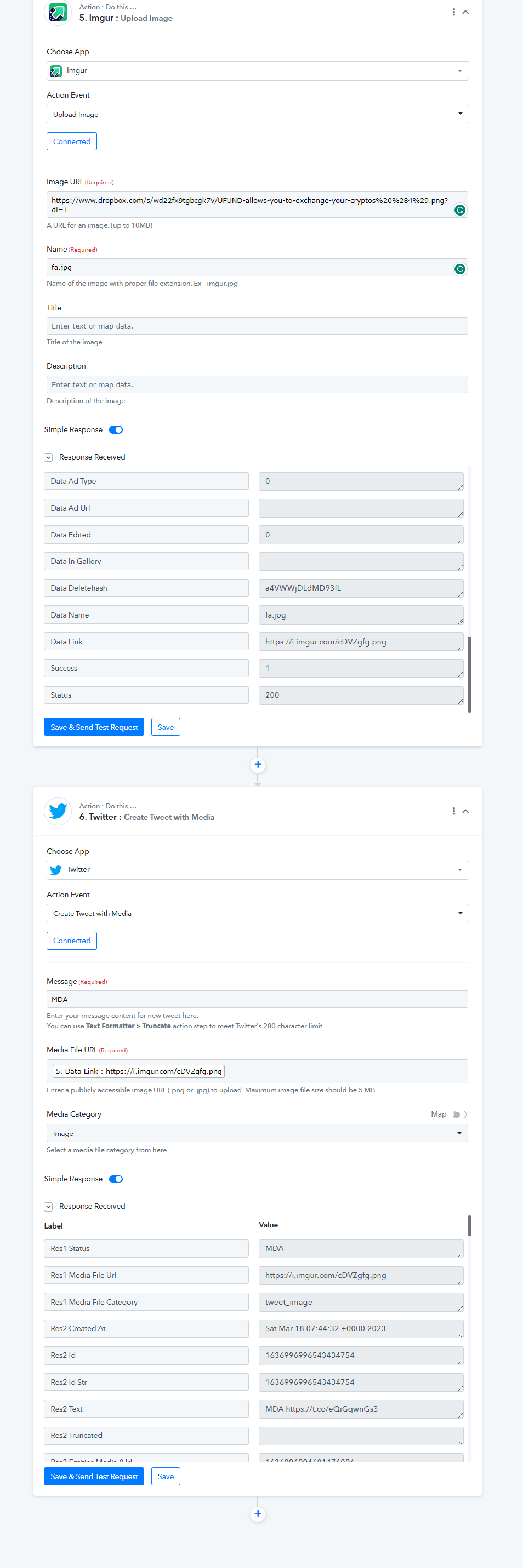
Please let me know if you still facing the same issue.