Improper Matching In Google Sheet Problem
Status: Open · Asked by toplinedropship on · 0 views
Hello guys,
I really need help with this workflow from "Elementor Forms" to "Google Sheets"
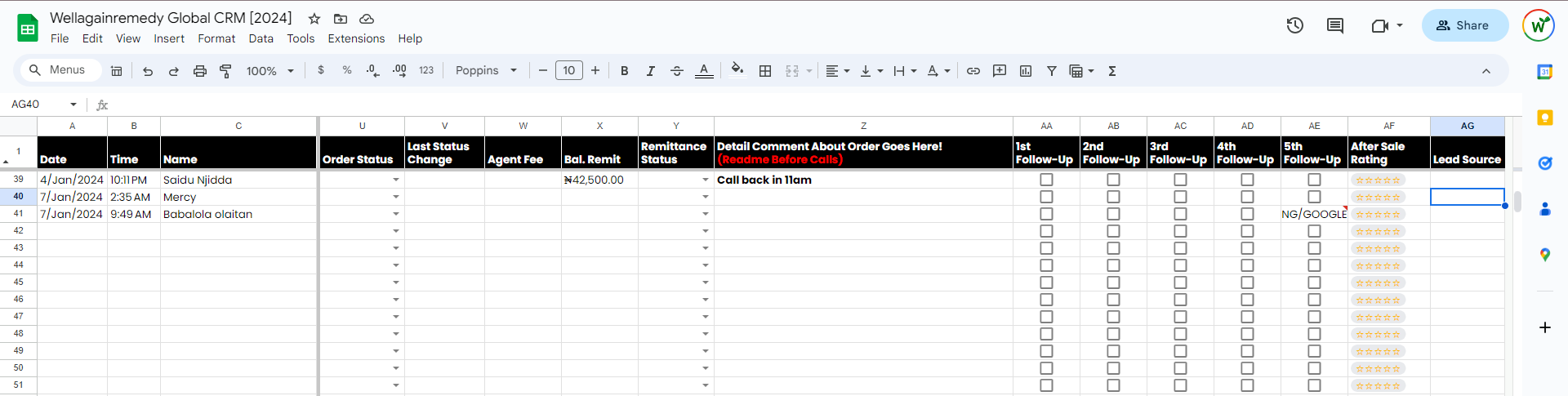
Each time the elementor form is filled, the data goes into Google Sheets, however, there is always a mismatch with a particular data for a column.
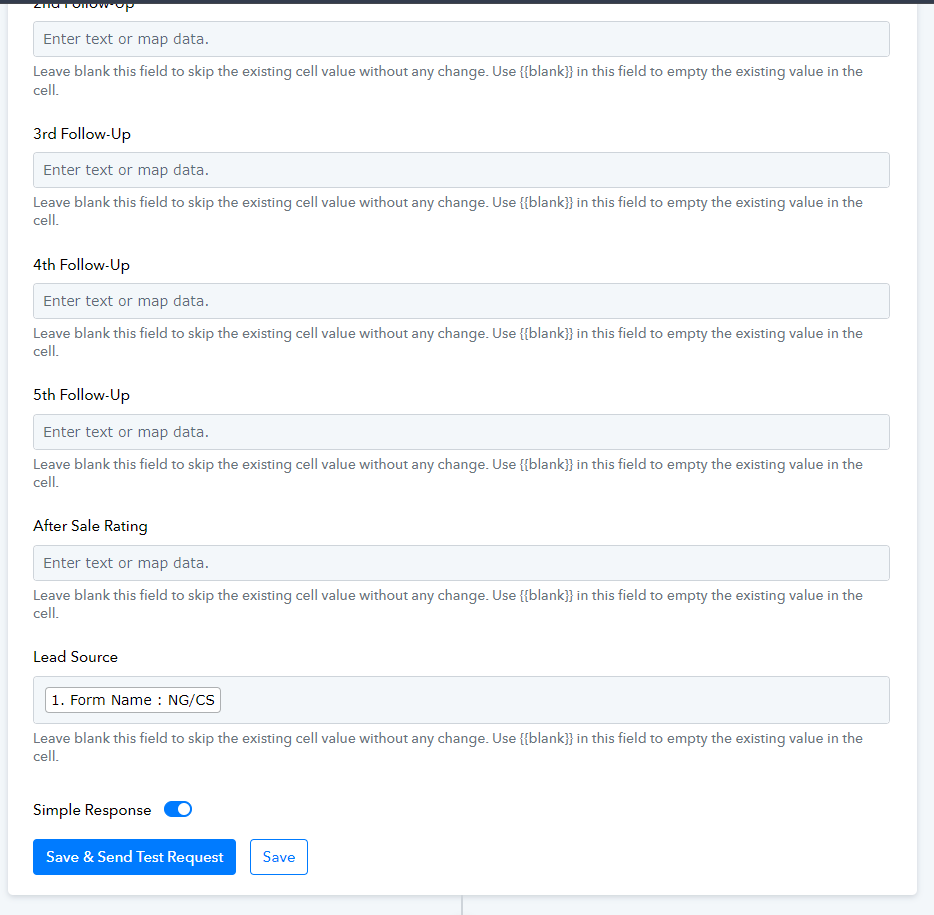
See the attached Images for the Google sheet and the elementor form mapping.
In the Google Sheets, column AE (5th Follow-Up) keeps collecting the "Form Name" data instead of it to be displayed in column AG (Lead Source) as mapped in the pabbly connect workflow.
Please any form of help to fix this would be appreciated. I would like to have the form name appear under the AG (Lead Source Column).
Attachments
Hi @toplinedropship,
Could you please share the Workflow URL in which you have this concern? I would also suggest you try using 'Append Value' action step and see if this fixes the issue for you.
Hi @toplinedropship,Could you please share the Workflow URL in which you have this concern? I would also suggest you try using 'Append Value' action step and see if this fixes the issue for you.
Here it is - https://connect.pabbly.com/workflow/share/DUVRYwRTAmFfFQhiD1xXcAAUAgYEXgM_VE1RQ1RbUysATQNGVBUKYAxAVHZXGAJjXxZXPVYKVmwMGAMHBVNVJlVbBhQGBQB6UB1RKlQNX2wNU1F5BGU#
Please try using the 'Google Sheets: Append Values' action event to add data to your Google Sheets spreadsheet. This action event is recommended when the spreadsheet contains large number of columns.
Okay there is a reason i was confused about using the Google Sheets: Append Values. Some columns will be filled manually, how can I skip those column and move to the last column?
See attach video - https://www.loom.com/share/7ebba78378fb4ed09b4700a615ea50c1?sid=41cbad44-b262-45f2-8f2e-351c05a38565
Also, See this attached image "Row Index" function is not available in Append Values
Hey @toplinedropship
If you want to exclude certain fields from your Google Sheets using the "Append Values" action, here's a helpful tip: skip those fields this way. When you're in the "Update" action step, choose "Update Row" or "Update Cell Value" and make sure to only include the "Row Index" field. This method will streamline the update process and avoid adding unnecessary information to your sheets.

Can you please have a look at my workflow, it didn't work. The form i filled refused to appear on google sheet unlike before. can you please help?
Could you please record a short video making a form submission in Elementor, workflow executing and data not being added to Google Sheets spreadsheet? Additionally, kindly display the Task History to illustrate the workflow execution.