Incorrect Date after mapping correctly
Status: Closed · Asked by Lot 20 Marketing on · 0 views
Your Workflow URL: https://connect.pabbly.com/v2/app/workflow/share/DEQENlEGVzRSGAhiBmNUc1tPAwcEXVI2Vk8DEVJdXCQESgZDURAJYwhEVT9eDQRlAEkHbVUJBzsIHFdTUgQEdwceUW1cX1YsWxYGfVMSADMMUgQsUTA#
Consent to Access & Modify: I authorize Pabbly Support to log in to my account and make changes to the specified workflow for troubleshooting.
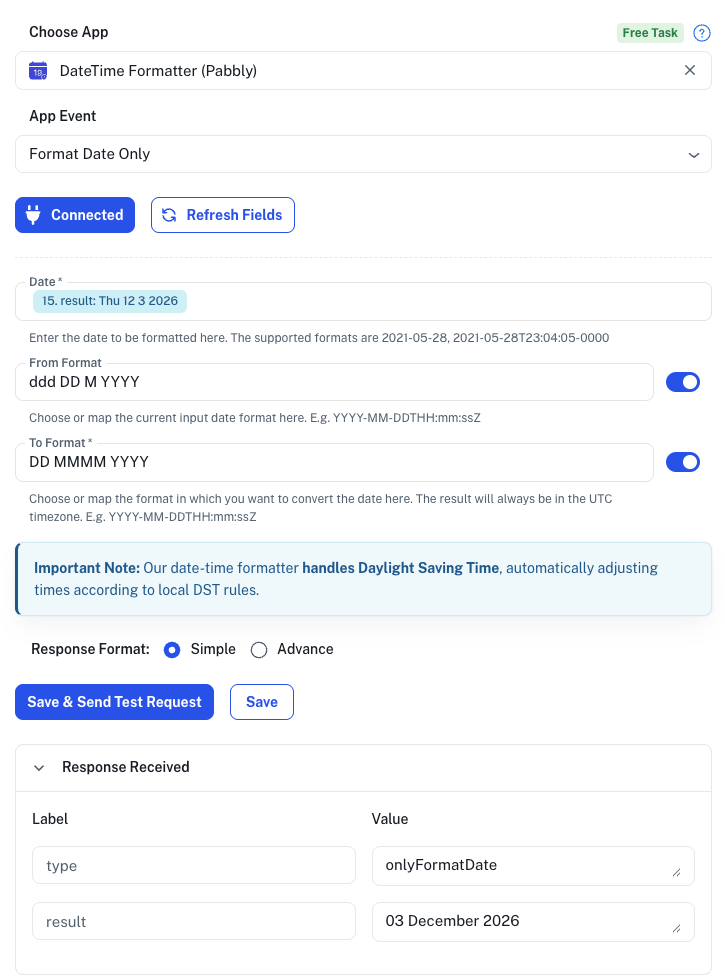
After mapping the date I require, the result is not mapping the way I have identified for it to layout.
In this case, the input date is 12 3 2026, and i am mapping as DD MM YYYY, however, it is coming back as 03 December 2026.
Any assistance would be great!
Thanks
Attachments
After mapping the date I require, the result is not mapping the way I have identified for it to layout.In this case, the input date is 12 3 2026, and i am mapping as DD MM YYYY, however, it is coming back as 03 December 2026.
Any assistance would be great!
Thanks
Hello @lot20,
Please check "To date" formate in your screen shot. You've addes DD MMMM YYYY instead of DD MM YYYY. FYI I'm not from Pabbly Connect team, just a freelancer who helps other Pabbly users.
Automation Freelancer
Contact me - https://www.facebook.com/himeshsoni07
Email - [EMAIL][email hidden][/EMAIL]
Contact me - https://www.facebook.com/himeshsoni07
Email - [EMAIL][email hidden][/EMAIL]