Initial setup and testing
Status: Closed · Asked by MMP on · 0 views
Hi
I am testing your product with Gravity Forms in WP and Infusionsoft (KEAP).
I have successfully created the links and the data from GF. This includes a user email which is the same user email in KEAP which is also their login to WP site.
I am linked to KEAP and need it to map to the user that has completed the form to then have a tag applied to their record in KEAP.
I only have one field from GF which is the Email.
The actual email is correct but it seems when I select that field from the GF data it enters the actual email address which then gives an error message - Input value is invalid: { "ids": [ [email hidden] ]} (which is the user email.)
I want it to enter the tag for that user if they complete the GF.
Am I doing something wrong or does the system not do that?
Thanks
David
Hey @MMP
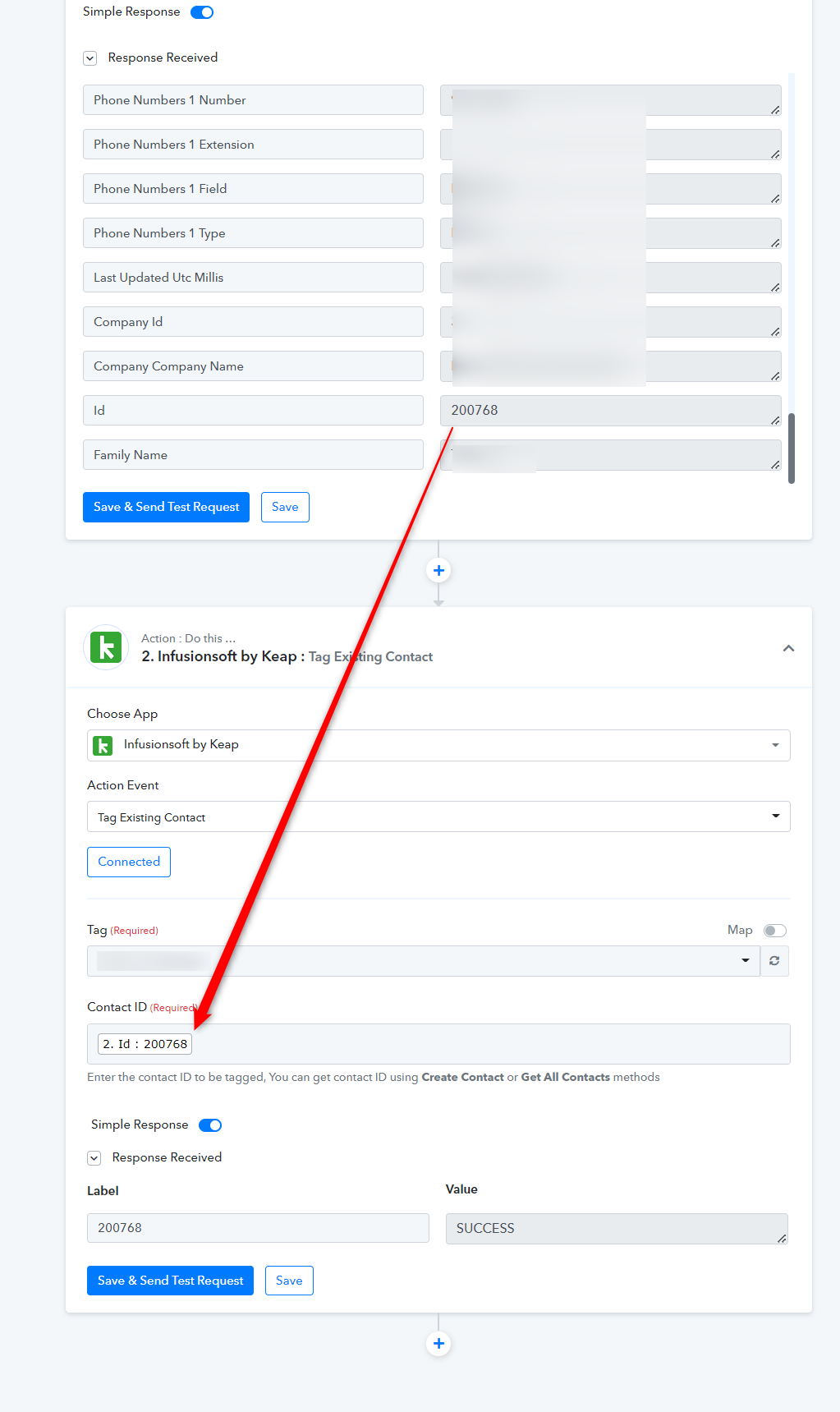
In the "Infusionsoft by Keap: Tag Existing Contact" action step you need to pass the Contact Id which you can retrieve from the "Infusionsoft by Keap : Tag Existing Contact" action step.
Please check out the following screenshot for your better understanding.