insert image to a specific location on google doc
Status: Closed · Asked by LaundryEZ / Go Get Laundry on · 0 views
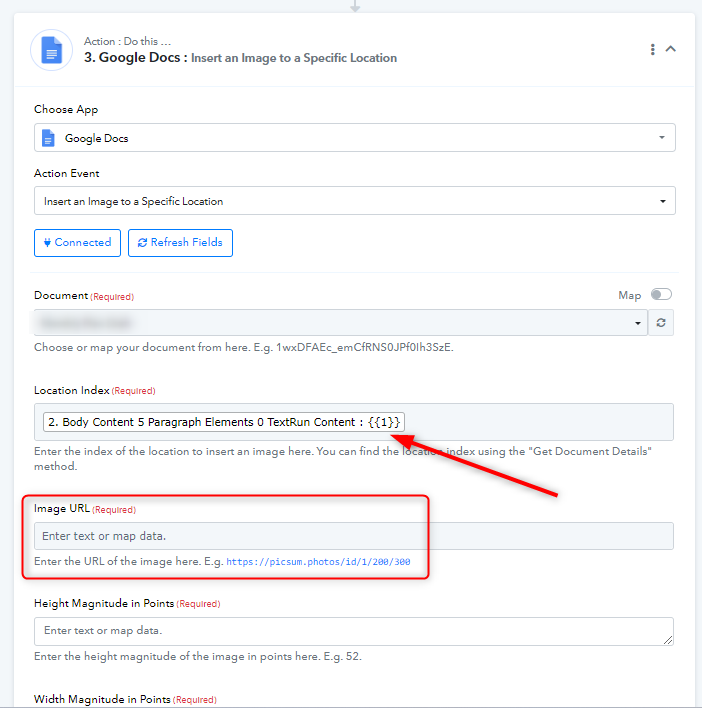
I am trying to use the insert a image to a specific location feature in Google Docs. I am having trouble with the location index section. what is the proper way to identify the location index, or do you have an instructional video on this?
I am having trouble properly adding the correct location index. Do you have a video on how to do this?
Hey @Devin Morris
Yes we do have a video for this on our YouTube Channel. Kindly refer to this video from timing 7:40.
Tis video only places the image at the bottom of the template. I want to use the option Insert Image in Specific location

Hey @Devin Morris
You can do that by using two action steps of Google Docs. The first one will be "Get Document Details" where you will fetch all the details about your doc. You can map the specific location where you want to insert the image, for e.g. {{1}}. Now you can find this in response of the "Get Document Details". 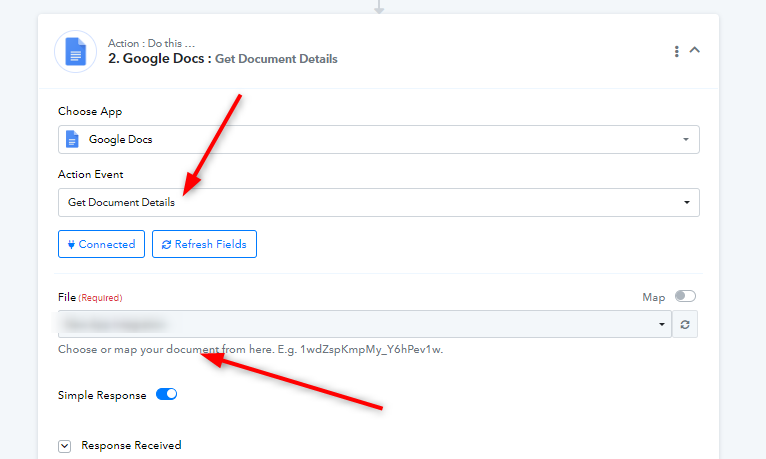
Then you need to use "Insert an Image to a Specific Location" step. Now all you need to do is map the details accordingly and you will get the document link for the new document with the image.