Is batch delay possible?
Status: Closed · Asked by Pabblynaut on · 0 views
I have a Google Sheet where most days 30-40 rows are automatically added, but some days 200 rows are added.
Each time a new row is added, triggers a workflow.
My problem is on the day with 200 rows added at once, this gives error in the workflow, because there is rate limit in other tools.
How would you fix this so it always works? I tried adding delay, but it did not help since the 200 rows are added at the same time.
Any help is appreciated
I think I figured this out, at least for my use case:
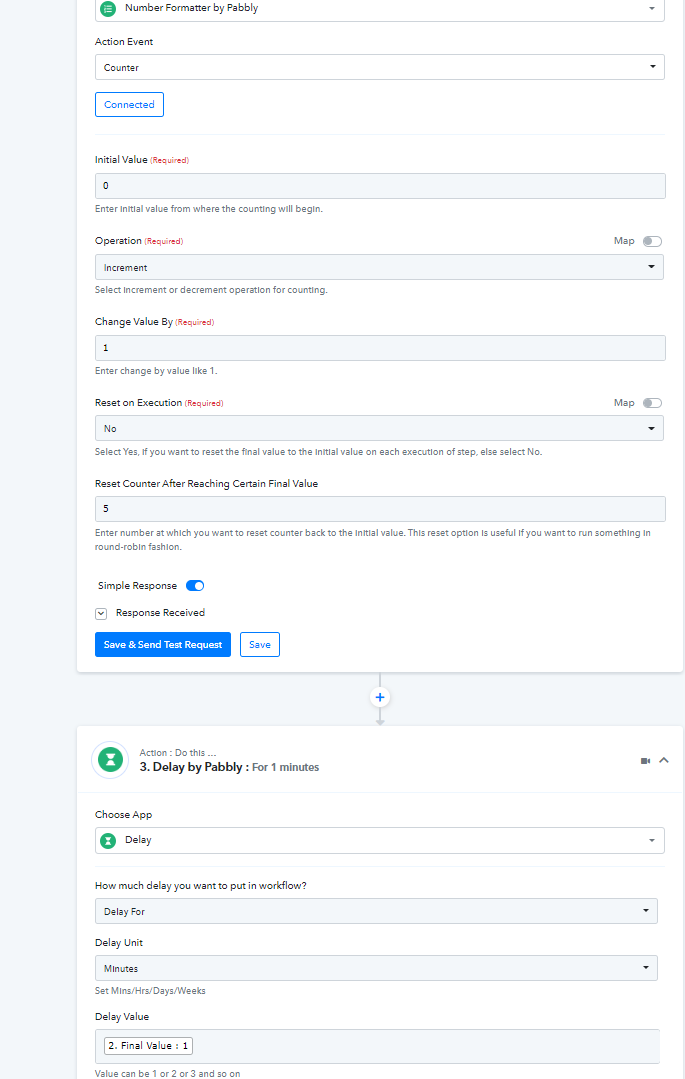
1) "Add Number Formatter by Pabbly"
2) Choose "Counter"
3) Initial value 0, Increment, Change value by 1, Reset on execution No, reset counter 5.
4) Add delay by Pabbly
5) In "Delay value", input the output from number formatter.
This seemed to work, although adding 200 rows now only took like 7 minutes, so it does not seem these steps actually added the time between each row as I thought it would. But it worked, so I am happy even if I don't understand it fully :-)
Hey @Pabblynaut
Thanks for sharing the usecase with us. I am glad that you resolve your problem.
Thanks
Kunal