Is there a Delay function for "Send all Data" from Google Sheets?
Status: Open · Asked by fisto on · 0 views
I am trying to send historical data from Google Sheets to be processed, via the Send All Data function of the Pabbly Google Sheets app.
However when I execute it, the other connected APIs give me an error because I send too many API requests at once. Is there a way to delay between each API request?
Hey @fisto,
The use case you are describing is possible; you just need to make modifications to your workflow.
- Change your trigger step from Google Sheets to Schedule by Pabbly.
- Add "Google Sheets: Get Row(s)" as your action event to capture all data at once.
- Add an Iterator to your workflow to process all data in your Google Sheets one row at a time.
- Add a Delay to your workflow, specifying the duration as needed.
- Add your API as the action step to send data.
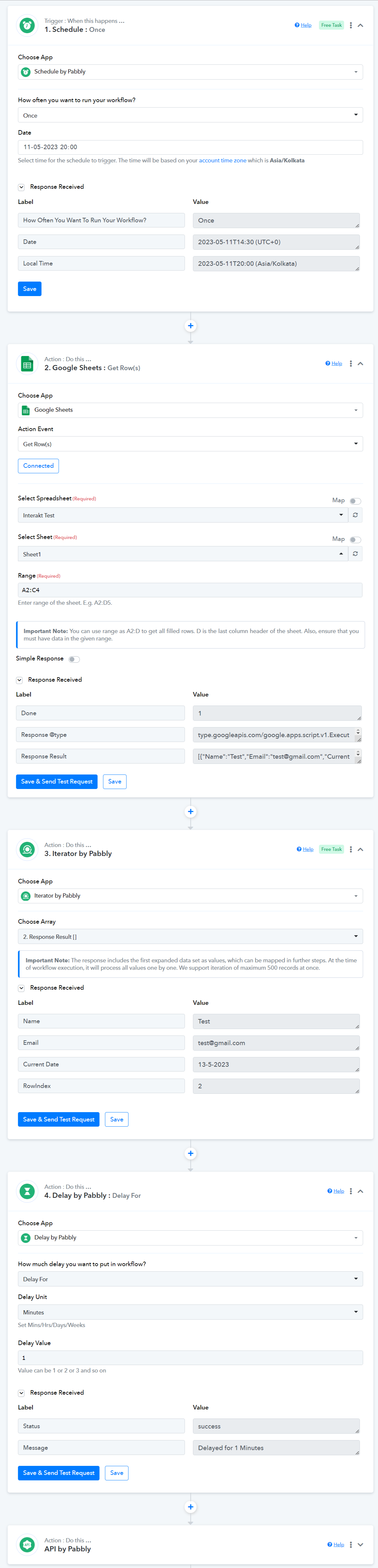
Attaching a video for your reference: