Iterator Not Processing All Line Items
Status: Closed · Asked by iRest Institute on · 0 views
I'm trying to take a Shopify Order with Multiple Line Items and split each line item into it's own SalesForce Opportunity. In my recent test, it seems to have only run for one of the line items. Any idea what's going wrong?
Hi @iRestAdmin,
Based on your Task History, we can see that only one Line Item is coming from your Shopify order.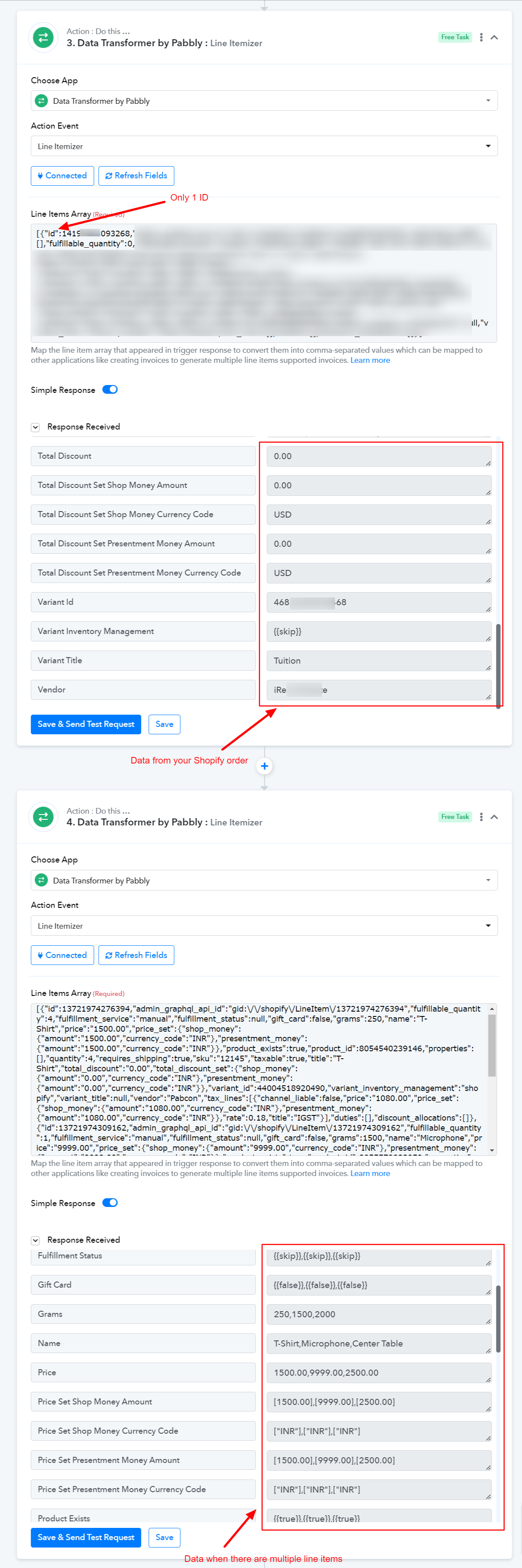
Here's the workflow having multiple line items, in case you want to compare the data:
https://connect.pabbly.com/workflow/share/AUlYalMEBmUHTQhiBU4NKgoeBgJQCQRgXEUIGgEOAHgBW1UAA0JfNQFNBW8DTAZnURgIYg5RDG0MGFFVBlAIe1xSVUBUSwZbVWYJTAJdCSMBYw
Hi ArshilAhmad, maybe I'm using the iterator wrong? I have the Iterator at step 2 with the idea that it will run through the entire workflow for each line item (in this case, they are products). The line itemizer in step 3 is to grab the Discount Data. Where am I going wrong?
You are using the Iterator correctly, and it will run through each line item if it receives more than one line item from Shopify. However, as you can see in the thread above, only a single line item is coming from Shopify, so it's running only once.
Can you look at this one, ArshilAhmad?
Task History ID - IjU3NjEwNTY0MDYzMjA0MzQ1MjZiNTUzNDUxMzE1MTYwNTQzNyI_3D_pc
Executed at Oct 25, 2023 15:10:03, (UTC-07:00) America/Los_Angeles
It has 3 IDs / Lineitems present, but only the first one ran.
[{"id":"14196130611476",REDACTED}]"},{"id":"14196130644244",REDACTED},{"id":"14196130677012",REDACTED"}]
Please allow us some time to look into this concern. We will get back to you with an update soon.
Sounds good, ArshilAhmad. I'll look forward to hearing what you learn.
Hi ArshilAhmad. Just checking in. Do you have any updates you can share for this issue?
Hi @iRestAdmin,
Our team is currently working on this issue. Please allow us some more time and we will get back to you with an update soon.
I had a discussion with the technical team, and they informed me that the issue is related to having both an Iterator and Delay in the same workflow. We suggest you try removing the Delay step from your workflow for now and see if this resolves the issue for you.
Sorry for the late reply. I missed your last message. I can try this tomorrow. However, the reason I added the Delay was because without it the next step (Salesforce: Find Contact) would error out.
As I recall, the error was something along the lines of the SF Contact being unavailable for the second lineitem, because the first line item was still working with or holding onto it. Is there a better way to resolve that than using the Delay?
As I recall, the error was something along the lines of the SF Contact being unavailable for the second lineitem, because the first line item was still working with or holding onto it. Is there a better way to resolve that than using the Delay?
We apologize for the inconvenience, but if run with an iterator action step, the delay action step may currently interfere with the workflow. Therefore, if you are utilizing an iterator action, we advise employing automation without a delay action step.
Thank you, Supreme. I'm happy to report the workflow ran without problems once I removed the Delay step and correctly created 3 Opps (1 for each lineitem). I was pleasantly surprised that it ran without the error it had previously. Perhaps something else I changed in the form is slowing it down enough to allow SF to let go of the Contact record (I think the last time I had that error was before I added the Router, so that could be the thing).
Thank you for the update. I trust that the information mentioned above will be helpful to you.