Emprendedores Alfa
Member
- Your Task History ID
- IjU3NjUwNTY5MDYzMTA0MzM1MjZjNTUzNTUxMzEi_pc
Hello.
We are creating a very simple integration, however, something is not working quite right.
So, once a form is filled in JotForm, we have to:
1. JotForm directly updates a person's custom fields.
2. We add a 1min timeout to our Pabbly Connect scenario.
3. PiPeDrive Find Person (using email)
4. Conditionally Run.
4.1 If the person exists:
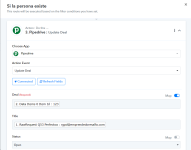
a) PipeDrive Find Deal
b) PipeDrive Update Deal.
(and recently we are testing PipeDrive Update Person).
4.2 If the person does not exist:
a) PipeDrive Create Person
b) PipeDrive Create Deal
Let's focus on: "If the person exists".
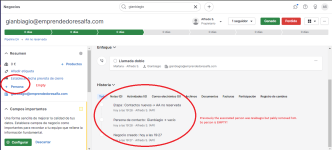
Normally, the person already exists in our database, and what we want is for Pabbly to move the DEAL to a new stage (non-reserved AA), which it does indeed accomplish. But, in addition, we need it to keep in that DEAL that it is moving the person linked to the DEAL, and this is not what happens. What happens is that it moves the DEAL to the new stage, but removes in turn the person associated with the DEAL.
We don't know if we are somewhere entering the wrong data or if there is a problem with the tool. We urgently need your assistance in this matter.
We are creating a very simple integration, however, something is not working quite right.
So, once a form is filled in JotForm, we have to:
1. JotForm directly updates a person's custom fields.
2. We add a 1min timeout to our Pabbly Connect scenario.
3. PiPeDrive Find Person (using email)
4. Conditionally Run.
4.1 If the person exists:
a) PipeDrive Find Deal
b) PipeDrive Update Deal.
(and recently we are testing PipeDrive Update Person).
4.2 If the person does not exist:
a) PipeDrive Create Person
b) PipeDrive Create Deal
Let's focus on: "If the person exists".
Normally, the person already exists in our database, and what we want is for Pabbly to move the DEAL to a new stage (non-reserved AA), which it does indeed accomplish. But, in addition, we need it to keep in that DEAL that it is moving the person linked to the DEAL, and this is not what happens. What happens is that it moves the DEAL to the new stage, but removes in turn the person associated with the DEAL.
We don't know if we are somewhere entering the wrong data or if there is a problem with the tool. We urgently need your assistance in this matter.