Kartra: spli custom field
Status: Closed · Asked by Mentorcoach on · 0 views
I've this string
[{"field_id":"14","field_identifier":"Anno_nascita_tuo_figlio","field_type":"input_field","field_value":""},{"field_id":"25","field_identifier":"Annonascitasecondofiglio","field_type":"input_field","field_value":""},{"field_id":"23","field_identifier":"Cognomealtrogenitorepartecipa","field_type":"input_field","field_value":""},{"field_id":"5","field_identifier":"EdizioneMICAP","field_type":"radio_button","field_value":[]},{"field_id":"18","field_identifier":"Eta","field_type":"input_field","field_value":""},{"field_id":"19","field_identifier":"Etaprimofiglio","field_type":"input_field","field_value":"14"},{"field_id":"20","field_identifier":"etasecondogenito","field_type":"input_field","field_value":"20"},{"field_id":"21","field_identifier":"FigliPartecipano","field_type":"drop_down","field_value":[]},{"field_id":"1","field_identifier":"Genitore","field_type":"checkbox","field_value":[]},{"field_id":"10","field_identifier":"gipartecipato","field_type":"radio_button","field_value":[]},{"field_id":"22","field_identifier":"Nomealtrogenitore","field_type":"input_field","field_value":""},{"field_id":"12","field_identifier":"NomeCoachInvitato","field_type":"input_field","field_value":""},{"field_id":"4","field_identifier":"NomeFigli","field_type":"text_area","field_value":""},{"field_id":"3","field_identifier":"NomeGenitori","field_type":"text_area","field_value":""},{"field_id":"6","field_identifier":"Nomepartecipante","field_type":"input_field","field_value":""},{"field_id":"8","field_identifier":"nomesecondopartecipante","field_type":"input_field","field_value":""},{"field_id":"2","field_identifier":"Numero_Figli","field_type":"drop_down","field_value":[]},{"field_id":"11","field_identifier":"PrivacyPolicy","field_type":"checkbox","field_value":[{"option_id":"20","option_value":"Acconsento al trattamento dei miei dati personali e alla ricezione di informazioni commerciali ai sensi dell'articolo 13 del Regolamento (UE) 2016\/679"}]},{"field_id":"15","field_identifier":"Qual__grande_preoccupazione","field_type":"text_area","field_value":""},{"field_id":"16","field_identifier":"Quallatuaambizionepertuofiglio","field_type":"text_area","field_value":""},{"field_id":"26","field_identifier":"realemotivazioneapartecipareeventi","field_type":"text_area","field_value":""},{"field_id":"7","field_identifier":"Scuolafrequentata","field_type":"radio_button","field_value":[]},{"field_id":"9","field_identifier":"Scuolafrequentatasecondopartecipante","field_type":"radio_button","field_value":[]},{"field_id":"13","field_identifier":"Sei_separato","field_type":"input_field","field_value":""},{"field_id":"17","field_identifier":"Sessofiglioa","field_type":"input_field","field_value":""},{"field_id":"24","field_identifier":"Sicuroomenoapartecipare","field_type":"checkbox","field_value":[]}]
that is my Custom Filed in Kartra.
I need to report 2 value on my Google Sheet
in particular from this 2 stings I need to report just the last number between "" that you can find in bold it means 14 and 20
{"field_id":"19","field_identifier":"Etaprimofiglio","field_type":"input_field","field_value":"14"} (forn this
{"field_id":"20","field_identifier":"etasecondogenito","field_type":"input_field","field_value":"20"}
Please can you explain me how Can I do?
Thanks
Hey @Mentorcoach
Can you please share the workflow URL once in which you have tried the same so that we can check the workaround?
Hey @Mentorcoach
Sure, I understand your concern. To address this, you can leverage the "Code By Pabbly" action step. This step is designed to generate the desired response from the provided JSON to the specified numbers. It's an effective solution to achieve the outcome you're looking for.
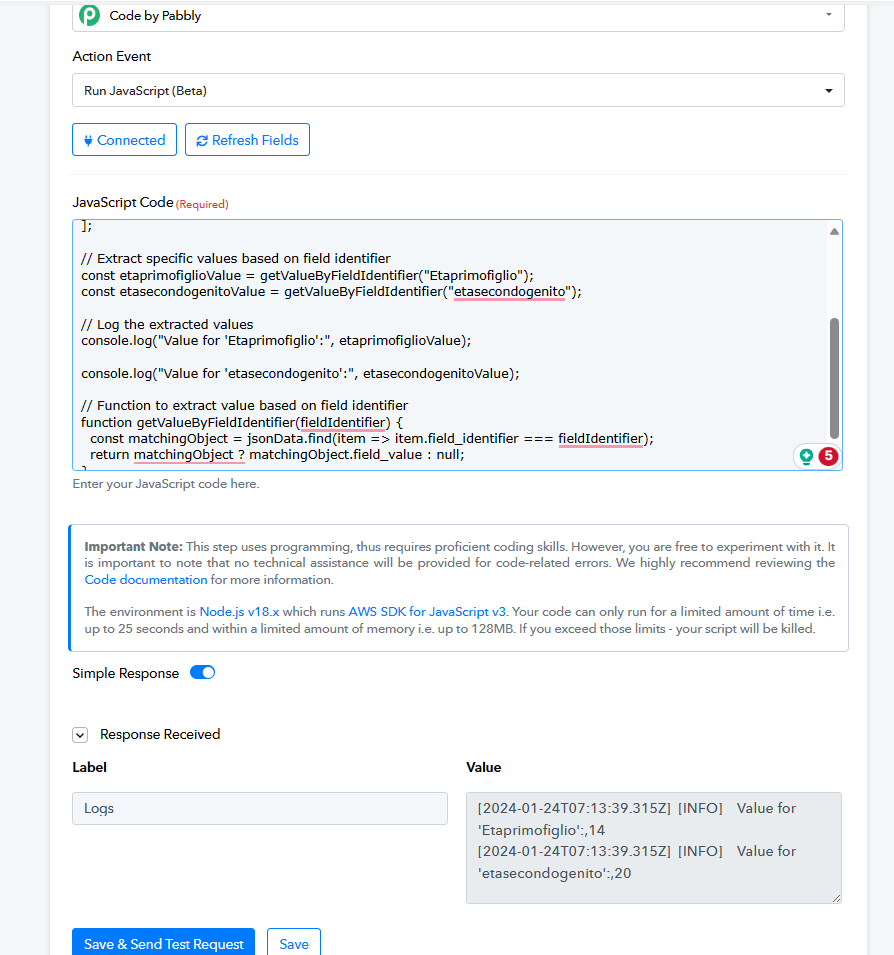
const jsonData = [
  {"field_id":"14","field_identifier":"Anno_nascita_tuo_figlio","field_type":"input_field","field_value":""},
  {"field_id":"25","field_identifier":"Annonascitasecondofiglio","field_type":"input_field","field_value":""},
  {"field_id":"23","field_identifier":"Cognomealtrogenitorepartecipa","field_type":"input_field","field_value":""},
  {"field_id":"5","field_identifier":"EdizioneMICAP","field_type":"radio_button","field_value":[]},
  {"field_id":"18","field_identifier":"Eta","field_type":"input_field","field_value":""},
  {"field_id":"19","field_identifier":"Etaprimofiglio","field_type":"input_field","field_value":"14"},
  {"field_id":"20","field_identifier":"etasecondogenito","field_type":"input_field","field_value":"20"},
  // ... (other objects in the array)
];
// Extract specific values based on field identifier
const etaprimofiglioValue = getValueByFieldIdentifier("Etaprimofiglio");
const etasecondogenitoValue = getValueByFieldIdentifier("etasecondogenito");
// Log the extracted values
console.log("Value for 'Etaprimofiglio':", etaprimofiglioValue);
console.log("Value for 'etasecondogenito':", etasecondogenitoValue);
// Function to extract value based on field identifier
function getValueByFieldIdentifier(fieldIdentifier) {
  const matchingObject = jsonData.find(item => item.field_identifier === fieldIdentifier);
  return matchingObject ? matchingObject.field_value : null;
}