Landingi Not Pulling Info
Status: Closed · Asked by Derek67 on · 0 views
Hello,
When I trigger a workflow with Landingi, and put the webhook URL in the appropriate area of the form, it's pulling the lead data into Landingi, but not reading in Pabbly.
Any ideas?
Thanks so much,
Derek
Hey @Derek67
Kindly see if the webhook URL is entered properly in Landingi, then you can try recapturing it by clicking the "Re-Capture Webhook Response" button and testing the form entry once more. If needed, you can generate a new webhook URL by setting up the trigger step again by creating a new workflow.
Kindly refer to the first half of the YouTube video below for more instructions,
Hey @Derek67Kindly see if the webhook URL is entered properly in Landingi, then you can try recapturing it by clicking the "Re-Capture Webhook Response" button and testing the form entry once more. If needed, you can generate a new webhook URL by setting up the trigger step again by creating a new workflow.
Kindly refer to the first half of the YouTube video below for more instructions,
Hi, thank you for getting back to me :)
I've done that multiple times and it's not working at all.
I've taken the webhook URL from here: https://share.zight.com/jku8BAO7
Input the URL here: https://share.zight.com/9Zu4OKzm
and here: https://share.zight.com/nOuJrK1q
Saved, entered my name & email in the capture form, and get nothing. The webhook response just keeps whirring.
If I put the webhook URL into my browser and 'Go' to it, the webhook response stops whirring but doesn't have any data.
Hey @Derek67
Kindly follow the instructions mentioned in this video to set up the webhook for your Landingi landing page.
https://www.loom.com/share/09248c1451bc485ca667caf735b21090?sid=193c13fb-8b13-4d1c-917e-42f1e64de955
Hey @Derek67Kindly follow the instructions mentioned in this video to set up the webhook for your Landingi landing page.
https://www.loom.com/share/09248c1451bc485ca667caf735b21090?sid=193c13fb-8b13-4d1c-917e-42f1e64de955
Still not working - nothing fires within Pabbly when I submit a lead.
Landingi responded to my help request with this:
"The URL that you are using in the integration returns 404 not found, please check the link or contact Pabbly to provide the correct one."
Thank you,
Derek
Hey @Derek67Kindly follow the instructions mentioned in this video to set up the webhook for your Landingi landing page.
https://www.loom.com/share/09248c1451bc485ca667caf735b21090?sid=193c13fb-8b13-4d1c-917e-42f1e64de955
Ok I've been playing around and it seems to be working now (deleted & redid everything)
Thank you, I'll reach out if I get stuck again lol
:)
Cheers!
@Luv it's pulling the data but I'm unsure how to set the 'opt-in-field in Go High Level.
What it's pulling from the form is Checkbox On or Checkbox Off.
GHL is asking for DND (Do Not Disturb) True or False
How would I map it so that if the Checkbox is ON, the DND is False for that contact (and vice versa?)
Thank you again! :)
You can add a Lookup Table to your workflow in this manner to achieve this use case.
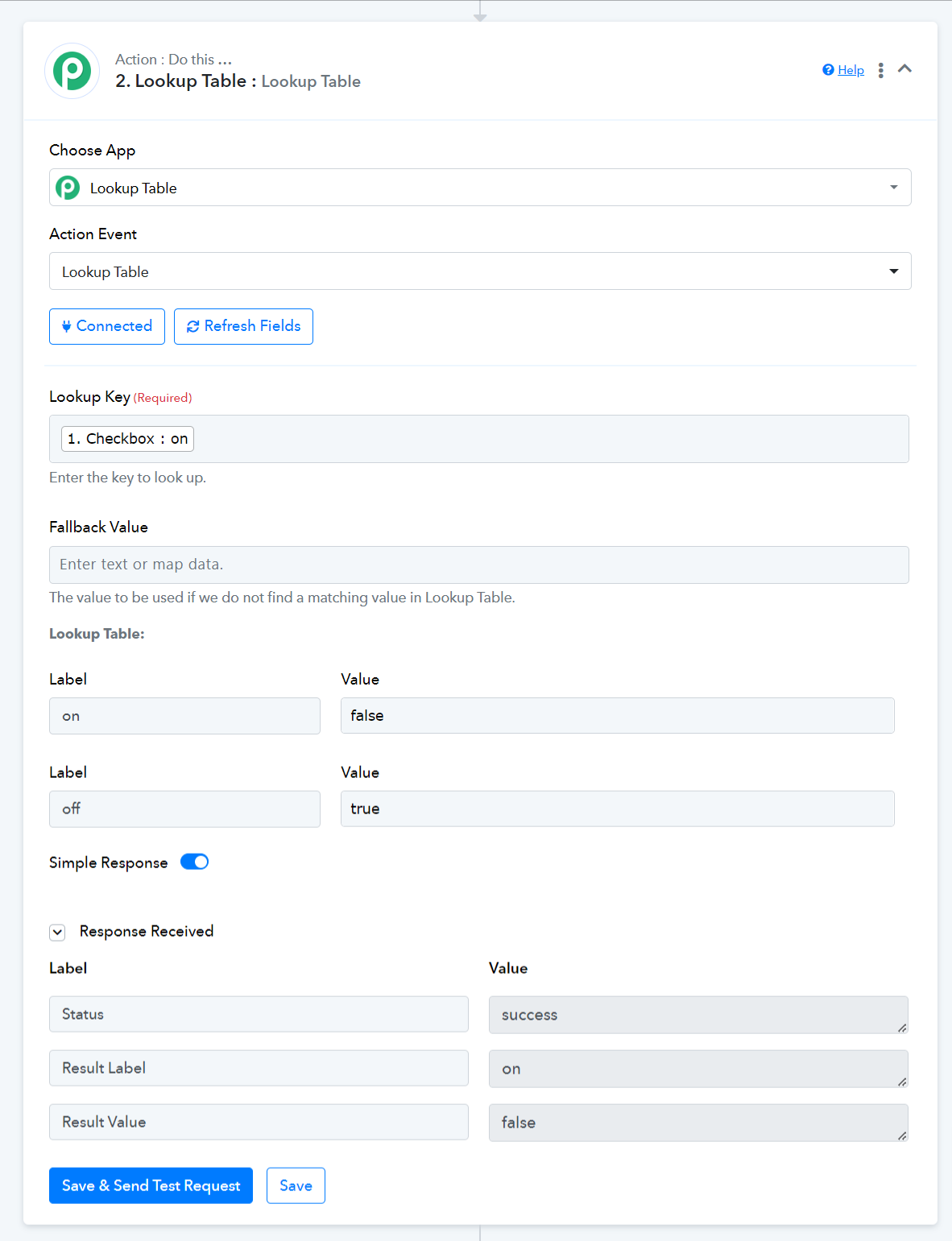
You can add a Lookup Table to your workflow in this manner to achieve this use case.
Oh perfect, thank you Arshil! :)