Landingi Problems (still)
Status: Open · Asked by Derek67 on · 0 views
Hello!
It looks like the previous thread was closed. I've used the Lookup Table as you've suggested.
When the box is checked it is returning ON as it should be.
When it's not checked, it isn't returning anything at all, which is producing an error (as it's trying to read something that doesn't exist.)
I've set the fallback default, but it still errors at this spot.
https://share.zight.com/DOuJY6qy
Thank you for any assistance,
Derek
Hi @Derek67,
Click the 'Re-Capture Webhook Response' button, and capture a response with checkbox checked. This will give you the checkbox field in your workflow setup.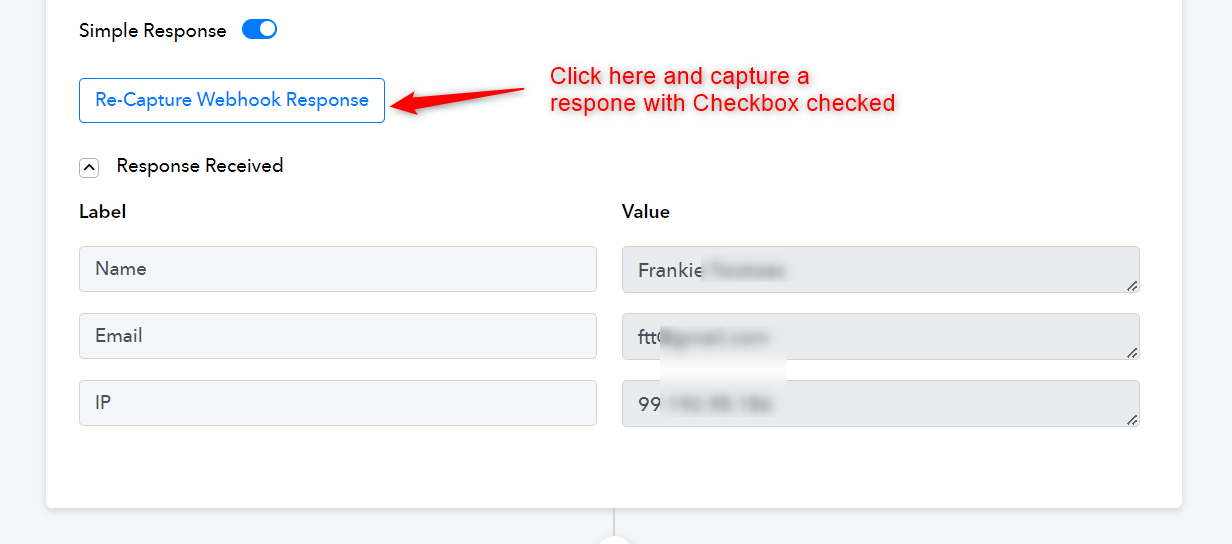
Once you have captured the checkbox field in your trigger response, you can then add a router to your workflow and set the condition as shown in the workflow shared below. (Ignore the trigger step)
https://connect.pabbly.com/workflow/share/CkJSYFcAUjEETgZsUgFQd1pOVlICWwNjVk8IGlVaUCgESgNWAkNaMABMV3UFTlMyUhtTOQVZBzpcSFZSVQNWJQMaBSkEBwF7Ux5ULwRVCjkKVFJ6VzY#
You can add a GHL action step in both of these routes and simply select DND conditions instead of mapping true/false from above. The filter condition set in your routes will take care of executing the action step with the correct DND condition on its own.
Add GHL action step with DND set to False, in Route 1 (ON).
Add GHL action step with DND set to True, in Route 2 (OFF).