Lead Connector V2 - Not finding Agency
Status: Closed · Asked by Elmorem00 on · 0 views
Hi!
I am trying to set up a workflow to automatically create sub-accounts in GetHighLevel (GHL) using the lead connector. However, when I configure the lead connector, it is only finding my sub-accounts in GHL (Like the image I have attached) rather than my main agency account.
My understanding is that with the GHL 479 plan and Advanced API, the lead connector should be able to access my agency account to generate sub-accounts programmatically. But for some reason, it seems limited to only seeing the sub-account.
Please help me.
Thanks!
Hey @Elmorem00
I am trying to set up a workflow to automatically create sub-accounts in GetHighLevel (GHL) using the lead connector. However, when I configure the lead connector, it is only finding my sub-accounts in GHL (Like the image I have attached) rather than my main agency account.
Can you please elaborate on your concern briefly with the help of a short recorded video?
Hi!
Yes ofcourse! I have attached i video file showing what I mean.
After receiving a response from the trigger, I want to set up LeadConnector V2 so that it can create a sub-account inside GoHighLevel. However, to do this I need to connect to my agency account (as shown in the attached image from the tutorial). The issue is that in my case, only my sub-accounts are showing up - the agency account does not appear (as seen in the attached video).
Please help!!
(How it should look)
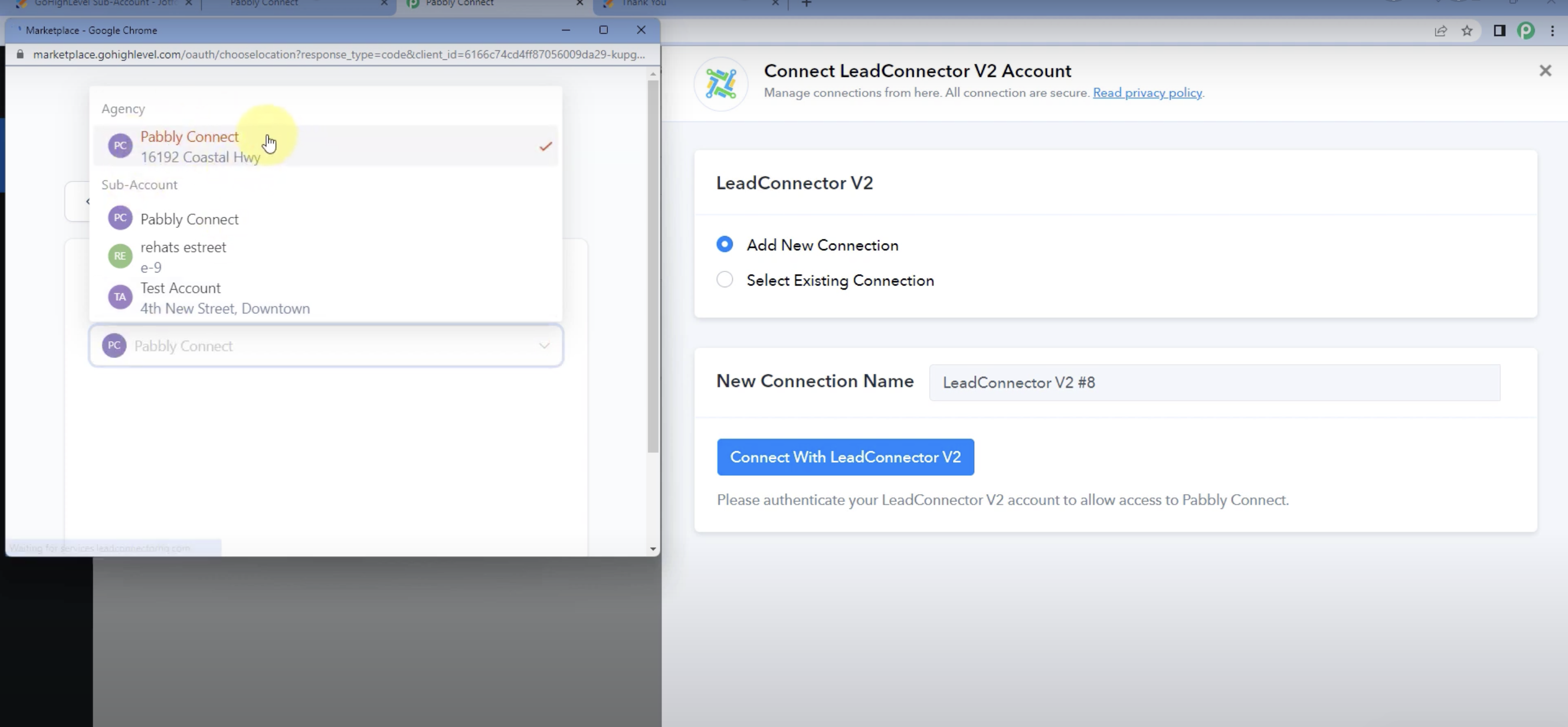
Hey @Elmorem00Can you please elaborate on your concern briefly with the help of a short recorded video?
Please allow us some time, we are currently looking into it.
Please allow us some time, we are currently looking into it.
Update?
It seems there might be a permissions concern linked to your Lead Connector account during the connection process. We kindly request that you review the permission settings within your primary agency account, where you should have the necessary permissions to access your agency accounts.
It seems there might be a permissions concern linked to your Lead Connector account during the connection process. We kindly request that you review the permission settings within your primary agency account, where you should have the necessary permissions to access your agency accounts.
Hi!
I have verified that all the permission settings for my LeadConnector account in GoHighLevel are correct and have granted full access. However, I'm still unable to see the account when trying to set up the action.
Any more ideas on what it could be?
It seems there might be a permissions concern linked to your Lead Connector account during the connection process. We kindly request that you review the permission settings within your primary agency account, where you should have the necessary permissions to access your agency accounts.
When I try with lead connector V1 where I can just copy the agency API key direct and then it works but then I can't create sub-accounts with lead connector v1... I need V2. Is there a possibility to connect my GHL with lead connector V2 where you just copy and paste your own agency API key?
Is there a possibility to connect my GHL with lead connector V2 where you just copy and paste your own agency API key?
The recommended approach of using a copy-paste API key method is not suitable for establishing a connection between GHL and Lead Connector V2 action steps. Lead Connector V1 employs API key authentication, while V2 utilizes OAuth 2.0, which constitutes a fundamentally distinct authentication method. Consequently, the integration is currently not feasible.
I have verified that all the permission settings for my LeadConnector account in GoHighLevel are correct and have granted full access. However, I'm still unable to see the account when trying to set up the action.
I recommend reaching out to the LeadConnector support team. They should be able to assist you appropriately.
I recommend reaching out to the LeadConnector support team. They should be able to assist you appropriately.
Do you have a direct contact link to them? They have multiple websites all saying different things...
Do you have a direct contact link to them? They have multiple websites all saying different things...
Please access the support link for LeadConnector at the following URL: https://gohighlevel.com/support.