LearnDash courses not showing up
Status: Closed · Asked by RafaelJ on · 0 views
Hi support,
I'm trying to set up a workflow that includes LearnDash. I'm preceding like it is shown in your video:
youtube.com/watch?v=41DNtVb9xLI
Although the connection to LearnDash works, I can't choose a course ID because the courses don't show up in the drop-down.
Can anyone help me with this?
Kind regards,
Rafael
Hey @RafaelJ
Kindly share the workflow and please tell us what action step you are using.
Hi @Supreme , my workflow is simple:
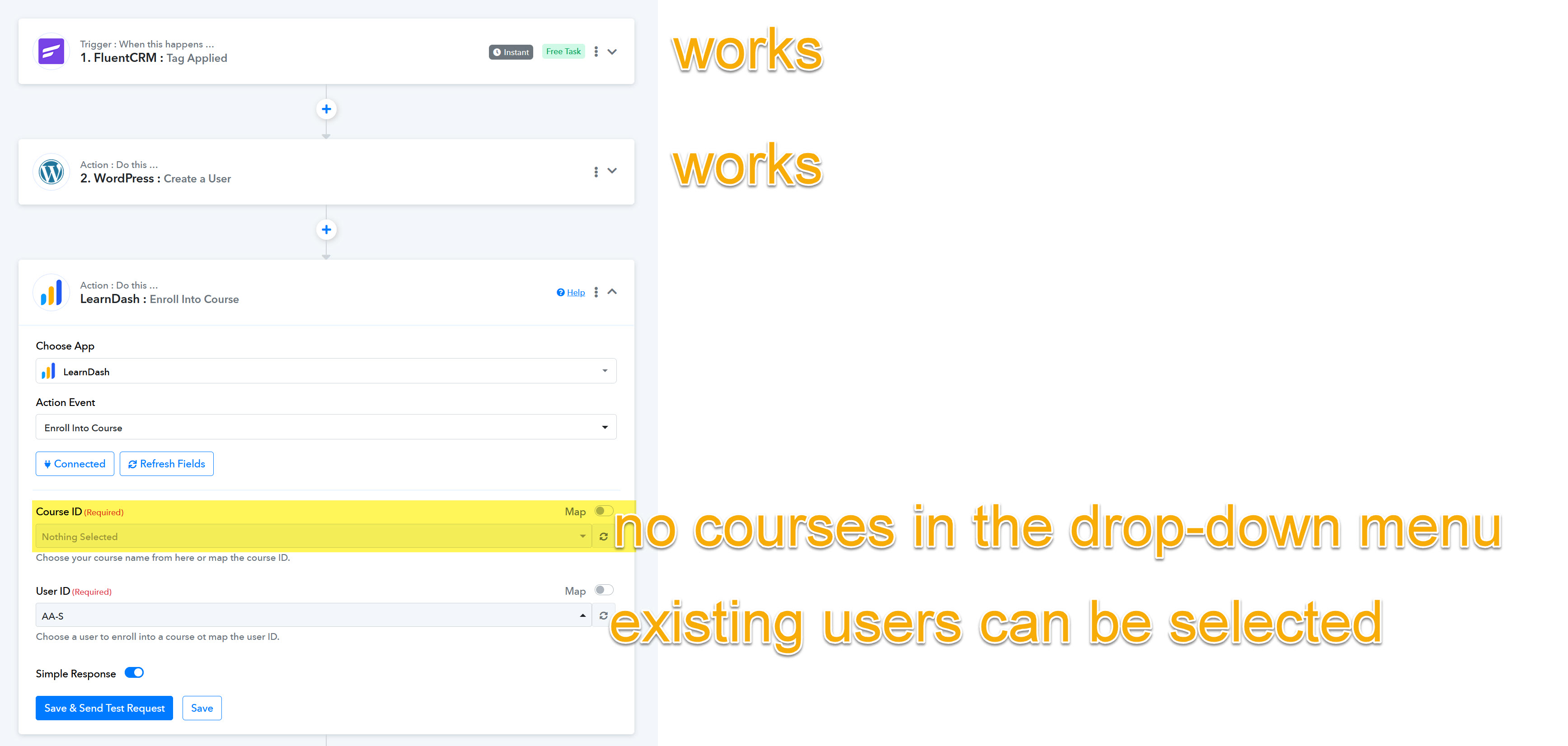
1. FluentCRM: Tag applied -> works
2. WordPress: Create a user -> works
3. LearnDash: Enroll into course -> connection established, but...
...the required field "Course ID" doesn't show any courses in the drop-down menu (despite the fact that there are 2 courses in LearnDash).
The required field "User ID", on the other hand, does show the existing users in the drop-down menu.
Am I missing something, or is this a bug?
Attachments
Please try following the steps given in the video shared below and see if that fixes the issue for you.
Hi @ArshilAhmad ,
Although I already had an authentication plugin installed (it was required in order for the step "create Wordpress user" to work), the LearnDash courses didn't show up. But after installing the plugin mentioned in the video, the LearnDash courses can now be selected. :-)
I just had to re-configure the Papply workflow and now everything works.
Thank you very much for your help.