Line message cannot be delivered
Status: Closed · Asked by DCParty - Jeremy on · 0 views
Good afternoon.
This workflow is not working.
It was fine when I tested it, but when I started to automate it, it didn't work.
https://forum.pabbly.com/threads/line-message-cannot-be-delivered.8478/#post-39443
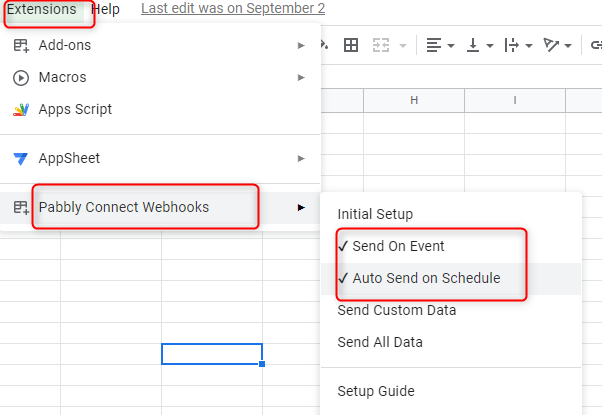
Could you please let us know how you are entering the values in Google Sheets? Through any 3rd party app or entering manually? If you are entering data in Google Sheets through any third-party app then kindly note that you have to enable Extension >> Pabbly Connect >> Auto Send on Schedule as well along with Send all Events. Also note that system will send the data from Google Sheets to Line app after 1 hour interval.
Screenshot for your reference:-
Thanks
Kunal
Could you please let us know how you are entering the values in Google Sheets? Through any 3rd party app or entering manually? If you are entering data in Google Sheets through any third-party app then kindly note that you have to enable Extension >> Pabbly Connect >> Auto Send on Schedule as well along with Send all Events. Also note that system will send the data from Google Sheets to Line app after 1 hour interval.
Screenshot for your reference:-
Thanks
Kunal
I am automatically integrating values into google sheets through elfsight.
If I use Schedule to send messages as you suggested, the system will send all the information of google sheet to Line.
Yes, if you are sending the data to Google sheets via 3rd party app (Elfsight) then kindly enable Auto Send on schedule and then click on the Save option. After the above steps wait for 1 hour then Google sheets send data to Line app.